TL;DR
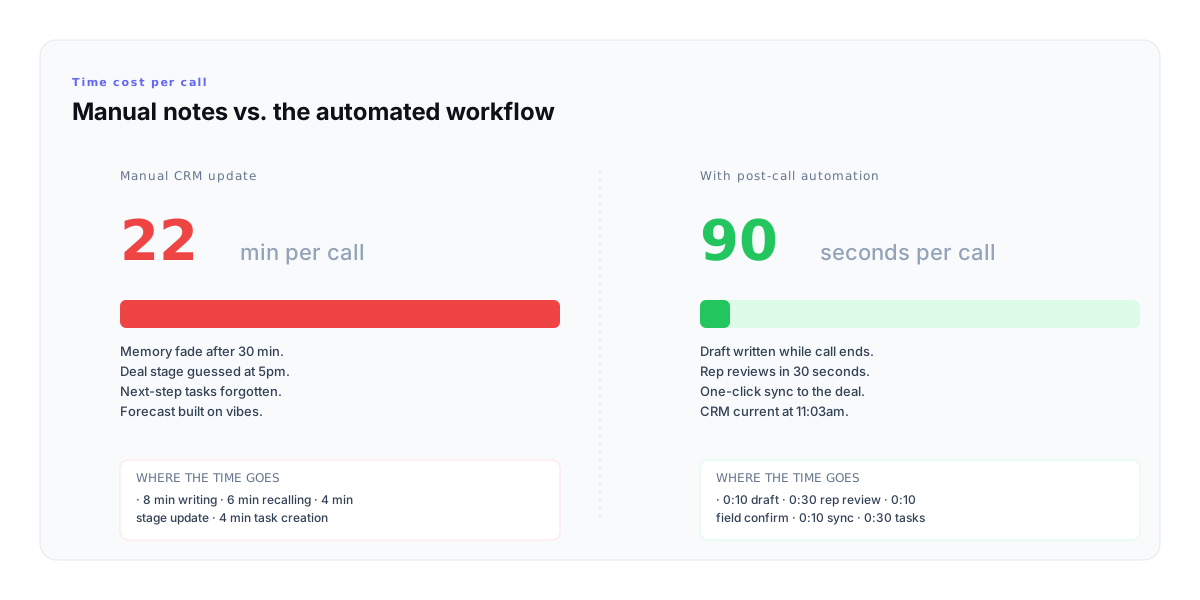
- Manual post-call notes cost reps roughly 22 minutes per call. Automated notes with a rep review step land in 90 seconds.
- A CRM-ready note has 5 parts: headline, key topics, decisions, next steps, CRM fields. Skip any and the note dies in the deal list.
- The critical step is rep review before sync. Auto-notes that skip review are the reason forecasts drift.
- 6 failure modes cause most bad auto-notes: hallucinated next steps, transcript-summary prose, missing the off-mic thing, blank stage fields, two-paragraph walls, and no owner on the next step.
- Works with HubSpot, Salesforce, and Pipedrive via OAuth or API key — draft, review, one-click sync to the deal.
Snippet answer
Post-call note automation is the workflow that drafts a CRM-ready sales note from the call transcript, surfaces the next-step tasks and CRM field updates, lets the rep review and edit in under a minute, then syncs to HubSpot or Salesforce with one click. It replaces the 20-minute manual write-up without replacing the rep\'s judgement — the rep stays in control, the CRM stays current, and the forecast stops running on memory.
The 20-minute tax every call takes after the call ends
A call ends at 11:02am. The rep has a 12:00 demo, a 1:00 follow-up, and a 3:00 close call. By 5pm the 11:00 call is a blur. The CRM note — if it gets written at all — is written from memory at 5:47pm, with the wrong stage, a vague next step, and the commitment the buyer made quietly forgotten.
That is the 20-minute tax. 8 minutes writing, 6 minutes recalling, 4 minutes updating stage, 4 minutes creating tasks. Multiply by 8–12 calls a day and the rep spends most of their afternoon reconstructing mornings instead of selling.
The cost is not just time. CRM data gets worse. Deals stall because the next step never got logged. Pipeline reviews run on "I think Acme is at evaluation" instead of what actually happened. The VP asks for the forecast roll and the rep answers with confidence about deals they can barely remember.
The 5-part anatomy of a CRM-ready post-call note
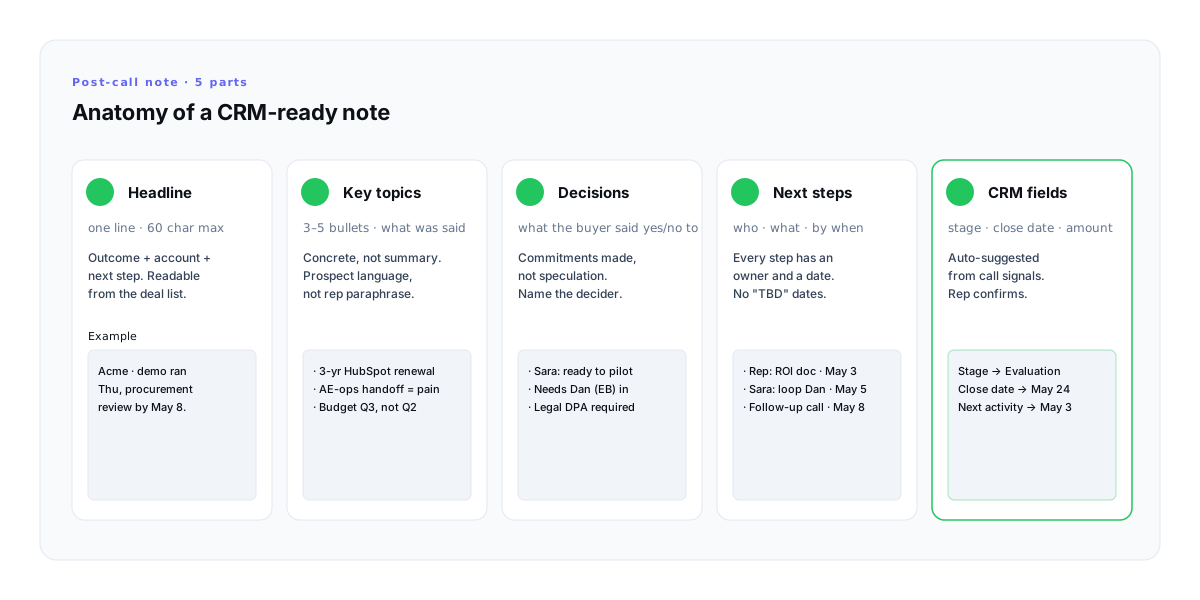
A post-call note is not a transcript. It is a structured record of what changed in the deal. Every CRM-ready note has the same five parts, in this order. Miss any and the note fails the one job a note has: making the deal readable a week later.
- 1
The headline
One line. Sixty characters. Outcome, account, next step. "Acme · demo ran Thu, procurement review by May 8." The deal list is the only place most managers will ever read your note — write for the scroll, not for the record.
- 2
Key topics
Three to five bullets of what was actually said, in the prospect's language, not your paraphrase. "3-year HubSpot renewal" beats "current CRM contract." Concrete beats summary every time.
- 3
Decisions
What the buyer committed to, with a name. "Sara: ready to pilot. Needs Dan (EB) looped in. Legal wants DPA." Decisions carry the deal; speculation does not.
- 4
Next steps
Every step has an owner and a date. No "TBD", no "soon". A next step without a date is a task that will never happen. A next step without an owner is nobody's job.
- 5
CRM fields
Stage, close date, amount, next activity. Suggested by the call, confirmed by the rep. This is the part that makes the forecast real — without it, the forecast is vibes.
The discipline is the order. Headline first — because the deal list is the one place a manager will skim. CRM fields last — because they compile from the decisions, not the other way around. Flip the order and the note becomes a diary instead of a deal record.
What post-call note automation actually does (and does not)
Post-call note automation is not a transcription service. It is not a call recorder. It is not an AI that takes over the CRM. It is a specific workflow that runs between the moment the call ends and the moment the deal record updates.
What it does:
- · Turns the call transcript into a 5-part note against a template the rep can trust.
- · Infers next-step tasks with owners and dates from what was actually said.
- · Suggests stage updates, close-date shifts, and next-activity fields based on the conversation.
- · Holds the draft until the rep reviews and approves — nothing syncs without the rep\'s click.
- · Syncs to the deal or opportunity record in one click, creating tasks and updating fields in the same action.
What it does not do:
- · It does not sync without rep review. Auto-sync is how CRM data gets worse — the rep is the last line of defence against the hallucinated next step.
- · It does not replace the CRM. Gangly writes to HubSpot and Salesforce; it does not become one.
- · It does not record the call. Live transcription via Zoom or Google Meet is the input; no persistent recording is stored.
- · It does not hallucinate commitments. The rep reviews every draft. Anything the transcript missed, the rep puts back in.
The 4-step automated post-call workflow
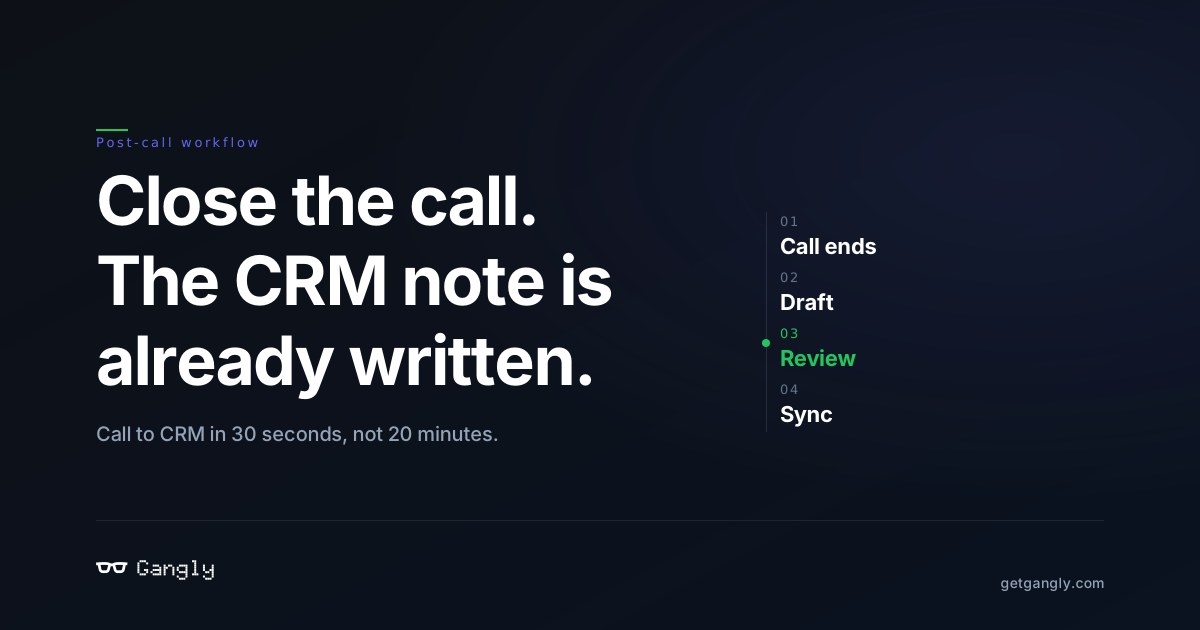
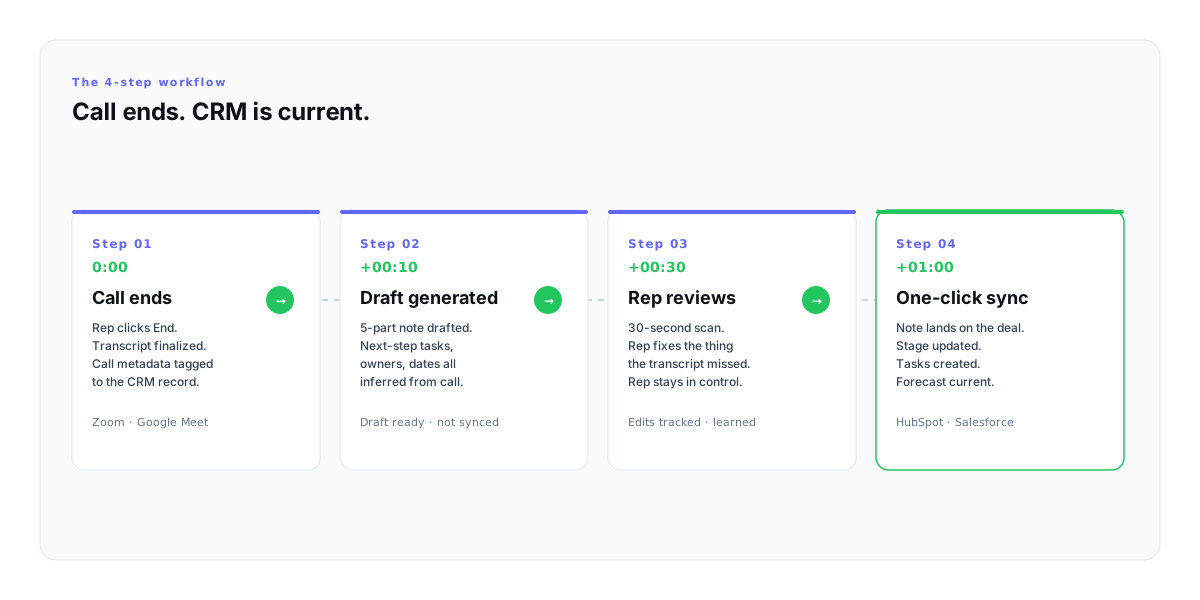
Four steps. Ninety seconds total. The compounding win is that the workflow runs after every call, every day, without the rep having to remember it.
- 01
Call ends
0:00Rep clicks End. Zoom or Google Meet finalizes the transcript. The call record is already tagged to the right deal — because the meeting invite linked to the CRM when it was booked.
- 02
Draft
+0:10The 5-part note drafts itself from the transcript. Next-step tasks, owners, and dates are inferred from what was actually said on the call. Nothing has synced to the CRM yet — this is a draft, not a commit.
- 03
Rep reviews
+0:30Rep scans for 30 seconds. Fixes the one thing the transcript missed (the unspoken body language, the off-mic aside). Edits are tracked so future drafts learn the rep's voice.
- 04
Sync
+1:00One click. Note on the deal, stage advanced, tasks created, next activity scheduled. The CRM was out-of-date at 11:02am. It is current at 11:03am. The forecast follows.
22min
Manual note time
Per call · writing, recalling, stage, tasks.
90sec
Automated + review
Draft, review, confirm fields, sync.
14×
Faster per call
The time gap compounds across 8–12 calls a day.
8hrs/wk
Reclaimed selling time
Across a rep's week of meetings.
The 6 failure modes of bad auto-notes
Most post-call automation tools fail on the same six things. They are not tooling problems — they are workflow design problems. A rep reviewing every draft catches every one.
- 1
Hallucinated next steps
The call never said "send ROI doc" but the auto-note did. The fix: the rep reviews and edits every draft before it syncs. Auto-notes that sync without review are why forecasts drift.
- 2
Transcript-summary notes
The note reads like a meeting log ("We discussed pricing") instead of a deal record ("Sara wants annual, not monthly, to close in Q2"). Summarization is not selling — decisions are.
- 3
Missing the off-mic thing
The champion said "my boss will push back on Concur" right before the call started — off-mic, not in the transcript. The auto-note misses it. The 30-second review is where that line goes back in.
- 4
Stage fields left blank
A post-call note with no stage update, no close-date shift, and no next-activity is half a note. Stage movement is the signal pipeline inspection actually rewards.
- 5
Two-paragraph prose notes
Scannable beats eloquent. Paragraphs die in the deal list. Bullets survive. Managers skim — write so the skim still gets the decision.
- 6
No owner on the next step
"Follow up on pricing" is not a next step. "Rep: send annual-vs-monthly ROI doc by May 3" is. Every task needs a name and a date or it is a wish.
The meta-failure underneath all six: shipping a tool that syncs without a rep review. Gong and Fathom can transcribe; Otter can summarize. None of that writes a deal record. The rep writes the deal record — the tool saves them the typing.
How Gangly writes your post-call note before you close Zoom
Gangly runs the 4-step workflow as part of the full rep workflow — signal detection, outreach, call prep, live coaching, and post-call notes in one connected sequence. The post-call step is built on three parts of the product:
- Post-Call Notes — drafts the 5-part note from the live transcript the moment the call ends. Rep edits, rep approves, rep clicks sync. The draft does not reach the CRM without the click.
- CRM Hygiene Engine — infers the stage update, close date, and next activity from the call. Rep confirms each field before the sync fires. The forecast gets built from decisions, not guesses.
- Workflow Sequencer — ties the call record to the upstream signal and the downstream follow-up, so the rep does not have to copy-paste between Zoom, HubSpot, and Gmail.
The rep still writes the deal. Gangly handles the typing, the field inference, and the sync. The CRM that was out-of-date at 11:02am is current at 11:03am — and the rep is already on the next call.
Related reading: the 5-minute sales call prep workflow covers the upstream step, and our roundup of AI tools for sales reps puts post-call note automation in context against the other 17 tools worth installing.
Run the workflow
Close the call. The note is already drafted.
14-day free trial. Connect HubSpot or Salesforce in 3 minutes. No credit card.
Frequently asked questions
What is post-call note automation? +
Post-call note automation is the workflow that generates a CRM-ready sales note automatically from a sales call — the summary, decisions, next-step tasks, and the suggested CRM field updates (stage, close date, next activity). The rep reviews and edits the draft in under a minute, then syncs to HubSpot or Salesforce with one click. It replaces the 20-minute manual write-up without replacing the rep's judgement.
How accurate are auto-generated CRM call notes? +
Accuracy depends on the call transcript quality and whether the rep reviews the draft before syncing. On a clean Zoom or Google Meet transcript, a modern post-call note automation tool captures 85–95% of what was said correctly. The remaining 5–15% — usually the off-mic comment, the unspoken commitment, the next step agreed after the recording stopped — is what the 30-second rep review is for. Auto-notes that sync without review are how forecasts drift.
Does post-call note automation work with Salesforce and HubSpot? +
Yes. The two most common CRM destinations are HubSpot (OAuth, native bidirectional sync to the deal record) and Salesforce (OAuth Connected App, syncs to the opportunity). Tools like Gangly also support Pipedrive via API key. The sync writes the note to the deal or opportunity, creates the follow-up tasks, and suggests a stage update that the rep confirms or overrides.
Will an auto-note replace my judgement on what to write? +
No — and it should not. A good post-call note automation tool drafts the note, then holds it for rep review before anything reaches the CRM. The rep stays in control. The tool's job is to do the typing; the rep's job is to decide what the deal looks like now. Tools that sync without review are the reason CRM data gets worse, not better.
How long should a CRM post-call note actually be? +
Between 80 and 180 words, structured in the 5-part anatomy: headline, key topics, decisions, next steps, CRM fields. Two-paragraph prose notes die in the deal list. Bulleted notes survive. If the note is over 200 words, the rep is writing a meeting log instead of a deal record — cut to decisions and next steps, not what was discussed.
What is the difference between a call recorder and post-call note automation? +
A call recorder stores and transcribes the call; post-call note automation turns that transcript into a CRM-ready deal record. Gong and Chorus record and analyze calls in aggregate. Fathom and Otter transcribe. Post-call note automation — the category Gangly sits in — takes the transcript one step further: drafts the CRM note against a 5-part anatomy, suggests the stage and next activity, lets the rep edit, and syncs in one click.