TL;DR
Pre-dial prospect research in five minutes: 60 seconds on company fit, 60 on the prospect profile, 60 to find the signal, 60 to write the hook, 60 for fallback angles. Eight data points matter \u2014 four are must-haves (role & tenure, recent trigger, tech stack, company size), four are nice-to-know. Free tools are enough: LinkedIn, BuiltWith, Crunchbase, the CRM. The opener is 15 words, in the prospect\u2019s own language, with one specific reason to call. Anything longer kills dials.
Direct answer
To research a prospect in under 5 minutes before a cold call, run five 60-second phases: (1) company check for ICP fit, (2) prospect profile for role and tenure, (3) signal check for a recent trigger, (4) write a 15-word hook referencing the trigger, (5) write two fallback angles. The eight data points that matter are role and tenure, a recent trigger, tech stack, company size, recent LinkedIn posts, prior CRM interactions, mutual connections, and competitor mentions. The first four are must-haves.
Why 30-minute prospect research lowers your dial count
Most cold-call research advice reads like a dissertation prompt \u2014 "deeply understand the prospect\u2019s world before you dial." Reps who follow it end up spending 25 minutes researching each account, making 8 dials a day, and missing quota.
The math says the opposite. At a 3% connect rate and a 10% book-on-connect rate, a rep needs 35+ dials a day to book a meeting. Twenty-five minutes of research per dial means 6 hours of research before the first dial goes out. That is how pipelines starve.
The alternative is a timeboxed 5-minute workflow that hits the four data points that actually change the opener, writes the 15-word hook, and moves on. The rest of this piece is that workflow.
Rule of thumb
If 60 seconds of looking does not surface a trigger, the account is cold. Dial cold, or move on. Do not spend another 10 minutes hunting.
The 5-minute prospect research workflow (minute-by-minute)
Five phases, 60 seconds each. Each phase produces one specific output the next phase needs.
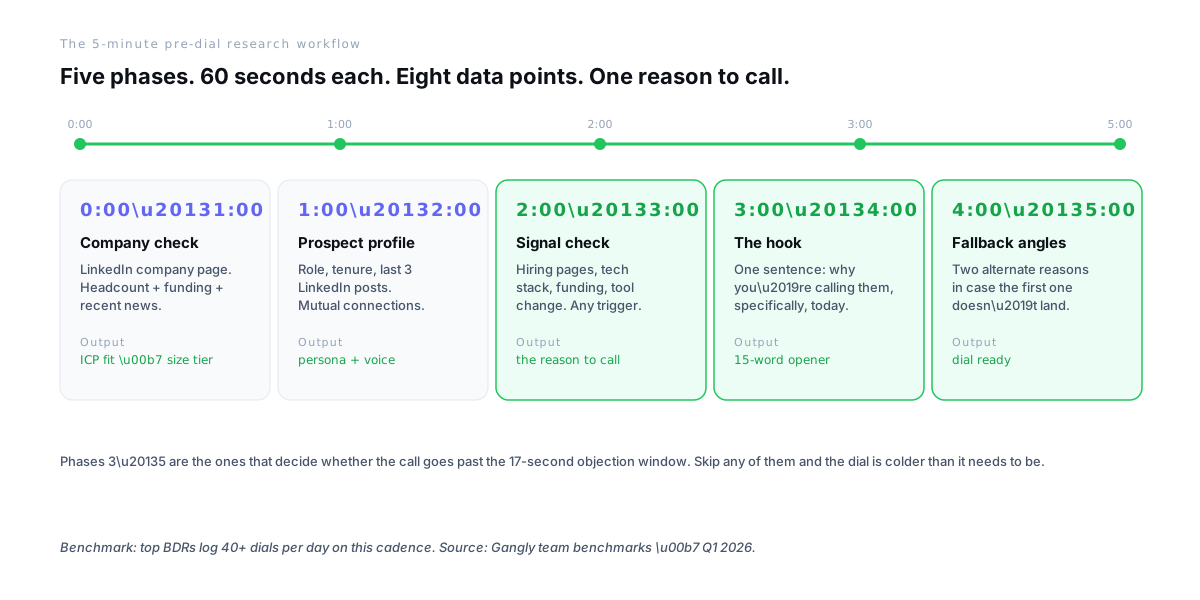
- 0:00–1:00
Company check
\u2192 ICP fit · size tierOpen the company’s LinkedIn page. Note headcount, last funding round, and any news pinned at the top. If the company is not in your ICP band, stop here — do not burn 4 more minutes on a no-fit account.
- 1:00–2:00
Prospect profile
\u2192 persona + voiceClick into the contact’s profile. Role, exact title, tenure (under 6 months = warm). Scan the last 3 posts or comments to catch their language, angle, and what they care about this week.
- 2:00–3:00
Signal check
\u2192 the reason to callFind one trigger from the last 30 days — hiring page (what roles?), tech-stack post, funding, exec hire, product launch, G2 review. This is the minute that decides whether the dial is worth making.
- 3:00–4:00
The hook
\u2192 15-word openerWrite the first line in the prospect’s own language. Reference the specific signal, state the specific problem, ask for specific time. 15 words max. Test it out loud.
- 4:00–5:00
Fallback angles
\u2192 dial readyWrite two alternate angles in case the first hook does not land. A different persona angle, a peer/case-study hook, a competitor angle. Now dial.
Phases 3 through 5 are the ones that decide whether the call survives the 17-second objection window. Skip any of them and the dial is colder than it needs to be.
The 8 data points every rep needs before dialing
Eight data points total. Four are must-haves \u2014 enough to dial. The other four are nice-to-know \u2014 useful if the first minutes surface them naturally, not worth hunting for.
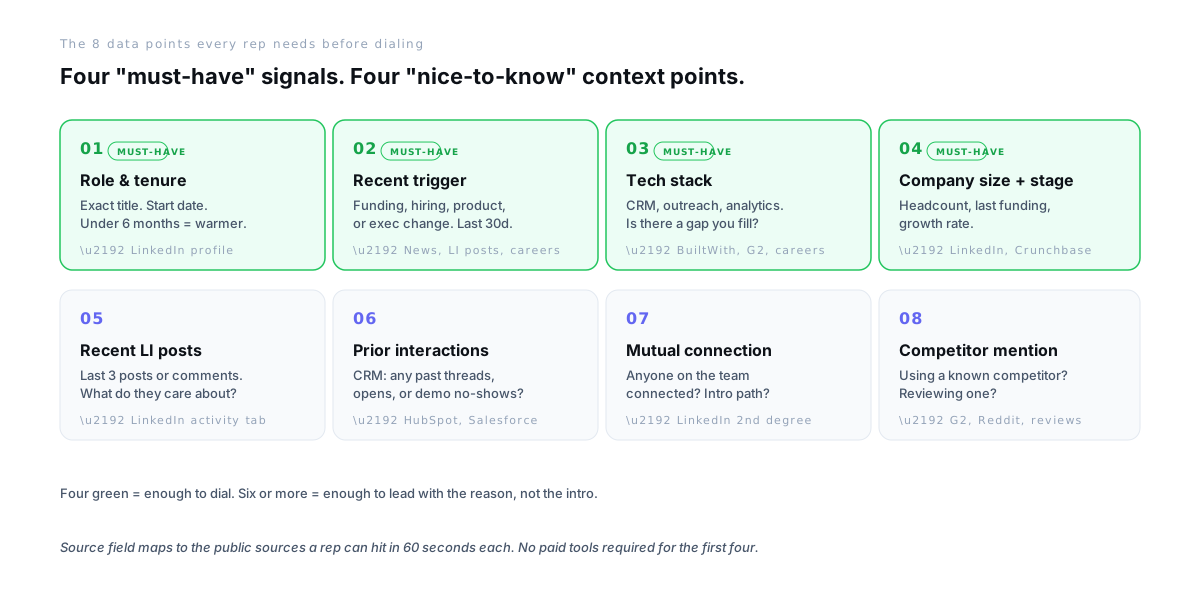
01Role & tenure
Must-haveExact title and tenure. Under 6 months = warmer.
\u2192 LinkedIn profile
02Recent trigger
Must-haveFunding, hiring, product, or exec change. Last 30 days only.
\u2192 News, LI posts, careers
03Tech stack
Must-haveCurrent CRM, outreach, analytics stack. Is there a gap you fill?
\u2192 BuiltWith, G2, careers
04Company size + stage
Must-haveHeadcount, last funding, growth rate.
\u2192 LinkedIn, Crunchbase
05Recent LI posts
Nice-to-knowLast 3 posts or comments. What is on their mind this week?
\u2192 LinkedIn activity tab
06Prior interactions
Nice-to-knowPast email threads, opens, or demo no-shows in the CRM.
\u2192 HubSpot or Salesforce
07Mutual connections
Nice-to-knowAnyone on the team who can intro or drop a name.
\u2192 LinkedIn 2nd degree
08Competitor mention
Nice-to-knowReviewing or using a known competitor? That is a live buying signal.
\u2192 G2, Reddit, reviews
Before vs after — the same account, two openers
Same account. Same prospect. One rep dials cold with no research. The other runs the 5-minute workflow. The call looks nothing alike.
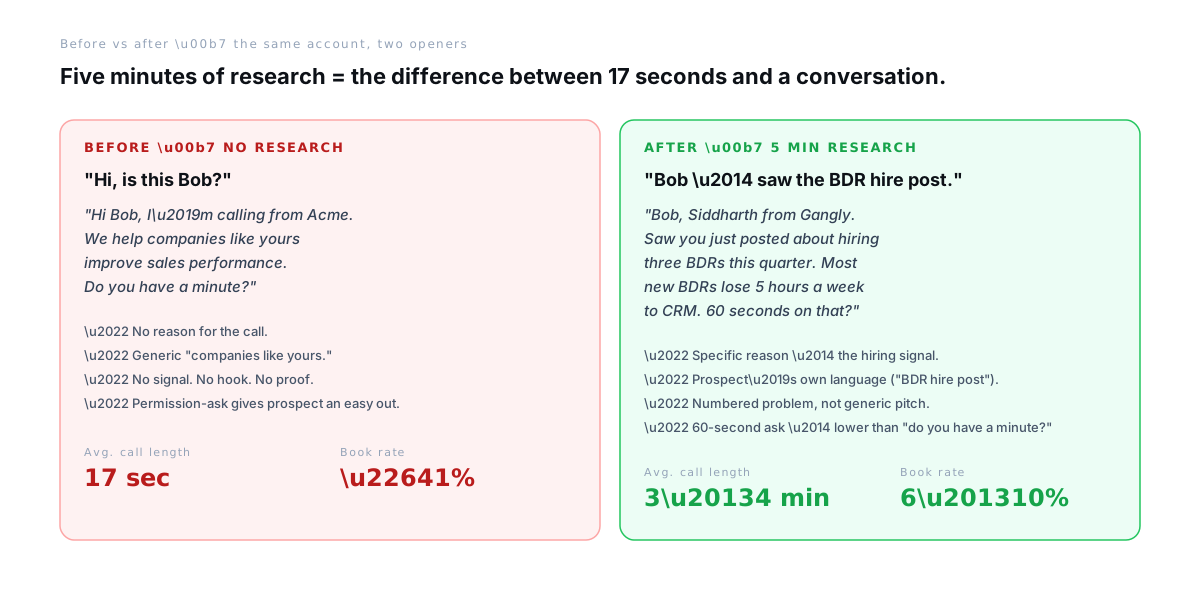
The left-hand opener triggers a polite brush-off in every industry, every tier, every day of the week. The right-hand opener references the specific trigger in the prospect\u2019s own language \u2014 "saw the BDR hire post" \u2014 and anchors to a numbered problem. Book rates differ by an order of magnitude on the same list.
4 mistakes that waste the 5 minutes
Four mistakes that turn a 5-minute workflow into 20 minutes of research-theatre with no better opener at the end.
- 1
Reading the entire LinkedIn profile
Education, every job since 2012, endorsements — none of it helps. Skip to the current role, tenure, and the last 3 posts. Everything else is research-theatre.
- 2
Spending 10 minutes searching for a signal
If 60 seconds of looking does not surface a trigger, the account is cold. Either dial cold (and say so), or skip to the next name on the list. Do not burn 10 minutes hunting for a reason that is not there.
- 3
Writing a 40-word opener
Long openers guarantee the prospect tunes out by word ten. The target is a 15-word first line. Read it aloud. If you run out of breath, rewrite it.
- 4
Skipping the fallback angles
If the first hook does not land, the rep defaults to generic pitch mode. Two pre-written alternates keep the rep sharp when the first try misses — and missed first tries are most cold calls.
Tools that make 5-minute research realistic
The first four data points are free-tool territory. The rep does not need a stack to run the 5-minute workflow \u2014 just browser tabs open to the right places.
LinkedIn Sales Navigator
Role, tenure, recent posts, mutual connectionsOne tab covers four of the eight data points. Non-negotiable for reps dialing 20+ accounts a day.
BuiltWith or Wappalyzer
Tech stackFree Chrome extension. Hover any domain, see the CRM / outreach / analytics stack in 3 seconds.
Google News or Crunchbase
Funding + exec movesFilter to "last 30 days." Anything older is stale. Crunchbase surfaces funding rounds cleanly.
G2 / Reddit
Competitor mentions and gripesReviews of competitors on G2, or r/sales threads mentioning the company, are signal-rich and underused.
The CRM (HubSpot/Salesforce)
Prior interactionsAlways check before dialing — nothing kills the call faster than "hi, first time reaching out" when the account opened 4 emails last quarter.
How Gangly handles the research automatically
Gangly\u2019s Signal Detection and Call Prep Engine run the 5-minute workflow in about 60 seconds. The rep opens the account in Gangly, reviews the brief, edits the opener, and dials. The human step that does not get automated: the review.
- Signal Detection \u2014 monitors LinkedIn activity, funding news, hiring pages, and CRM history for the top triggers. Surfaces the "reason to call" for every account in the daily queue.
- Call Prep Engine \u2014 pulls role, tenure, tech stack, and prior thread context into a one-page brief. Ready before the dial, not after.
- Outreach Writer \u2014 drafts the 15-word opener against the detected signal. The rep reviews and edits before anything is said.
- Integrations \u2014 HubSpot, Salesforce, Pipedrive for CRM context; LinkedIn (via extension) for profile and signals.
- Pricing \u2014 Signal Detection is on every plan starting at $99/seat. Free 14-day trial, no credit card.
The rep stays in control. Nothing dials. Nothing sends. Nothing writes to the CRM without review.
Try the research brief
Run 40 dials today \u2014 on prepared accounts.
Connect HubSpot or Salesforce, import your call list, see the signal brief before you dial. Free 14 days, no credit card.
Frequently asked questions
How long should a rep spend researching a prospect before a cold call? +
Five minutes, maximum. The top 4 data points — role and tenure, a recent trigger, tech stack, and company size — take 60 seconds each to find on LinkedIn, Crunchbase, and BuiltWith. Any more than five minutes and the per-dial cost of research kills the daily dial count. Reps who run this workflow consistently hit 40+ dials a day without losing personalization.
What data points matter most for a cold call? +
Four must-haves: the prospect’s exact role and tenure, one recent trigger from the last 30 days (hiring, funding, product, exec change), the tech stack the company is running, and the company’s size and funding stage. These four are enough to write a specific opener. Nice-to-haves are recent LinkedIn posts, prior CRM interactions, mutual connections, and competitor mentions.
Where do I find a trigger for a cold call? +
Four public sources, each under 60 seconds. The company’s careers page for hiring signals. LinkedIn for exec moves and posts. Crunchbase or Google News for funding. G2 or Reddit for competitor gripes and active review searches. If 60 seconds of looking surfaces nothing, the account is cold — dial cold or move to the next name.
Do I need paid tools to research a prospect in 5 minutes? +
No. The first four data points are free — LinkedIn free tier for the profile and posts, Crunchbase free for funding, BuiltWith free extension for tech stack. LinkedIn Sales Navigator, Apollo, and ZoomInfo speed up the workflow but are not required. A rep dialing fewer than 20 accounts a day can run the whole 5-minute workflow on free tools.
What is a good cold call opener after 5 minutes of research? +
Reference the specific trigger in the prospect’s own language, state one numbered problem, ask for specific time. Example: "Bob, Siddharth from Gangly. Saw you just posted about hiring three BDRs this quarter. Most new BDRs lose five hours a week to CRM. Sixty seconds on that?" Fifteen words. One reason. One specific ask.
What is the difference between pre-dial research and call prep? +
Pre-dial research is for cold calls — five minutes to decide if the account is worth dialing and what to say if it picks up. Call prep is for scheduled demos or discovery calls — deeper account brief, MEDDPICC fields, prior thread review. Different workflows, different time budgets. This piece is about the first one.
Can AI research a prospect faster than 5 minutes? +
Yes, in 30 to 60 seconds. A sales workflow tool pulls the account signals, the tech stack, the recent triggers, and any prior CRM context into a single brief before the rep dials. The rep reviews, edits, and dials. The 5-minute manual workflow is still the baseline every rep should know — automation only wins if the rep knows what it is supposed to produce.