TL;DR
- An AI sales workflow is a six-stage sequence — signal, outreach, call prep, live call, post-call, CRM — where AI handles a bounded task at each step and the rep approves every write.
- It is different from rule-based automation: automation runs "if X then Y" rules, AI runs reasoning on context. The best stacks combine both and keep the rep in the loop.
- Twelve KPIs across the six stages prove it's working. The north-star metric is workflow completions per rep per week; the target is 5+.
- Expect to save 6–10 admin hours per rep per week inside 30 days of a clean rollout. McKinsey found teams using AI agents in sales ops see a 3–15% revenue lift.
- For under 500 reps, buy a workflow platform — building in-house takes 3–6 months and $200k–500k per year in engineering to match what a $99–299/seat/month tool ships on day one.
Snippet answer
An AI sales workflow is a six-stage sequence — signal detection, outreach drafting, call prep, live call coaching, post-call notes, and CRM hygiene — where AI handles a specific, bounded task at each step and the rep approves every write. The output of each stage becomes the input to the next, so the rep works inside one continuous motion instead of copy-pasting between six disconnected tools. The four tests of a real implementation: do stages hand off to each other, does the rep review every write, do outputs land in the systems of record, and is drop-off measurable per stage?
What an AI sales workflow is (plain-English definition)
The plain answer: an AI sales workflow is a six-stage pipeline from spotting a warm account to updating the CRM, where AI does a specific job at each stage, the output of each stage is the input to the next, and the rep approves every write that leaves the tool. That is the whole category — everything else is decoration.
Three words are doing the work in that sentence. Pipeline — the stages connect; a disconnected tool stack does not qualify. Bounded — each AI call has a defined input and a defined output, not a hand-wavy promise to "help with sales." Approval — the rep still drives; AI drafts, the rep reads, the rep clicks.
Definition
AI sales workflow: a six-stage pipeline in which AI performs a bounded, auditable task at each stage — signal detection, outreach drafting, call preparation, live call coaching, post-call note generation, and CRM hygiene — and a human rep approves every downstream write to a system of record or outbound channel.
This definition is useful for vendor evaluation. If a demo cannot name six stages, describe the input and output of each, and show where the rep approves the write, the product is a feature bundle with workflow branding. A real AI sales workflow passes all three tests before it gets the name.
Two things it is not. It is not a replacement for the rep — the best-performing 2026 implementations explicitly keep humans on the decision loop (McKinsey, 2025). And it is not a synonym for "AI inside a sales tool." A single-stage AI feature (a transcription tool, a sequencer with AI drafts) covers part of the workflow; it does not constitute one on its own.
Why manual sales workflows break at 20+ deals
A rep with 8 open opportunities can hold the state of each deal in their head. A rep with 25 cannot. That is the inflection point where a manual workflow — spreadsheets, loose CRM fields, meeting-from-memory notes — stops working. The deals don't get smaller; the rep's attention budget does.
The time math is punishing. The typical AE with 30 accounts spends 3 hours a day in actual selling (calls, demos, negotiations) and 5 hours a day in admin — researching, prepping, writing notes, updating the CRM, chasing follow-ups. That ratio is backwards and it gets worse as account count grows. Selling time is quota-producing time; admin time is quota-protecting time. A rep who cannot swap the ratio will miss number by the amount they overshoot on admin.
Concrete scenario. Tuesday morning. Rep has a 10am demo with Acme. At 9:15 they open Salesforce, scroll through 6 prior notes (most written from memory, a few with typos), open LinkedIn in a second tab, read Acme's last three posts, switch to Gmail for the email thread, switch back to Salesforce to find the CFO's name, and at 9:58 they dial in — half-prepared, three tabs open, no brief. The demo goes fine. At 11:02 the call ends. The 20-minute CRM write-up gets pushed to "later this afternoon." By 5pm, the rep writes the note from memory, leaves out the off-mic commitment, and the pipeline report the VP sees on Friday has a slightly wrong stage on Acme.
Multiply that scenario by 8–12 calls a day, 5 days a week, 30 reps. That is where manual workflows leak pipeline — not at the closing table, at the hand-offs between stages. An AI sales workflow exists because the hand-offs are automatable and the stage content mostly isn't — a rep can still close; the typing between closes is what AI removes.
The 6 stages of an AI sales workflow
The six stages are stable across vendors. Names change — Gangly, Gong, Clari, Outreach each have their own labels — the shape does not. Every serious AI sales workflow runs some version of this pipeline, in this order, with a named input and a named output at each step.
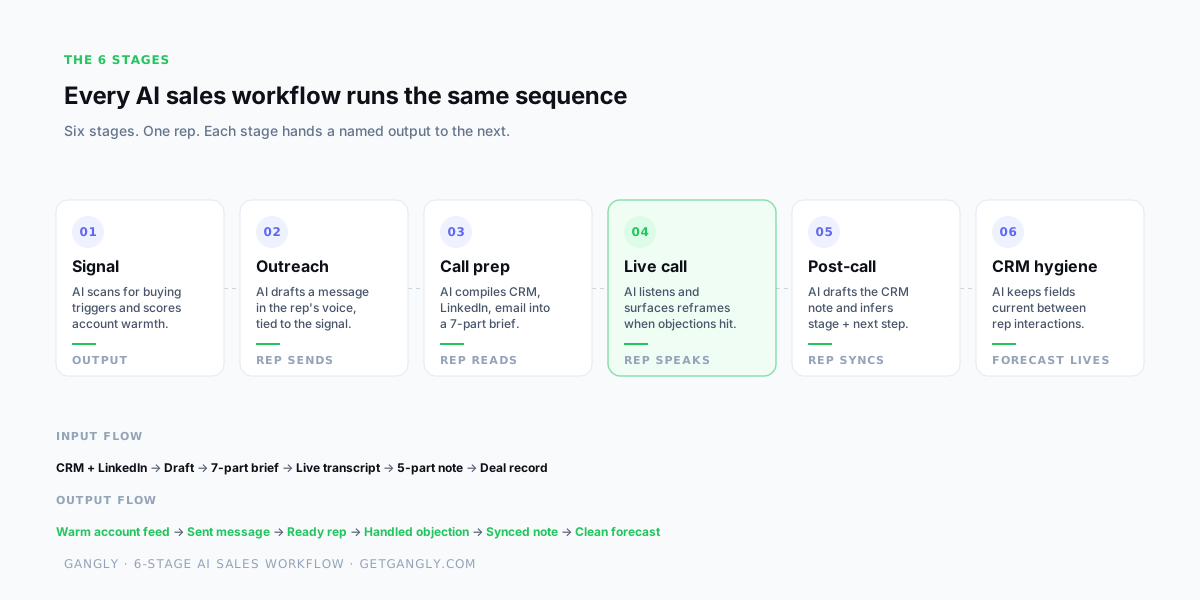
| Stage | Input | AI task | Output |
|---|---|---|---|
| 01 Signal | CRM activity, LinkedIn, web visits, funding news | Scores account warmth on recency and match signals. | Ranked feed of warm accounts for the day. |
| 02 Outreach | Signal + contact + 5 past rep messages | Drafts a message in the rep's voice, tied to the signal. | Rep-reviewed draft — sent by the rep, not the tool. |
| 03 Call prep | Booked meeting + CRM history + email thread | Builds a 7-part brief — account, contact, prior, objections, questions, track, targets. | Rep walks in prepared in under 5 minutes. |
| 04 Live call | Live Zoom or Meet transcript + deal context | Detects objection keywords and surfaces reframes in ~2 seconds. | Rep handles the objection without searching mid-call. |
| 05 Post-call | Call transcript | Drafts the 5-part CRM note and infers stage, close date, tasks. | Rep reviews for 30 seconds, one-click syncs to CRM. |
| 06 CRM hygiene | Every event on the deal (email, meeting, reply) | Proposes field updates, flags stale deals, nudges for next step. | Forecast reflects reality, not a Friday-afternoon guess. |
Two rules about the stages. First, a tool that covers four stages is a very useful tool — it is not a workflow. Missing stages mean the rep bridges the gap manually, which is where the hand-off leaks surface. Second, the rep approves at every stage that writes out — an outbound message, a CRM update, a stage change. The write is the sharpest edge in the system; that is the one place AI has to ask before it acts.
How AI works at each stage — in plain English
"AI" without specifics is marketing. The useful question at every stage is: what does the AI read, and what does it write? Six stages, six bounded answers — in plain language, no jargon.
1 · Signal — scanning account activity for intent
AI reads a live feed of events — a new VP hire on LinkedIn, a funding announcement on the company news page, a visit to the pricing page, a keyword-tagged LinkedIn post — and scores each account against the rep's historical win pattern. The signal is not the account; the signal is the specific reason the account is worth working today. AI returns a ranked feed the rep checks first thing in the morning instead of staring at 800 open accounts in a territory. This is the only stage that runs without the rep asking it to.
2 · Outreach — drafting in the rep's voice, tied to the signal
AI takes the signal and five of the rep's past sent messages and drafts a first-touch email or LinkedIn DM. The hook references the signal — "I saw you just hired Alex as VP Ops" — not a generic opener. The body uses sentence length, punctuation, and word choice from the sample set, so the draft reads like the rep wrote it in five minutes. The rep reads, edits, sends. The tool that auto-sends without a rep click is called a cold-email blaster, not a workflow.
3 · Call prep — compiling context into a brief
AI reads the CRM record, the LinkedIn profile, the email thread, and the prior call note, and builds a 7-part brief: account summary, contact brief, prior conversation, likely objections, discovery questions, recommended talk track, next-step targets. The brief compiles 30 minutes before the meeting, triggered by the calendar event. The rep scans for 3 minutes and walks into the call with the whole account picture, not a half-remembered version. Covered in detail in the 5-minute call prep workflow.
4 · Live call — detecting keywords, surfacing reframes
While the call runs, AI listens to the Zoom or Google Meet transcript and detects objection keywords, competitor names, and pain-point language. It surfaces the relevant reframe, stat, or case study on the rep's screen in under two seconds — a glance, not a tab-switch. The rep stays on camera and speaks the response. AI does not speak on the call. The rep does.
5 · Post-call — extracting signals, drafting the note
The moment the call ends, AI reads the full transcript and writes a 5-part CRM note — headline, key topics, decisions, next steps, CRM fields. It infers the stage update, the close-date shift, and the tasks to create. The rep reviews for 30 seconds, puts back the off-mic comment the transcript missed, and clicks sync. The CRM that was stale at 11:02 is current at 11:03. Full pattern in post-call note automation.
6 · CRM hygiene — keeping deal records current between touches
AI watches every event on the deal after the call — new emails, replies, LinkedIn activity, calendar changes — and proposes field updates: stage advances, close-date shifts, next-activity creation, task closure. The rep confirms or overrides. The forecast runs on what actually happened across the week, not on what the VP's Friday pipeline pull guessed based on stale fields.
AI sales workflow vs traditional sales automation
Sales leaders who have bought automation before — Zapier flows, HubSpot workflows, Salesforce Process Builder — ask the right question about AI sales workflows: what is different? The answer is the kind of decision the software makes. Rule-based automation runs "if X then Y" deterministic steps. AI workflows run reasoning on context.
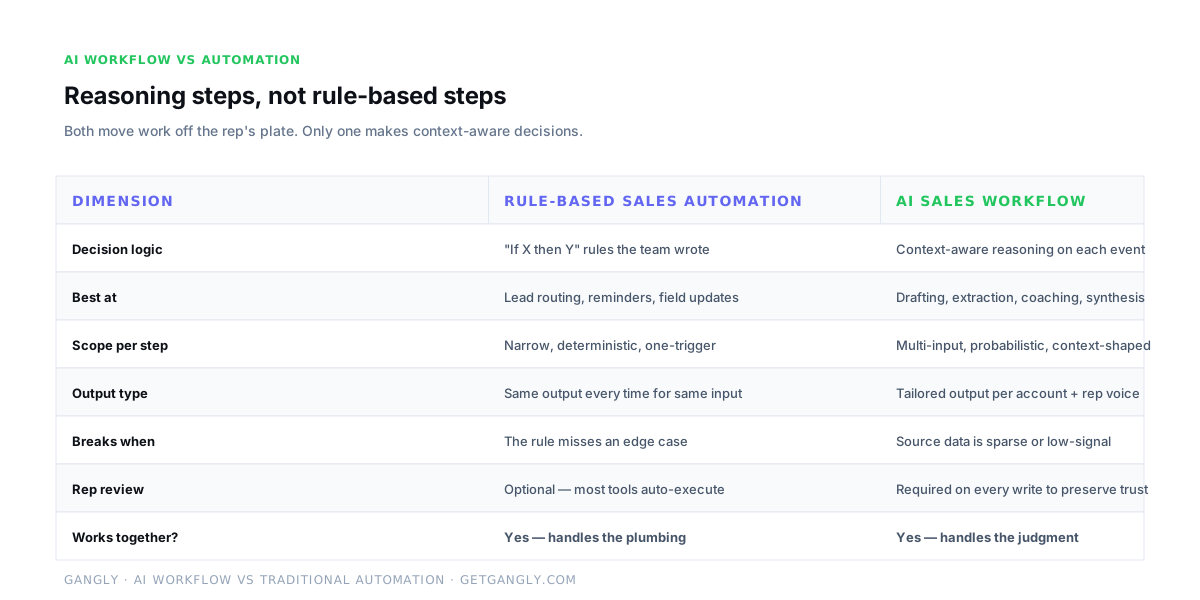
Concrete split. Automation is best at lead routing ("if lead source = webinar, assign to rep West"), reminder triggers ("no activity on deal for 7 days, send rep an alert"), and field updates ("close date is in the past, move to closed-lost"). These are narrow, deterministic, and should stay in the workflow engine — they do one thing reliably and cheaply.
AI is best at drafting ("write a first-touch email tied to this signal in the rep's voice"), extraction ("pull the 8 signals from this call transcript"), coaching ("surface a reframe for this objection in 2 seconds"), and synthesis ("turn these 42 minutes of transcript into a 5-part deal record"). The common thread is context — the output changes based on inputs no rule could enumerate in advance.
The best stacks combine both. Automation handles the plumbing — triggers, routing, reminders. AI handles the judgment steps inside each stage. The rep reviews every write. A team that deploys only automation ships fast sequences with generic messages. A team that deploys only AI gets intelligent drafts that never actually reach the prospect because there is no trigger to send them. The category matures when the two layers are explicit and coordinated.
What AI does well in sales — and what it doesn't
Buying an AI sales workflow without knowing its limits is how the budget item gets cut next year. Three things AI does remarkably well, and three it cannot do — and the rep-in-the-loop rule exists because of the second list, not the first.
- ✓
Extraction from long context
AI turns a 42-minute call transcript into a 5-part note with the right decisions, next steps, and CRM fields pulled out.
- ✓
Voice-matched drafting
Trained on 5 of the rep's past emails, AI drafts a first-touch that reads like the rep — not a template.
- ✓
Pattern-matching on signals
AI reads a stream of activity and scores which accounts look warm now — faster than any rep with a spreadsheet.
- ×
Reading the room
AI cannot hear tone shift, catch a side-mouth remark, or feel when a buyer is about to walk. The rep still reads the room.
- ×
Net-new creative positioning
AI rearranges what it knows. It does not invent a new category narrative — that's still a human product-marketing job.
- ×
Judgement calls on the deal
Whether to push for a close, walk from a ghost, or loop in the VP is a rep decision. AI surfaces inputs; the rep decides.
The pattern: AI is excellent at anything with a large context window and a clear output format. It struggles at anything that requires reading unstated social signals, inventing a new frame, or making a judgement call where the inputs don't contain the answer. A rep is still the best piece of hardware in the workflow for those three things. The design job is to give the rep back the time they currently spend on the first three so they can do the second three better.
The data an AI sales workflow needs to run
An AI sales workflow is only as good as the data it reads. Six data sources cover 95% of what every stage needs. Three are required to run anything at all; three are required for specific stages (signal detection and live coaching).
| Source | Role in the workflow | Direction | Required |
|---|---|---|---|
| CRM (HubSpot, Salesforce, Pipedrive) | Source of truth for deals, contacts, stage, notes | Read + write | Required |
| Calendar (Google, Outlook) | Triggers call prep 30 min before the meeting | Read | Required |
| Inbox (Gmail, Outlook) | Email history for context and follow-up drafts | Read + write (drafts) | Required |
| Call platform (Zoom, Google Meet) | Live transcript for coach + post-call note | Read | Live coach |
| LinkedIn (via extension) | Profile context + signal events | Read | Signal detection |
| Company data + news | Funding, hiring, product announcements | Read | Signal detection |
One common mistake: trying to run signal detection without LinkedIn access. Public news feeds alone miss 60–70% of what a rep actually cares about (new-hire announcements, reply-to-reply activity, company-page updates). The workaround is a browser extension — the rep keeps using LinkedIn normally, and the extension pipes profile-level signals back into the workflow. Full integration list in Gangly's integrations page.
Metrics that prove the workflow is working
Twelve metrics — two per stage at most, plus two workflow-level — prove the investment is working. Vanity metrics like "emails sent" or "calls recorded" don't qualify; they measure activity, not outcomes. The 12 below measure conversion, quality, and time recovered.
| Stage | Metric | Target |
|---|---|---|
| Signal | Warm accounts surfaced per rep per week | 20–40 |
| Signal | Warm-to-reply conversion rate | 15–25% |
| Outreach | Drafts reviewed and sent per day | 10–15 |
| Outreach | Reply rate on signal-led outreach | ≥ 3× cold baseline |
| Call prep | Time in prep per call | < 5 minutes |
| Live call | Rep talk ratio | 43–46% |
| Live call | Objection handle time | < 20 seconds |
| Post-call | Time to synced CRM note | < 90 seconds |
| Post-call | Stage update accuracy | > 95% |
| CRM | Stale deal flag rate | < 5% of open pipeline |
| Workflow | Full workflow completions per rep per week | 5+ |
| Workflow | Admin hours saved per rep per week | 6–10 |
The two north-star metrics. Workflow completions per rep per week is the Gangly north star — how many times the full 6-stage motion fired end-to-end on a real account that week. Target: 5 within 30 days, 10+ within 90. Admin hours saved per rep per week is the reality check — if the rep isn't getting back 6–10 hours by day 30, the weakest stage is leaking and needs attention.
Common failure modes when deploying
Most AI sales workflow rollouts fail in one of five predictable ways. None are model problems — better LLMs don't fix any of them. All are workflow-design problems that show up at implementation time.
- 1
Auto-writing to the CRM
Skipping the rep review step is how hallucinated next steps and wrong stages enter the pipeline. Rule: the rep clicks every write. No exceptions.
- 2
Buying six single-stage tools
A transcription app + a sequencer + a CI dashboard + a CRM + a signal tool + a coach isn't a workflow. Buy tools that cover multiple stages and pass state between them.
- 3
Skipping voice training
AI outreach without a voice sample reads like a template. Upload 3–5 of the rep's past sent messages at setup or every draft arrives lifeless.
- 4
No source-of-record discipline
AI writes to Notion, the rep writes to the CRM, and the forecast drifts. Rule: every workflow write lands in HubSpot, Salesforce, Gmail, or the calendar — not a parallel dashboard.
- 5
Measuring the wrong KPIs
Vanity metrics (emails sent, calls made) don't prove the workflow works. Per-stage conversion, talk ratio, time-to-synced-note, and workflow completions do.
The meta-failure under all five: optimizing for the enablement dashboard instead of the rep's next call. A workflow the rep doesn't use is decoration. The rollout playbook below exists specifically to keep the rep at the center of every decision.
How to implement an AI sales workflow in 30 days
Four weeks. One rep to start. Each week ends with a deliverable that proves the prior week landed. Skip the deliverable and the rollout drifts — don't proceed to the next week until the deliverable is real.
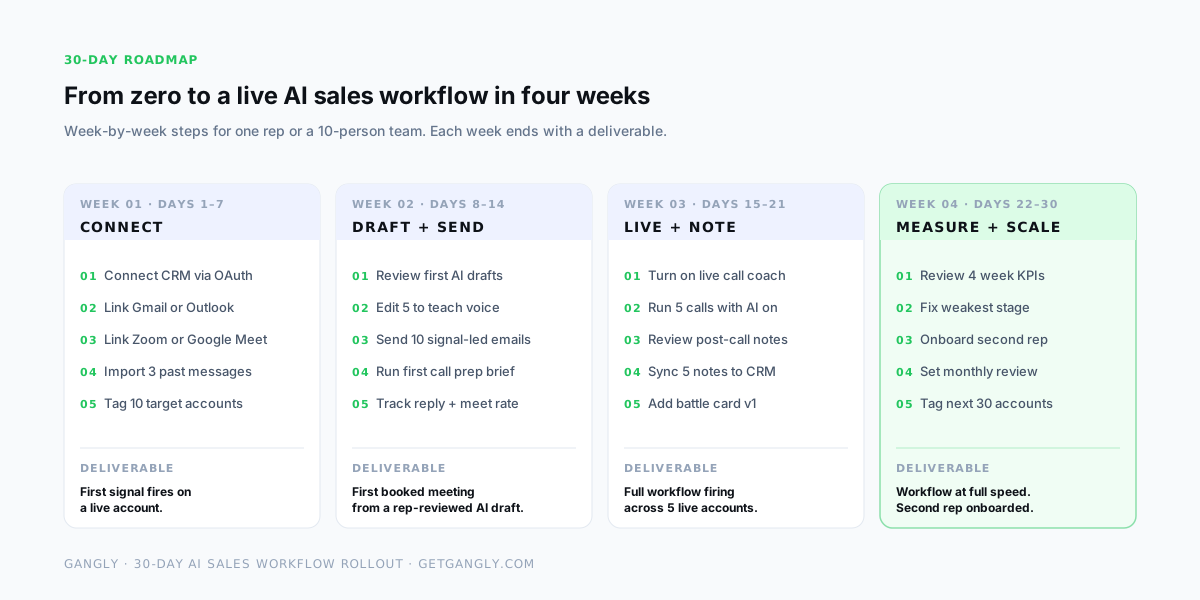
- 01
Connect Days 1–7
OAuth the CRM, inbox, calendar, and call platform. Install the LinkedIn extension. Import 3–5 rep messages for voice training. Tag the first 10 target accounts.
Deliverable: First signal fires on a real account.
- 02
Draft + send Days 8–14
Review the first AI drafts. Edit five to teach the voice. Send 10 signal-led emails with rep approval. Run the first call prep brief. Track reply and meeting rate.
Deliverable: First booked meeting from a rep-reviewed AI draft.
- 03
Live + note Days 15–21
Turn on the live call coach. Run 5 calls with AI on. Review post-call notes, edit, sync five to CRM. Add the first battle card for the top-named competitor.
Deliverable: Full workflow firing across 5 live accounts.
- 04
Measure + scale Days 22–30
Review the 4-week KPI sheet. Fix the weakest stage (usually call prep quality or note accuracy). Onboard a second rep. Set a 30-day review cadence. Tag the next 30 accounts.
Deliverable: Workflow at full speed. Second rep onboarded.
The rollout scales at the end of week 4, not before. Onboarding rep 2 earlier risks doubling down on a workflow that isn't working yet — use the first 30 days to prove the loop on one rep, fix the weakest stage, and then replicate with the confidence of a working template. The second rep takes roughly a week to onboard with the lessons already baked in.
Build vs buy: when to use a platform
For most teams the answer is buy, but the math is worth running once rather than assuming. Building in-house makes sense at Fortune 500 scale where the volume supports the engineering cost and the customization requirements go beyond what any vendor packages. Below that scale, buy.
| Dimension | Build in-house | Buy a platform |
|---|---|---|
| Time to first signal | 3–6 months | 1 day |
| Integration count | Maintain 6–10 APIs | OAuth covered |
| Cost | $200k–500k / year (eng team) | $99–299 / rep / month |
| Ongoing maintenance | Continuous, eng-owned | Vendor-owned |
| Model upgrades | DIY every 6 months | Automatic |
| Fit for most teams | Fortune 500 only | Under 500 reps |
The hidden cost in build is maintenance. Model providers ship new versions every 6 months; integrations break when vendor APIs change; security reviews add a quarter to every release. A platform covers all three because its business depends on it. A home-grown workflow has exactly one engineer who remembers why the prompt looks the way it does — and that engineer leaves eventually.
How Gangly builds the complete workflow
Gangly is a sales workflow system — seven features wired together as one six-stage pipeline. The rep works inside one interface instead of bouncing between the CRM, the inbox, Zoom, LinkedIn, and a separate intelligence dashboard.
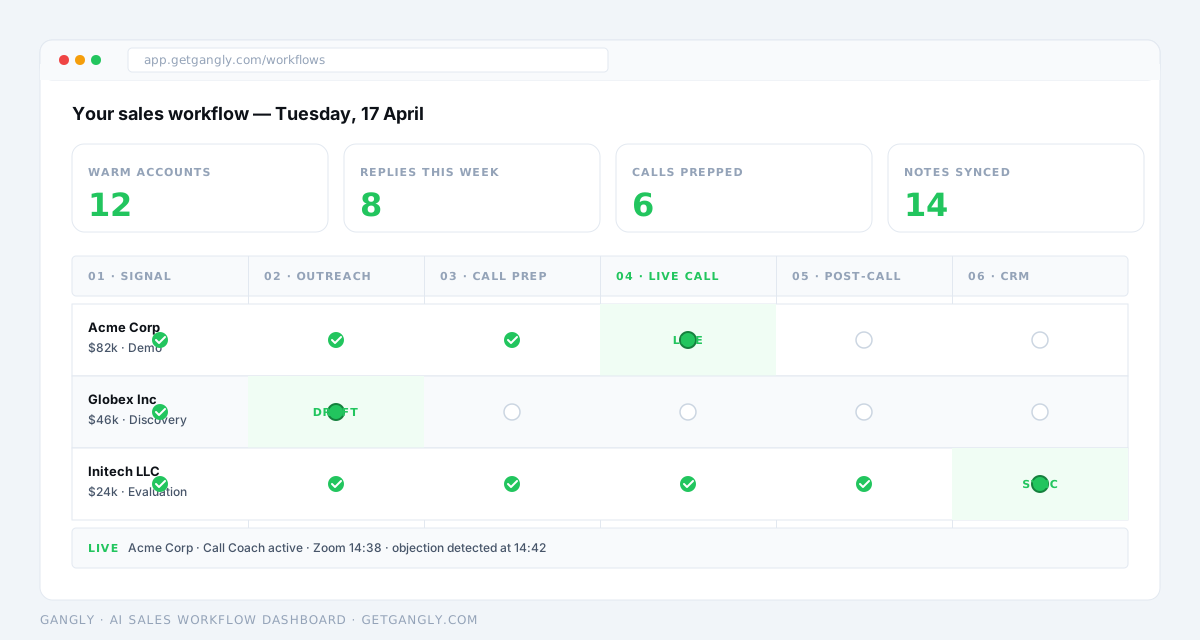
- Signal Detection — scores warm accounts from CRM, LinkedIn, and web signals. Stage 01.
- Outreach Writer — drafts the first-touch in the rep's voice, tied to the signal. Stage 02.
- Call Prep Engine — builds the 7-part brief 30 minutes before the meeting. Stage 03.
- Live Call Coach — surfaces objection reframes on Zoom or Google Meet in under 2 seconds. Stage 04.
- Post-Call Notes — drafts the 5-part CRM note the moment the call ends. Stage 05.
- CRM Hygiene Engine — keeps deal fields current between touches. Stage 06.
- Workflow Sequencer — the layer that ties all six stages into a single motion.
Pricing lives at /pricing. Seat plans start at $99/month with a 14-day free trial and no credit card. For related reading: the spoke version of this guide, how AI sales workflows work, goes deeper on the rep-level mechanics; the best AI tools for sales teams covers team-level stack design; and AI tools for sales reps catalogs individual-stage tools for reps still building their own stack.
Run the workflow
Six stages. One rep. First workflow live in 5 minutes.
14-day free trial. Connect CRM, Zoom, and Gmail in under 10 minutes. No credit card.
Frequently asked questions
What is an AI sales workflow? +
An AI sales workflow is a six-stage sequence — signal detection, outreach drafting, call prep, live call coaching, post-call notes, and CRM hygiene — where AI handles a specific, bounded task at each stage, and the rep approves every write. The output of each stage becomes the input to the next, so the rep works inside one continuous motion instead of copy-pasting between six separate tools.
What does an AI sales workflow actually do that automation doesn't? +
Traditional sales automation runs rules: if a form is filled, send email A. An AI sales workflow runs reasoning: given this signal, this account's context, and this rep's voice, draft a message that reads like it took five minutes. Automation is best at plumbing — routing, reminders, field updates. AI is best at judgment steps — drafting, extraction, coaching. A good stack uses both and keeps the rep in the loop on every write.
How much does an AI sales workflow cost? +
For a platform like Gangly, Outreach, or Gong, expect $99–299 per rep per month depending on tier and team size (Gangly: $99–299/seat/mo). For a 10-rep team, that is $12k–36k per year, usually paying back in 1–2 months of recovered selling time. Building in-house costs $200k–500k per year in engineering salaries plus API fees, and takes 3–6 months to ship a first version — rarely justified below 500 reps.
Does AI in a sales workflow replace the rep? +
No. The rep drives every call, reads the room, makes deal-level judgement calls, and approves every CRM write and every sent message. AI handles the parts that are slow and repetitive — drafting, extraction, field inference, transcript-to-note conversion. McKinsey's 2025 research on AI agents in sales found the best-performing setups escalate low-confidence decisions back to a human; fully autonomous bots under-perform in pipeline quality.
How do I know the AI sales workflow is working? +
Twelve KPIs, one per stage plus two workflow-level. Track warm accounts per rep per week, signal-to-reply rate, reply rate vs cold baseline, time in call prep, rep talk ratio (target 43–46%), objection handle time, time to synced CRM note, stage update accuracy, stale deal flag rate, workflow completions per rep per week, and admin hours saved. If admin hours saved is under 4 per rep per week after 30 days, the weakest stage is failing — usually call prep quality or note accuracy.
What tools do I need to run an AI sales workflow? +
Four connections, at minimum: a CRM (HubSpot, Salesforce, or Pipedrive), a calendar (Google or Outlook), an inbox (Gmail or Outlook), and a call platform (Zoom or Google Meet). Add LinkedIn via browser extension for signal detection and profile context. A workflow-first platform like Gangly ties those four into the 6-stage motion — without a workflow layer, you have six disconnected tools and a rep still copy-pasting between them.
How long does it take to set up? +
Under 10 minutes from install to first workflow running for a single rep. The longest steps are the OAuth flows — CRM (3 min), calendar and inbox (2 min each), call platform (3 min) — plus the LinkedIn extension install. Once connected, the first signal fires inside the first real day of sales activity. For a 10-person team, add 1–2 weeks for CRM field mapping and per-rep voice training.