
 By Siddharth Gangal
What an AI sales workflow actually is (in one paragraph)
Most definitions of "AI sales workflow" blur into marketing copy. Here is the plain one, in a sentence: an AI sales workflow is a six-stage pipeline — from spotting a warm account to updating the CRM — where AI does a specific, bounded job at each stage, the output of each stage feeds the next, and the rep keeps approval rights on every write.
Three words do the work in that sentence. Pipeline — the stages connect; a disconnected tool stack does not count. Bounded — each AI call has a defined input and output, not a vague promise to "help with sales." Approval — the rep still drives; AI drafts, the rep clicks.
Everything else in the category description is decoration. If a vendor pitches an AI sales workflow and cannot name six stages, describe what goes in and out of each, and show where the rep approves the write, they are selling a dashboard with a buzzword attached. That is worth knowing before the demo.
The 6 stages of every AI sales workflow
Every serious AI sales workflow, regardless of vendor, walks the rep through the same six stages. The names change, but the shape does not. If a tool covers four of them, it is a good tool; it is not a workflow.
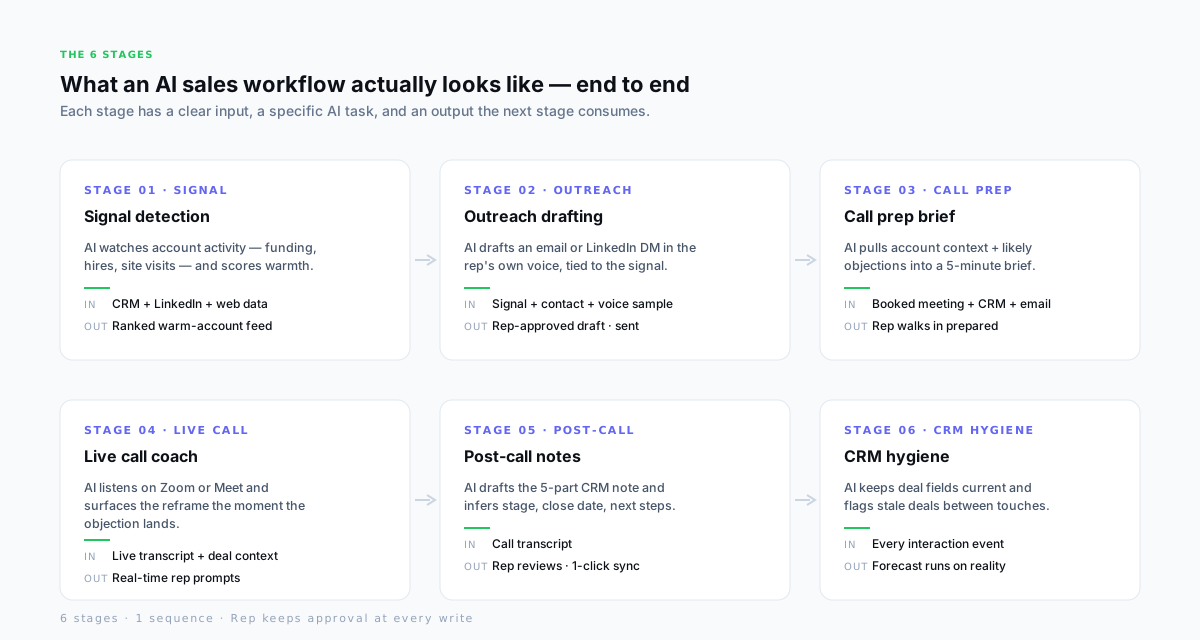
| Stage | Input | AI task | Output |
|---|---|---|---|
| 01 Signal | CRM + LinkedIn + web data | Scores account warmth from new-hire, funding, visit, and keyword signals. | Ranked feed of warm accounts the rep should work today. |
| 02 Outreach | Signal + contact + voice sample | Drafts a first-touch message tied to the signal, in the rep's own voice. | Rep-approved email or LinkedIn DM · sent. |
| 03 Call prep | Booked meeting + CRM + email thread | Builds a 7-part brief — account context, contact, prior conversation, likely objections, talk track. | Rep walks into the call prepared in under 5 minutes. |
| 04 Live call | Live Zoom/Meet transcript + deal context | Listens for objection keywords; surfaces the reframe and the right proof point in seconds. | Rep handles the objection without searching mid-call. |
| 05 Post-call | Call transcript | Drafts the 5-part CRM note and infers stage, close date, next activity, and tasks. | Rep reviews for 30 seconds · one-click sync to CRM. |
| 06 CRM hygiene | Every interaction event | Keeps deal fields current, flags stale deals, nudges the rep when a next step lapses. | Forecast runs on what was said, not what was remembered. |
6
Stages end-to-end
Signal → Outreach → Call prep → Live call → Post-call → CRM.
8hrs/wk
Saved per rep
Typical admin-hour recovery across the workflow.
3–15%
Revenue lift
Teams using AI agents in sales ops (McKinsey, 2024–25).
100%
Rep-approved writes
Every CRM update, every send, passes a rep click.
How AI works at each stage — in plain English
"AI" is a lazy label. The useful question is always: what specifically does the AI read, and what specifically does it write? Six stages, six answers.
1 · Signal — pattern-matching on account activity
The AI reads a feed of account events — new-hire announcements, funding news, website visits, keyword-tagged LinkedIn posts — and scores how warm each account looks. It compares against your historical win patterns. The output is a ranked feed of accounts worth working today, not all 800 accounts in the territory. This is the only stage that runs on its own without the rep prompting it. See the 7 signals that predict reply for the signal menu most tools score against.
2 · Outreach — drafting in the rep\'s voice
The AI takes the signal and a sample of the rep\'s past messages and drafts a first-touch email or LinkedIn DM. The hook is the signal — "I saw you just hired Alex as VP Ops" — not a generic opener. The rep reads the draft, edits, and sends. The tool that auto-sends without the rep clicking is called a cold-email blaster, not a workflow.
3 · Call prep — compiling context into a brief
The AI pulls the CRM record, the LinkedIn profile, the email thread, and the prior call note, and builds a 7-part brief: account summary, contact, prior conversation, likely objections, discovery questions, talk track, next-step targets. The rep reads the brief in under five minutes and walks into the call prepared. The detail of the prep is covered in the sales call prep workflow.
4 · Live call — detecting keywords and surfacing reframes
While the call runs, the AI listens to the Zoom or Google Meet transcript and detects objection keywords — "too expensive," "not this quarter," "we already have one." It surfaces the right reframe, the relevant stat, or the correct case study on the rep\'s screen in a second or two. The rep stays on camera, answers the objection, and keeps moving. AI does not speak on the call. The rep does.
5 · Post-call — extracting signals and drafting the note
The moment the call ends, the AI reads the transcript and writes a 5-part CRM note — headline, key topics, decisions, next steps, CRM fields. It infers the stage update, the close date shift, and the tasks. The rep reviews for 30 seconds, fixes the off-mic comment the transcript missed, and clicks sync. The full pattern is in post-call note automation.
6 · CRM hygiene — keeping fields current between touches
The AI watches every event on the deal — new emails, meeting replies, LinkedIn activity — and proposes field updates. Stage moves, close dates shift, tasks get added or closed. The rep confirms or overrides. The forecast ends up reflecting what actually happened, not what anyone remembered at 5pm on Friday.
What an AI sales workflow is NOT
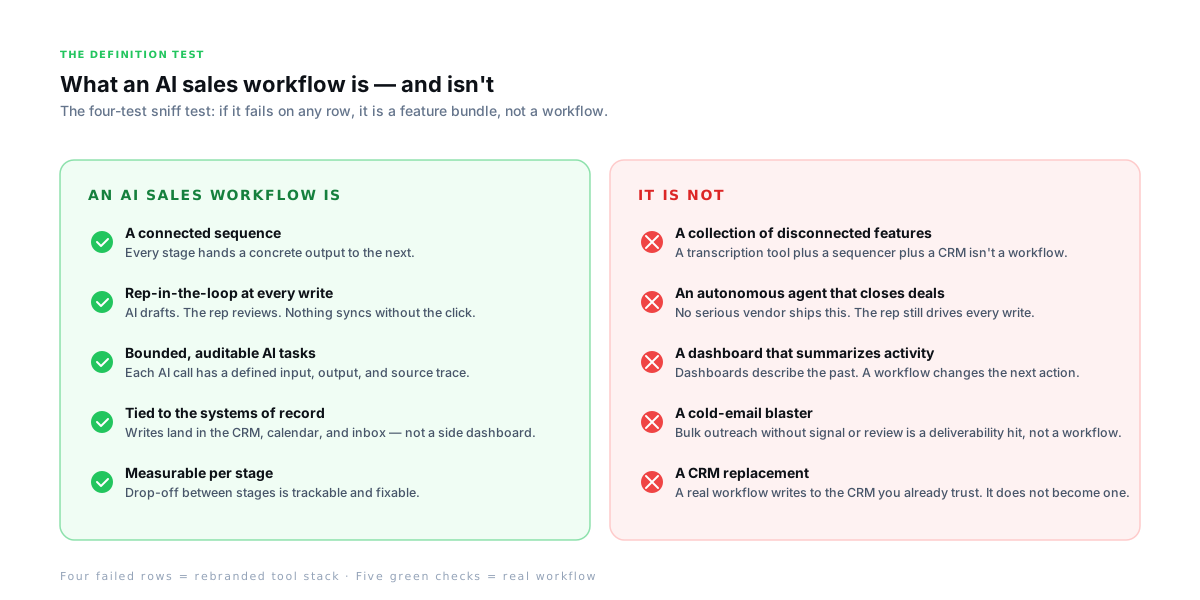
Half the category confusion is naming. "AI sales workflow" gets pinned on five different things, only one of which is actually a workflow. Ruling the rest out is a faster path to the definition than describing what it is.
- 1
A disconnected tool stack
A transcription app, a sequencer, and a CRM sitting next to each other in a browser is three tools. The rep still copy-pastes between them. A workflow wires the output of one stage into the input of the next.
- 2
An "autonomous agent"
No serious vendor ships a bot that closes deals for the rep. "Autonomous" in the 2026 context means the tool runs between stages — it does not mean the rep got replaced. The rep still drives every write.
- 3
A dashboard that summarizes the week
Dashboards describe the past. A workflow changes the next action. A weekly CI report is useful; a Wednesday-morning reframe while the rep is on a live call is the job.
- 4
A cold-email blaster
Bulk outreach without a signal, without rep review, without a system of record on the other end is a deliverability hit. That is a sequencer, not a workflow.
- 5
A CRM replacement
A real sales workflow writes to HubSpot, Salesforce, or Pipedrive — the CRM the team already trusts. It does not try to become a system of record.
The 4 tests a real AI sales workflow must pass
Four questions. If a tool passes all four, it is a real AI sales workflow. If it fails one, it is a feature bundle with good branding. Run these on the next demo you take.
- 1
Test 1 — The stage hand-off
Can the output of stage N be named, and does it become the input of stage N+1? If the rep still has to manually bridge the gap, it is a feature bundle, not a workflow.
- 2
Test 2 — The rep-review gate
Does every CRM write, every sent message, every stage change require the rep to approve? If "auto-sync" is a setting, the CRM data is about to get worse.
- 3
Test 3 — The system-of-record write
Do the outputs land in the tools the team already uses — CRM, calendar, inbox, Zoom — or in a separate dashboard the rep has to remember to open? Real workflows write where the team already works.
- 4
Test 4 — The per-stage measurement
Can the team see drop-off between any two stages (e.g., outreach-to-call conversion, call-to-CRM-sync rate)? A workflow is observable per stage. A feature bundle is observable only in aggregate.
The four tests pick up most category confusion in a 30-minute call. Ask a vendor "what is the output of stage three and the input of stage four?" and the honest answers come fast. The hedged ones are usually selling a single stage with workflow gloss.
How Gangly builds the workflow end-to-end
Gangly is built as a single six-stage workflow, not a bundle of features. Every stage has the input, AI task, and output called out above. The rep approves every write. The outputs land in HubSpot, Salesforce, Pipedrive, Gmail, Outlook, or the calendar — not in a Gangly-only dashboard.
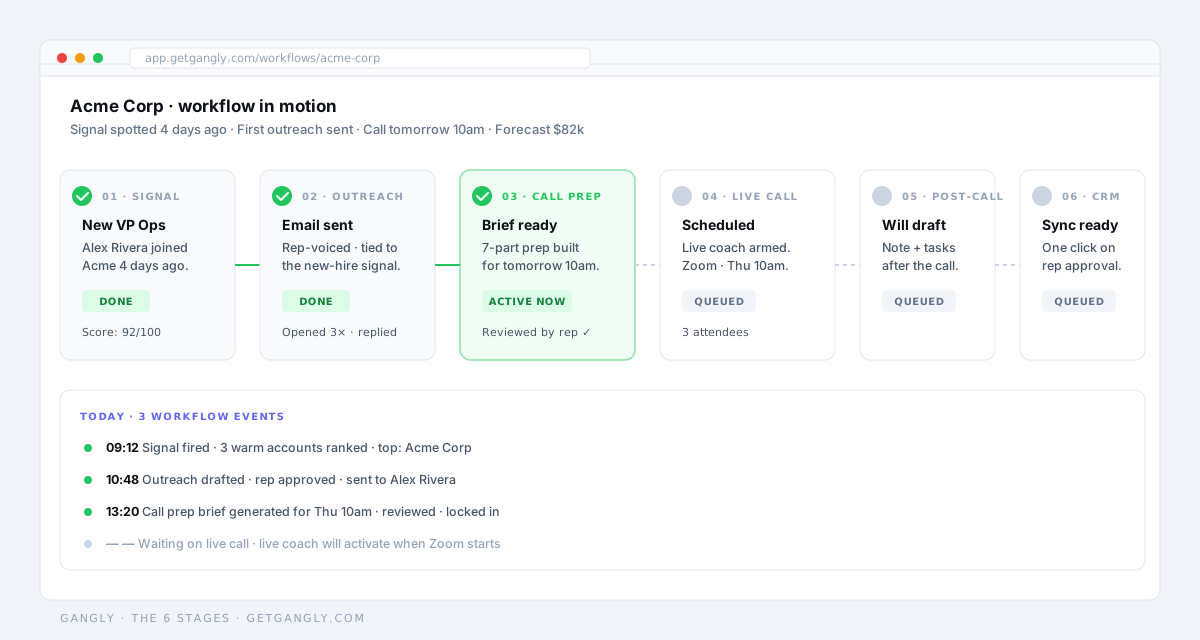
- Signal Detection — scores warmth from CRM, LinkedIn, and web signals; surfaces the top warm accounts on a daily feed.
- Outreach Writer — drafts the signal-led first-touch message in the rep\'s voice; rep reviews, edits, sends.
- Call Prep Engine — builds the 7-part brief 30 minutes before the meeting; rep walks in ready.
- Live Call Coach — surfaces objection reframes on Zoom or Google Meet during the call, in seconds.
- Post-Call Notes — drafts the 5-part CRM note the moment the call ends; rep syncs with one click.
- CRM Hygiene Engine — keeps deal fields current, nudges on stale deals, confirms every write with the rep.
- Workflow Sequencer — the layer that wires the six stages together so the rep works inside one motion.
Seat plans start at $99/month with 14-day free trial, no credit card. Pricing is covered in detail on the pricing page.
Related reading: AI tools for sales reps in 2026 reviews the individual-stage tools, the best AI tools for sales teams covers team-level stack design, and AI call recording analysis zooms in on stages 4 and 5 specifically.