
 By Siddharth Gangal
A useful CRM hygiene checklist is not a demand that sellers “update everything.” It is a controlled sequence: protect the current state, define which records and fields matter, find exceptions, correct them with an audit trail, and change the workflow that created them. The checklist below is designed to be copied into an operating document and signed off with evidence.
Direct answer. Back up the scoped data; assign an owner for every object and field; check duplicates, required values, formats, relationships, open-opportunity state, next steps, activity capture, integrations, access, retention, and correction workflows; quarantine ambiguous records; then measure exception rates from a timestamped snapshot. Prevent recurrence with validation, matching, controlled write authority, monitoring, and a named exception queue.
This page is intentionally narrower than CRM hygiene: the complete playbook for sales teams. The playbook owns the recurring governance model and its weekly, monthly, and quarterly routines. This page owns the field-ready, pass/fail checklist used during one audit or cleanup. For deeper data-quality measurement and remediation logic, use the companion CRM data quality guide.
Use this CRM hygiene checklist in the right order
Run checks in dependency order. Identity must be stable before you merge or reparent records. Field definitions must be frozen before you score completeness. Opportunity stages and close dates must have business meanings before a stale-deal report is actionable. Integration owners must agree on write authority before a cleanup, or connected systems may restore the values you removed.
| Order | Control | Pass evidence | Do not proceed when |
|---|---|---|---|
| 1 | Scope and backup | Objects, fields, snapshot time, export, restore test, owners | The target or recovery method is unclear |
| 2 | Identity and relationships | Stable keys, matching rules, survivor policy, exception queue | Records would merge on name alone |
| 3 | Completeness and validity | Definitions, allowed values, missing/invalid reports | A field has no purpose or owner |
| 4 | Pipeline and activity | Stage criteria, next-step evidence, activity reconciliation | Reports mix conflicting definitions |
| 5 | Integrations and lifecycle | Write map, error queue, access/retention tests | A source can silently overwrite corrected truth |
| 6 | Remediation and prevention | Approved changes, reconciliation, controls, follow-up date | Rollback or acceptance checks are absent |
Mark every item pass, fail, not applicable, or blocked. Add evidence location, exception count, owner, due date, and approval. “Looks clean” is not a result. A reproducible query, sample, export, log, or tested workflow is.
Freeze scope, ownership, and a backup first
Write the audit header before changing data: production or sandbox, CRM tenant, objects, teams, regions, time window, snapshot timestamp and timezone, excluded records, currency, opportunity cohort, and connected systems. Record the person who approves changes and the people who own account, contact, lead, opportunity, activity, product, and custom objects.
- Export scoped records with stable CRM IDs, relationships, owners, created/modified times, and fields that will change.
- Export automation, matching, duplicate, assignment, validation, workflow, and integration mappings that affect the scope.
- Test restoration on a safe sample or sandbox. Opening an export is not a restore test.
- Freeze or log concurrent bulk imports and configuration changes during the cleanup window.
- Define the reconciliation equation:
source records = unchanged + corrected + merged + archived + quarantined + rejected.
Use least privilege for exports and working files. Do not copy the entire CRM when only current-quarter opportunities are in scope. Store working data in an approved location, restrict access, define deletion timing, and remove temporary exports after acceptance under the applicable policy.
Check identity, duplicates, and relationships
Identity controls answer whether each real person, company, and deal maps to the correct CRM record. Start with stable identifiers such as CRM ID, verified email where appropriate, canonical company domain, external system ID, or a governed composite key. Names alone are ambiguous. Employment changes, shared inboxes, consultants, subsidiaries, rebrands, acquisitions, and international domains all need explicit handling.
Salesforce distinguishes matching rules from duplicate rules: matching rules identify potential duplicates, while duplicate rules determine whether to alert, report, or block. Its official guidance also describes exact and fuzzy matching. HubSpot’s current duplicates manager documentation describes reviewing, merging, rejecting, custom rules, and merge history; features and limits depend on subscription. Those capabilities can support the checklist, but the business still owns matching and survivor decisions.
- Check duplicate candidates separately for leads, contacts, companies/accounts, opportunities, and custom objects.
- Inspect false positives and false negatives on a labeled representative sample before bulk action.
- Define the survivor record and field-level survivor rule: newest verified value, approved source, human selection, or never overwrite.
- Preserve activities, consent state, ownership, campaign membership, opportunities, tickets, notes, attachments, and external IDs.
- Route ambiguous pairs to quarantine with reason, owner, and review date. Do not force a merge to improve the headline rate.
- Test downstream sync after a merge. Confirm that deleted aliases or IDs do not recreate the losing record.
Check relationships after identity: contact-to-account, opportunity-to-account, opportunity contact roles, parent-child accounts, territory, owner, product, and activity associations. An “orphan” means the required parent is missing or invalid under your data model, not merely that a field is blank.
Check required fields and valid values
Create a field dictionary with business purpose, object, type, allowed values, format, source of truth, write authority, owner, point at which the value becomes knowable, required condition, refresh rule, and downstream consumers. Remove or retire fields with no decision, workflow, compliance, or reporting use instead of making every field mandatory.
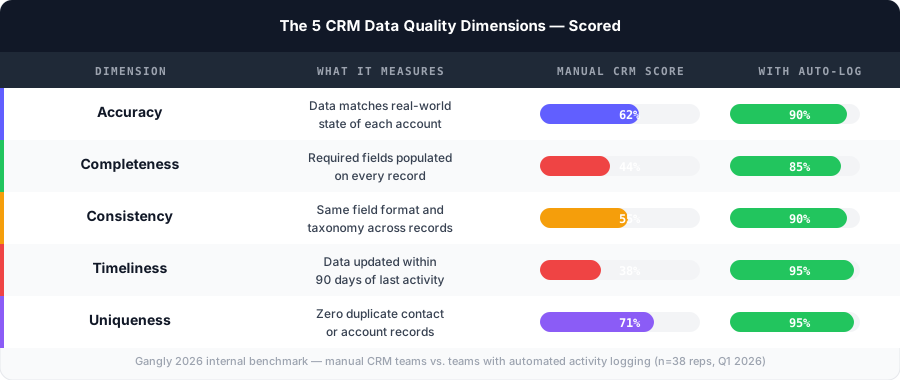
| Check | Example failure | Safer control |
|---|---|---|
| Completeness | Close date missing on an open forecasted deal | Conditional requirement at the relevant stage |
| Validity | Free-text amount or impossible date | Typed field, range rule, clear error message |
| Consistency | “United States,” “US,” and “USA” split reports | Governed picklist or normalization at ingestion |
| Accuracy | A previous employer shown as current company | Source, verified timestamp, correction workflow |
| Recency | Last verified date exceeds the approved use window | Refresh or quarantine based on purpose |
Salesforce documents validation rules as formulas that test record data against defined criteria before save, displaying an error when the invalid condition evaluates true. Validate the workflow, not only the formula: integrations, bulk loads, different page layouts, legitimate unknown values, and emergency exceptions may take different paths.
Require data at the point it is knowable. A rep may not know procurement steps at lead creation, but the team can require them before a defined late stage. Use a real “unknown” state only when it carries meaning and ownership; do not let blank, unknown, none, N/A, hyphen, and placeholder text become five competing versions.
Check opportunity stages, dates, and next steps
Open opportunities deserve a separate audit because they feed execution and forecast decisions. Freeze stage definitions and exit evidence before querying. For every open deal, check amount basis and currency, close date, stage, forecast category, owner, account, primary contacts or roles, last meaningful activity, buyer-confirmed next step, next-step owner and date, qualification evidence required at that stage, and loss or disqualification handling.
A stale deal is not universally “21 days without activity.” Define staleness by stage, motion, segment, and expected cadence. A procurement wait may be valid; an overdue buyer meeting with no follow-up may not be. Separate system timestamps from meaningful buyer engagement. An automated email or internal field update should not refresh a deal’s buyer-activity clock.
- Close dates in the past: correct with evidence, close, or quarantine.
- Stage and forecast category conflict: apply the documented mapping or route the exception.
- No dated next step: require owner, action, counterparty where relevant, and due date.
- Amount changed materially: preserve history and reason; do not overwrite without an audit trail.
- Duplicate open opportunities: confirm distinct buying motions before merge or close.
- Closed won without required handoff evidence: route to the post-sale acceptance queue.
Use the sales pipeline management guide for the portfolio-level inspection cadence and CRM pipeline stages for stage design. This checklist tests whether records follow the approved definitions.
Check activity capture and recency
Activity data should show what occurred without inventing activity or duplicating it. List approved sources for email, calendar, dialer, meeting, social, tasks, and manually logged events. Define what counts as captured, linked, meaningful, inbound, outbound, buyer-facing, or internal.
- Sample source events and trace them to the correct CRM person, account, opportunity, owner, channel, and timestamp.
- Sample CRM events and trace them back to an approved source. Detect replayed webhooks and duplicate sync.
- Test late arrival, cancellation, rescheduling, deleted events, shared meetings, forwarding, aliases, and owner reassignment.
- Confirm timezone conversion and preserve source time where required.
- Separate automated sends and opens from human-written messages and buyer responses.
- Report capture gaps by connector and reason rather than blaming the rep for unavailable telemetry.
Post-call automation can reduce manual entry, but proposed summaries, qualification fields, next steps, or stage changes should have explicit write authority and review rules. The CRM data entry automation guide covers those controls in depth. Gangly’s post-call notes product is relevant when reviewed call context is part of the capture path.
Check integrations and write authority
Build a field-level write matrix. Rows are CRM fields; columns are the CRM interface, import, form, enrichment provider, marketing automation, dialer, calendar, conversation system, sales-engagement tool, support system, warehouse, and AI workflow. Each cell says read, propose, append, overwrite, create, delete, or no access. Conflicting authoritative writers are a design defect.
For every connection, test create, match, update, retry, timeout, rate limit, partial failure, out-of-order event, duplicate delivery, revoked permission, schema change, and recovery. Failed writes need an inspectable queue with record ID, source event, attempted value, current value, reason, retry state, owner, and resolution. Silent failure is dirty data with a delay.
Reconcile batches: attempted = succeeded + rejected + quarantined + unresolved. Reconcile creates separately from updates and merges. A connector reporting “sync complete” does not prove correct identity, relationships, or values. Sample the destination and verify that newer human-reviewed data was not replaced by older upstream data.
Use CRM integration best practices when designing transports and the sales stack audit when inventorying overlapping systems.
Check minimization, accuracy, and lifecycle controls
CRM hygiene includes using only data that is appropriate for its purpose and responding to accuracy challenges. The UK Information Commissioner’s Office summarizes data minimisation as ensuring personal data is adequate, relevant, and limited to what is necessary. Its accuracy guidance says organizations should take reasonable steps to avoid incorrect or misleading personal data, keep source and status clear, and correct or erase inaccurate data as appropriate. Both linked ICO pages currently state that their guidance is under review following changes made by the Data (Use and Access) Act. Requirements vary by jurisdiction and use; obtain qualified advice.
- Inventory sensitive and personal fields, purpose, lawful handling basis where applicable, source, users, recipients, region, retention, and deletion path.
- Remove collection that has no defined purpose. Mask or restrict sensitive working exports.
- Test access for role changes, temporary coverage, territory movement, departures, administrators, service accounts, and vendor support.
- Test a correction request across CRM, connected tools, analytics copies, exports, and future enrichment.
- Test archive, deletion, legal hold, suppression, and backup expiry without breaking the approved historical record.
- Preserve fact versus opinion, source, verification time, and dispute state where relevant.
A blanket deletion or enrichment pass can make data less correct. Historical employment may be valid as history even when it is not current. Define what the field is meant to represent, label history clearly, and retain only what policy and purpose justify.
Assign daily, weekly, monthly, and quarterly controls
| Cadence | Owner | Minimum controls |
|---|---|---|
| At the event | Rep + workflow | Correct identity; meaningful activity; reviewed next step; stage-gate evidence |
| Weekly | Manager | Open deal state, overdue next steps, close dates, forecast conflicts, owner exceptions |
| Monthly | RevOps + integration owners | Duplicates, missing/invalid values, orphans, sync failures, write conflicts, correction backlog |
| Quarterly | Business owners + governance | Schema and field use, definitions, access, retention, automation, vendors, control effectiveness |
| On change | Change owner | Migration/import mapping, regression tests, reconciliation, rollback, acceptance |
Each review produces an exception register, not a reminder email. Required columns are exception type, affected object and stable ID, evidence, severity, source, owner, due date, status, correction, reviewer, and prevention action. Track reopened exceptions and repeat causes. A queue without service expectations becomes storage for known defects.
Measure the checklist with reproducible rates
Publish every metric with object scope, snapshot time, query or logic, numerator, denominator, exclusions, owner, and prior comparable result. Do not invent universal targets. Establish a baseline, segment by workflow, and set service levels based on business risk.
- Duplicate candidate rate = records flagged by approved matching logic ÷ in-scope records. Report confirmed duplicates and false-positive sample separately.
- Required-field completeness = required field instances populated with accepted values ÷ required field instances applicable.
- Valid-value rate = values passing type, range, format, relationship, and business rules ÷ values tested.
- Orphan rate = records missing a required valid relationship ÷ in-scope records requiring that relationship.
- Stale opportunity rate = open opportunities breaching the documented stage-specific recency rule ÷ in-scope open opportunities.
- Next-step completeness = open opportunities with an accepted action, owner, and date ÷ open opportunities where required.
- Integration exception rate = failed, rejected, quarantined, or unresolved writes ÷ attempted writes.
- Correction lead time = accepted correction timestamp − first confirmed exception timestamp. Report median and upper percentile.
A composite score can summarize for leadership, but always expose component rates. Weighting can hide a dangerous failure: excellent contact completeness should not cancel widespread unauthorized access or wrong opportunity amounts. Treat access, restore, identity, and material write-authority defects as gates.
Remediate safely and prevent recurrence
Remediate in a sandbox or controlled batch whenever practical. Begin with the highest-risk active records, not the easiest historical count. Pilot transformations on a representative sample, include edge cases, obtain object-owner approval, and log the exact script, rule, mapping, or manual procedure. Use small batches with checkpoints.
- Freeze scope and export the before state.
- Label proposed corrections, merges, archives, and quarantines without applying them.
- Review false positives, relationship effects, permissions, automations, and downstream behavior.
- Approve the batch, apply it, and reconcile every source record.
- Run acceptance reports and targeted record checks.
- Monitor connected systems for recreation, overwrite, or delayed failure.
- Enable prevention: matching, validation, source precedence, monitoring, training, and exception ownership.
- Delete temporary working exports under the approved lifecycle and schedule the next review.
Do not measure success by records changed. Measure remaining exceptions, repeat rate, correction time, workflow completion, and trust-critical failures. For changes that touch forecasts, coordinate with the sales forecast review so leaders understand snapshot and definition changes.
Copy the printable CRM hygiene checklist
HEADER: tenant/environment ___ · objects ___ · teams/regions ___ · snapshot/timezone ___ · exclusions ___ · approver ___.
RECOVERY: scoped export ___ · configuration export ___ · storage/access ___ · restore test ___ · change freeze/log ___.
IDENTITY: stable keys ___ · duplicate rules ___ · labeled sample ___ · survivor policy ___ · ambiguous queue ___ · relationship checks ___.
FIELDS: dictionary ___ · purpose/owner ___ · source/write authority ___ · required condition ___ · allowed values ___ · missing/invalid report ___.
PIPELINE: stage evidence ___ · amount/currency ___ · close date ___ · forecast mapping ___ · meaningful activity ___ · next action/owner/date ___.
ACTIVITY: approved sources ___ · source-to-CRM trace ___ · CRM-to-source trace ___ · duplicates/retries ___ · identity/timezone ___ · gap reasons ___.
INTEGRATIONS: field write matrix ___ · failure tests ___ · error queue ___ · batch reconciliation ___ · delayed overwrite monitor ___.
LIFECYCLE: minimisation ___ · access tests ___ · correction ___ · archive/delete/hold ___ · temporary-export deletion ___.
RESULT: metric definitions ___ · exception register ___ · owner/due date ___ · approved remediation ___ · acceptance ___ · rollback ___ · prevention ___ · next review ___.
Attach the completed sheet to the queries, before-and-after exports, sample decisions, exception register, change approvals, reconciliation, and acceptance report. The checklist is complete only when every scoped record is accounted for, every unresolved exception has an owner, and the source workflow has a control that makes the same defect less likely to return.