
 By Siddharth Gangal
The two categories most "AI CRM" articles conflate
Search "best AI CRM tools" and the top 10 results read like the same listicle. Attio, Folk, HubSpot Breeze, Salesforce Einstein, Pipedrive AI, Coffee, Scratchpad, Gangly — listed side by side as if a rep can pick one off the shelf.
They are not the same product. The list collapses two distinct categories into one, and that confusion costs teams a quarter of a year on the wrong project.
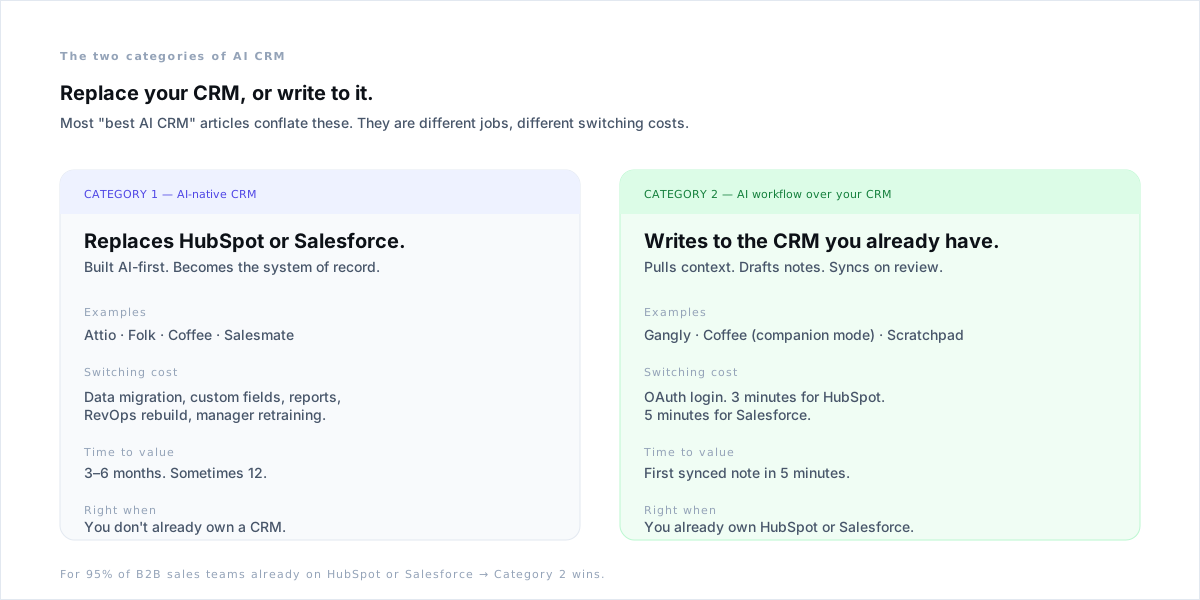
Category 1 — AI-native CRMs. Tools like Attio and Folk are built AI-first and become the system of record. They replace HubSpot or Salesforce. The pitch is real — clean schemas, modern UI, AI-everywhere. The cost is data migration, custom field mapping, report rebuilds, RevOps retraining, and three to six months before the team is shipping pipeline again. Right when you don't already own a CRM.
Category 2 — AI workflow systems. Tools like Gangly, Coffee (companion mode), and Scratchpad write to the CRM you already have. They pull context out of HubSpot or Salesforce, draft the note, infer the field updates, and sync back on rep review. The switching cost is an OAuth login. First synced note in 5 minutes. The rep keeps their CRM and stops typing into it.
For 95% of B2B sales teams already running HubSpot or Salesforce, the second category is the win. Most reps do not have a CRM problem — they have a typing problem. Replacing the CRM does not fix the typing. Automating the typing does.
AI-native CRM vs. AI workflow over your CRM — head-to-head
Pull the categories apart on the four dimensions that actually matter to a quota-carrying rep: where does the data live, how long until the first synced note, what breaks when you switch back, and who has to set it up.
| Dimension | AI-native CRM | AI workflow over your CRM |
|---|---|---|
| System of record | The new CRM | HubSpot, Salesforce, or Pipedrive (unchanged) |
| Time to first synced note | 3–6 months (migration) | 5–10 minutes (OAuth) |
| Reversibility | Migrate twice to switch back | Disconnect the integration |
| Who sets it up | RevOps + admin + IT | The rep, in their browser |
| Reports + dashboards | Rebuild from scratch | Existing CRM reports keep running |
| Best for | Greenfield teams without a CRM | Teams already on HubSpot or Salesforce |
The asymmetry is what gets missed. A workflow tool you tried for two weeks is a Tuesday meeting; a CRM migration you abandoned is a board agenda item. Default to reversible decisions until you have evidence the typing is not the bottleneck.
The 5 things AI CRM tools should automate (in this order)
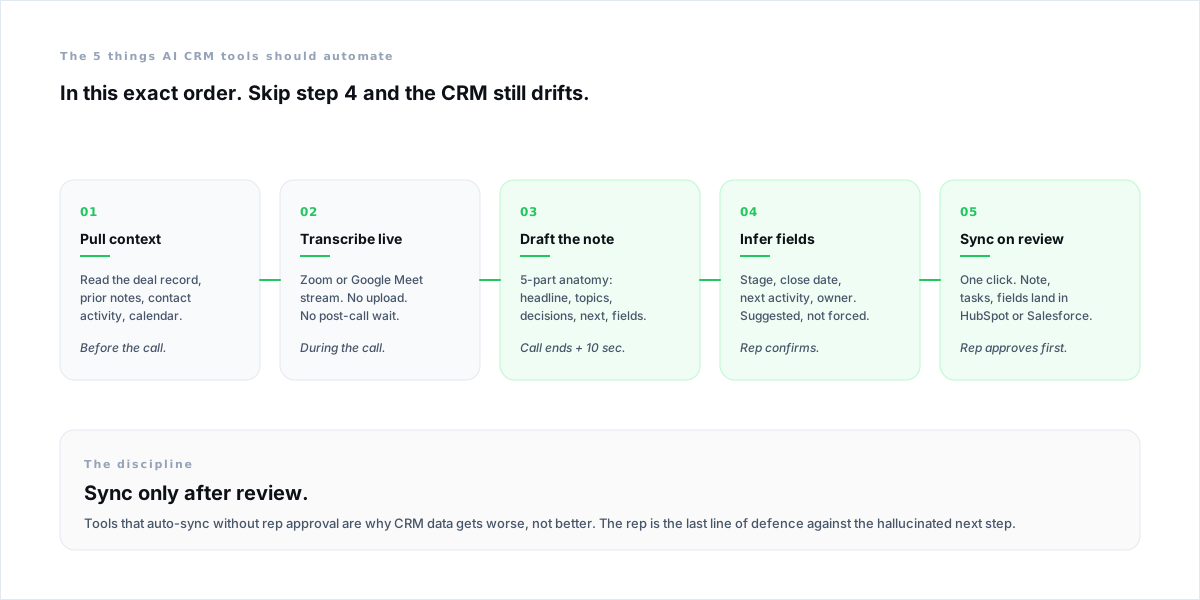
Whether the AI lives inside the CRM or runs alongside it, the same 5-step workflow has to fire on every call. Skip a step and the data still drifts.
- 1
Pull context before the call
Read the deal record, prior notes, contact activity, and the calendar. The brief lands before the rep opens the meeting invite. Without this step, every AI feature downstream is guessing.
- 2
Transcribe the call live
Stream Zoom or Google Meet — no upload, no post-call wait. Live transcription is the input for everything that follows. If the tool needs a recording uploaded after the call, the workflow is broken.
- 3
Draft the note from the transcript
A 5-part anatomy: headline, key topics, decisions, next steps, CRM fields. Drafted within 10 seconds of the call ending. The rep reads it, not writes it.
- 4
Infer the CRM fields
Stage, close date, next activity, owner — suggested from what was actually said. The rep confirms each one. Auto-applied fields without rep confirmation are how forecasts drift.
- 5
Sync only after rep review
One click pushes the note, the tasks, and the field updates to HubSpot or Salesforce. The rep is the last line of defence against the hallucinated next step. Tools that sync without review are why CRM data gets worse, not better.
The order matters. Tools that draft the note before they pull context produce generic write-ups. Tools that infer fields without showing the rep produce wrong stages. Tools that sync without review produce hallucinated next steps that compound across the pipeline.
Comparing the 8 AI CRM tools sales reps actually shortlist
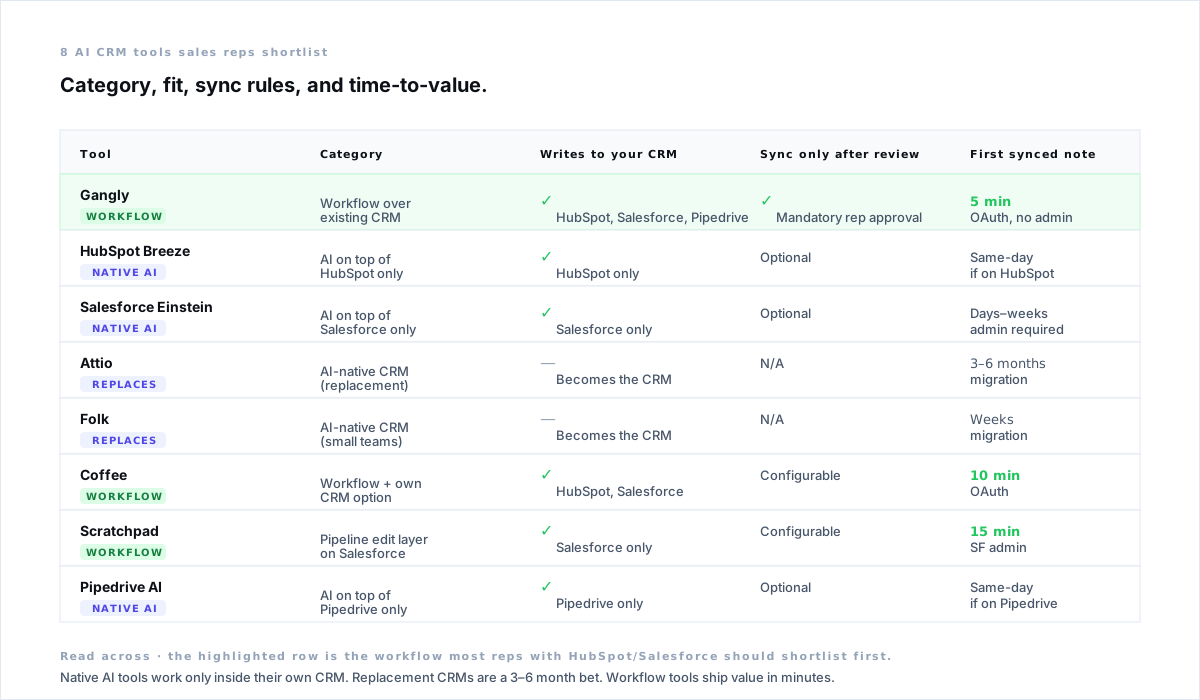
Eight tools come up on every shortlist. Three are AI-native CRMs (replacement plays). Three are native AI inside an existing CRM. Two are workflow systems that ride on top.
Workflow systems (write to your existing CRM)
- Gangly — covers the full rep workflow: signal detection, call prep, live coaching, post-call notes, and CRM sync. Writes to HubSpot, Salesforce, and Pipedrive. OAuth setup in 3–5 minutes. Sync only after rep review. First synced note in under 10 minutes.
- Coffee — runs in companion mode against HubSpot or Salesforce, with an own-CRM option for greenfield teams. Strong on transcription and field inference. Configurable on whether sync is rep-approved.
- Scratchpad — a pipeline-edit layer that sits on top of Salesforce. Best for Salesforce-heavy orgs that want a faster way to update opportunities without leaving Slack or Chrome. Salesforce-only.
Native AI inside an existing CRM
- HubSpot Breeze — included in HubSpot plans. Email drafting, conversation summaries, deal-record queries. Useful inside HubSpot. Does not write back to custom CRM fields based on call content — the rep still moves insights manually.
- Salesforce Einstein / Agentforce — automated activity capture, predictive scoring, Agentforce for the heavier lifts. Powerful inside Salesforce. List price for full Agentforce starts around $300/user/month and scales to $550+ — a different category of bet from workflow tools.
- Pipedrive AI — native AI features inside Pipedrive: email drafts, smart suggestions, summary cards. Good for Pipedrive-only teams. Limited outside Pipedrive.
AI-native CRMs (replacement plays)
- Attio — modern, schema-flexible, AI-everywhere CRM. Real fit for teams without a system of record. Switching from HubSpot or Salesforce is a 3–6 month migration project.
- Folk — relationship-first AI CRM aimed at small teams and agencies. Light footprint. Best for teams that never adopted HubSpot in the first place.
The honest read: HubSpot Breeze and Salesforce Einstein cover the obvious in-CRM AI. They do not cover the rep workflow upstream of the CRM — signal detection, call prep, live coaching. That is where workflow tools fit. The decision is rarely "Breeze or third-party." It is "Breeze plus a workflow layer that ties the rest of the day together."
Why rip-and-replace almost never wins
Replacement looks attractive in the demo. The new CRM is clean. The fields make sense. The AI is everywhere. Then comes the migration.
Custom properties have to map. Reports have to rebuild. The marketing automation stitched into HubSpot has to find new home. Sales engineering hates the new layout. The VP asks for the same forecast view they had in Salesforce, and the answer is "we'll get there in Q3." Three months in, no one is shipping pipeline.
The rep, meanwhile, is still typing. The CRM swap did not change the workflow that produced the typing in the first place. The typing only goes away when something pulls the context, drafts the note, and syncs on review. Whether that something lives inside the CRM or alongside it is the smaller question.
Replace the CRM only when the CRM is the actual problem — schema is wrong, the team never adopted it, the contract is up. Otherwise, keep the CRM and fix the typing. That is a quarter of a year you spend selling instead of migrating.
How to choose: a 4-question buying framework
Four questions, in order. Answer all four before pulling out a credit card or starting a procurement thread.
- Q1
Do I already own a CRM the team uses?
If yes, default to a workflow tool that writes to it. The cost of replacing HubSpot or Salesforce is six months of RevOps work and broken reports — none of which makes the rep faster this quarter. If no, an AI-native CRM is on the table.
- Q2
Does the tool sync only after the rep reviews?
If a tool auto-syncs without rep review, walk away. Hallucinated next steps and wrong stage updates compound across the pipeline. The forecast you build on top of bad auto-sync is the forecast that breaks at QBR.
- Q3
Can a rep set it up without RevOps?
OAuth in 5 minutes is the bar. If the answer involves a custom Salesforce admin project, the tool will live in the procurement queue, not on the rep's laptop. Time-to-first-synced-note is the metric — under 10 minutes or no.
- Q4
Does it cover the full workflow, or one slice?
A note-taker is a feature. A pipeline-edit layer is a feature. A signal-to-CRM workflow is a system. Reps already run too many tabs — the right AI CRM tool covers signal, prep, call, note, and CRM in one connected sequence.
Three yeses out of four is a fast trial. Two or fewer means the tool is solving a different problem than the one you have. Be specific about which workflow it covers — the right AI CRM tool ties signal, prep, call, note, and sync into one sequence.
28%
Of week selling
Salesforce, 2023 State of Sales — the rest is admin and data entry.
5min
First synced note
Workflow tool over HubSpot via OAuth.
3–6mo
Replacement CRM
Migration window before the team is back to selling.
90sec
Note + review + sync
Down from a 22-minute manual write-up.
How Gangly automates CRM data entry without becoming the CRM
Gangly sits squarely in Category 2: a sales workflow system that writes to the CRM you already have. It does not replace HubSpot or Salesforce. It runs the 5-step workflow on every call, ties signal detection and call prep upstream of the note, and keeps the rep in control of the sync.
- Call Prep Engine — pulls deal context, contact activity, and recent company news into a structured brief 30 minutes before the call. Step 1 of the workflow, fired off the calendar.
- Live Call Coach — listens via Zoom or Google Meet and surfaces objection responses during the call. Steps 2 happens in real time, not after the upload.
- Post-Call Notes + CRM Hygiene Engine — drafts the 5-part note from the live transcript, infers stage and next activity, and holds the draft until the rep clicks sync. Steps 3, 4, and 5 — done before the rep opens the next tab.
The result for a rep already on HubSpot or Salesforce: connect the CRM via OAuth in 3–5 minutes, run the workflow on the next call, and the deal record updates with zero typing. The CRM that was out-of-date at 11:02am is current at 11:03am — and the rep is on the next call.
Related reading: the deeper dive on post-call note automation covers the 5-part note anatomy and the 6 failure modes; CRM automation for sales reps walks through the upstream prep workflow; and AI tools for sales reps puts AI CRM tools in context against the other 17 tools worth installing in 2026.