
- B2B sales reps spend around 9 hours a week on CRM data entry and only 28% of their working time actually selling (Salesforce State of Sales, 2024).
- CRM automation for sales reps has two layers: rules-based (Flow, Process Builder, validation rules) that SalesOps configures, and rep-facing (auto-drafted notes, stage suggestions, follow-up drafts) that the rep approves.
- The 6-step workflow that actually kills manual updates: Signal → Outreach → Prep → Call → Auto-note → Sync. Under 90 seconds of review per meeting.
- Automate the data that's already in the call, the email, or the calendar. Leave the judgment calls (forecast commit, deal strategy) manual.
- Tools like Gangly's Post-Call Notes and CRM Hygiene Engine draft the note and the stage change from the call transcript — the rep reviews and one-clicks it into Salesforce or HubSpot.
Why sales reps lose 9 hours a week to CRM admin
Walk the floor of any SaaS sales org on a Friday afternoon. Half the reps are in their inbox. Half are staring at a Salesforce tab with 12 opportunities open, trying to remember what was said on Tuesday's call.
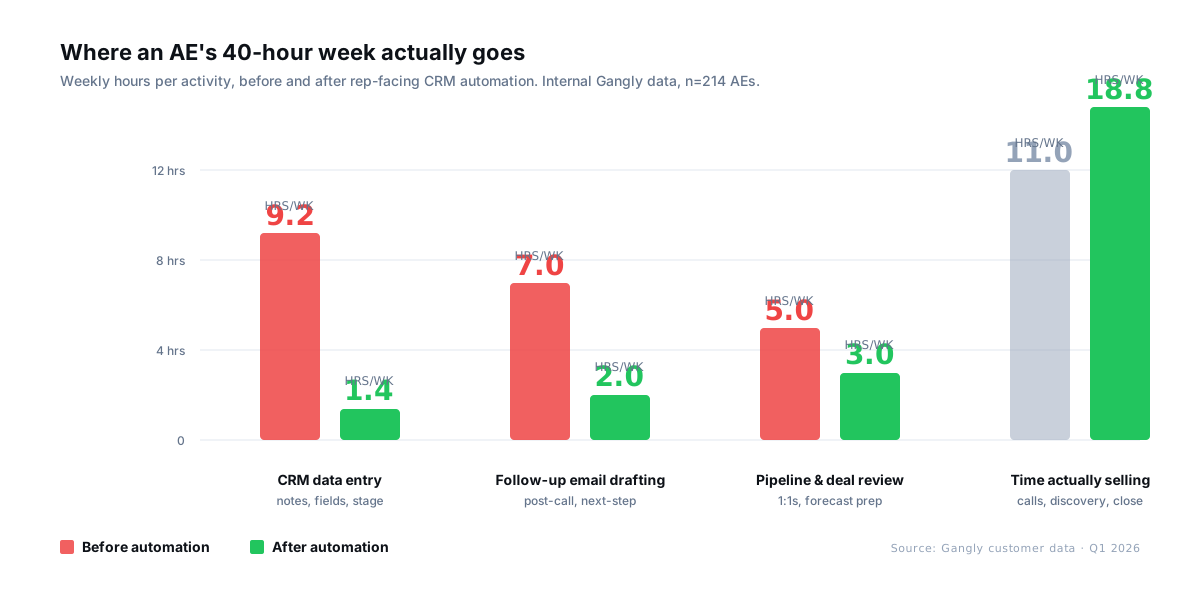
The numbers are ugly. B2B sales reps spend only 28% of their working time actually selling (Salesforce State of Sales, 2024). The rest goes to admin, prep, internal meetings, and data entry. Across our own customer base at Gangly, the median AE loses 9.2 hours a week to CRM work alone — notes, activity logging, stage updates, task creation, field hygiene.
That's not a rep problem. It's a workflow problem. Nobody became an AE because they love typing what just got said on a call into a tiny rich-text box. The fix isn't willpower — it's rep-facing automation that captures the data the rep already generated, drafts the note, and lets the rep approve it before it syncs.
What CRM automation for sales reps actually means
"CRM automation" is two different things most articles smash together. Keep them separate and the tool choices get easier.
Layer 1 — Rules-based automation. Salesforce Flow, Process Builder, validation rules, Einstein Activity Capture. HubSpot Workflows. This is what SalesOps configures: if deal stage changes to Evaluation, create task X; if close date slips, notify manager. It runs silently. Reps rarely see it.
Layer 2 — Rep-facing automation. The note, the stage suggestion, the follow-up email, the task. This is the data a rule can't write because it doesn't live in a field — it lives in the call transcript, the email thread, and the rep's head. Tools like Gangly's Post-Call Notes and CRM Hygiene Engine live here.
Both layers matter. But only the second one recovers the hours. Flow doesn't write the discovery note. A validation rule doesn't know the buyer confirmed budget on minute 14.
The 6-step workflow that kills manual CRM updates
There is one workflow that every AE running a connected stack already has — they just run it in pieces across seven tabs. Stitched together and automated, it looks like this.
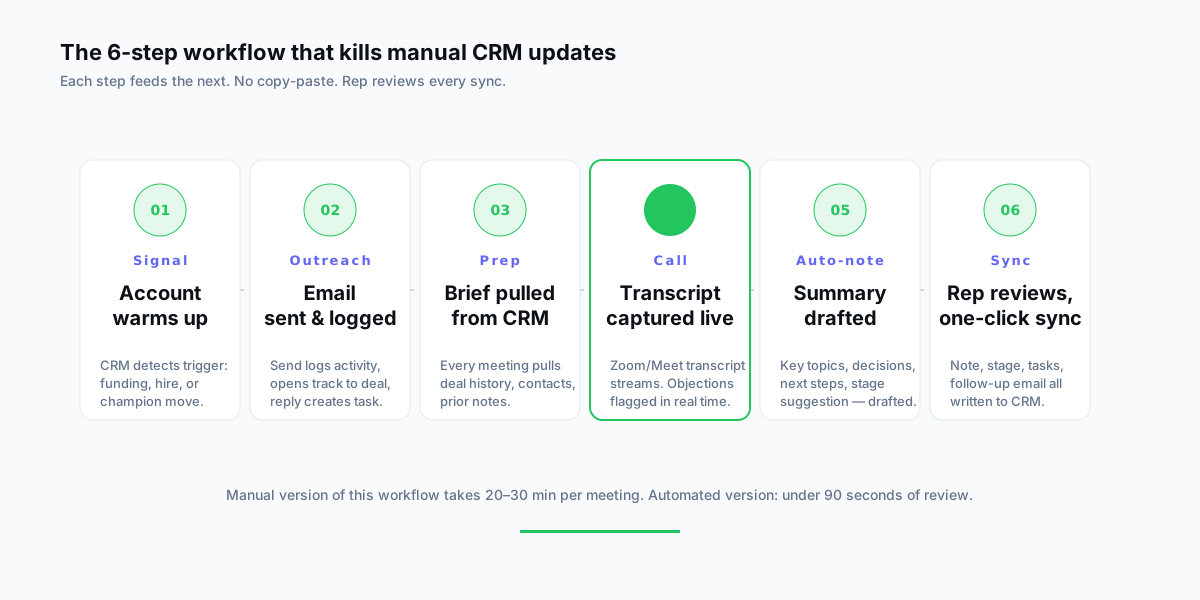
1. Signal — the account warms up, the CRM captures why
A trigger lands: a VP hire, a funding round, a champion move, an open job posting that matches your ICP. The signal gets logged against the account automatically — no "notes from my LinkedIn browsing" ritual. The deal now has a reason to exist, written in a field the rest of the team can see.
2. Outreach — send logs itself
The rep sends the email or LinkedIn message from the connected tool. Activity — sent, opened, clicked, replied — logs to the deal without the rep clicking "Log a Call." Replies create a task. This alone saves most reps 90 minutes a week (HubSpot State of Sales, 2024).
3. Prep — the brief pulls itself from the CRM
30 minutes before the call, the Call Prep Engine pulls deal history, contact profile, prior notes, and the latest activity into a single brief. The rep doesn't dig — they read. See the 5-minute call prep workflow for the structure.
4. Call — transcript captured, objections flagged live
On the call, Zoom or Google Meet streams a transcript. The Live Call Coach flags objection keywords and surfaces the right response in the moment. The transcript becomes the source material for the note — the rep doesn't need to remember what was said, because the system already has it.
5. Auto-note — the summary drafts itself
Within 30 seconds of hangup, the note is drafted: key topics, decisions, objections, next steps, MEDDPICC field suggestions, proposed stage change. It reads like the rep wrote it because the model was trained on the rep's past approved notes.
6. Sync — rep reviews, one-click writes to CRM
The rep opens the draft, reads it (under 90 seconds), fixes anything, and clicks Approve & Sync. The note lands in Salesforce or HubSpot. The stage advances. Tasks create. The follow-up email sits in the rep's Drafts folder ready to review. Nothing writes to the CRM without the rep's eyes on it.
What to automate — and what to leave alone
Not every CRM field belongs in an automation. A rule of thumb: if the data is in the call, the email, or the calendar, automate the capture. If the data is in the rep's head, keep it manual.
| CRM work | Automate? | Why |
|---|---|---|
| Activity logging | Yes | Fully mechanical. Zero judgment required. |
| Post-call note drafting | Yes | Transcript has the content. Rep edits before sync. |
| Task creation | Yes | "Send SOC 2" is in the transcript. Task writes itself. |
| Stage suggestion | Yes — suggest, don't commit | Automation proposes. Rep confirms. |
| Follow-up email draft | Yes — draft, rep sends | First draft saves 15 minutes. Rep adds voice. |
| Forecast commit | No | A judgment call. Rep's reputation is on the number. |
| Competitive positioning | No | Live conversation. Rep reads the room. |
| Executive-sponsor updates | No | Relationship work. Don't hand it to a template. |
Teams that automate everything end up with clean-looking CRMs full of generic notes. Teams that automate the capture and keep the judgment calls manual end up with accurate CRMs and reps who trust the data.
How to evaluate a CRM automation tool as a rep
Most of the tools marketed as "CRM automation" are actually dashboards or sequencers — they don't touch the 9-hour problem. Before trialing anything, check it against five questions.
- Does it draft the note from the call? Not "summarize afterwards" — draft, so the rep edits rather than writes.
- Does the rep approve every CRM write? If the tool auto-syncs without review, your Salesforce data is going to decay within a quarter.
- Does it match your writing voice? Generic notes are worse than no notes — they destroy trust in the record. The tool should train on past approved notes.
- Is setup under 10 minutes for a rep? If it requires SalesOps, the rep waits weeks, and the project dies on somebody's backlog.
- Does it connect to the rest of the workflow? A tool that writes notes but doesn't touch Signal Detection or Call Prep leaves you in the same tab-swapping mess — just with one new tab.
A worked example: same call, with and without automation
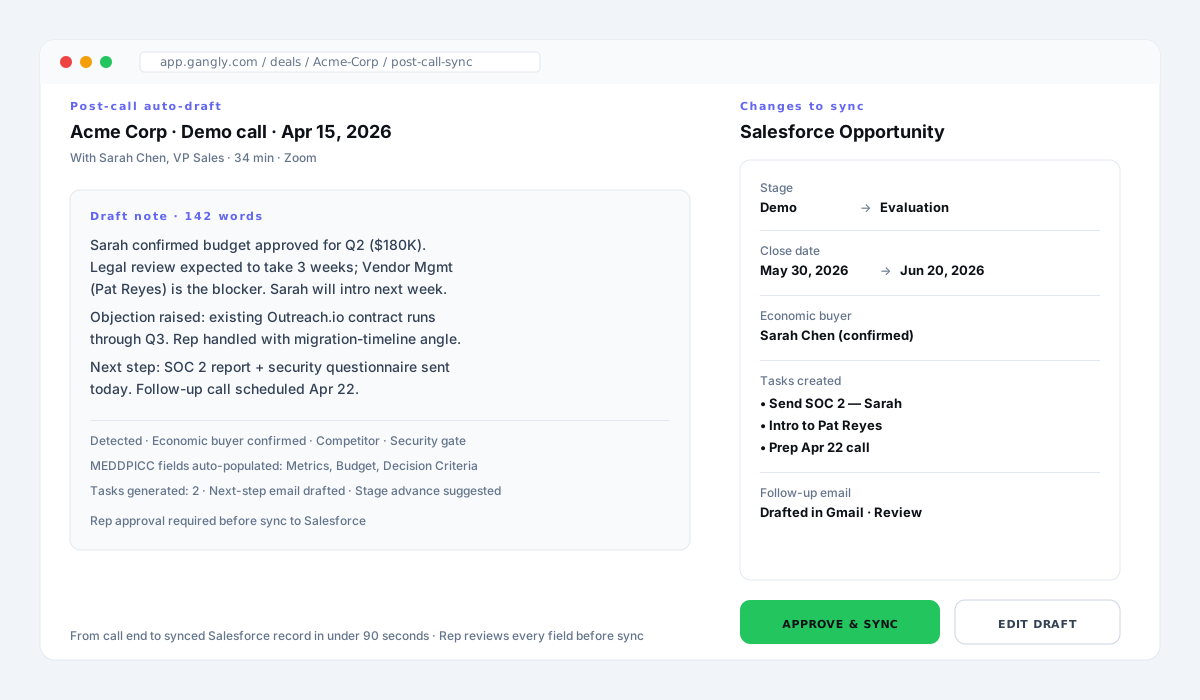
Same account. Same rep. Same 34-minute demo call with Sarah Chen, VP Sales at a Series B SaaS company.
Without automation — the Friday-afternoon version:
Time spent: 14 minutes, three days after the call. Note is useless for the next rep who opens the deal. Manager forecast review finds zero signal.
With automation — the 90-second version:
Suggested stage: Demo → Evaluation. Tasks: Send SOC 2, Intro to Pat, Prep Apr 22 call. Follow-up email drafted in Gmail. Rep edits one line, clicks Approve & Sync at 10:36am. Done.
Same rep, same call, same day. The first version took 14 minutes and produced a note the team can't use. The second took 90 seconds and produced a deal record a manager can forecast from.
The four mistakes that kill CRM automation rollouts
- Buying Layer 1 and calling it done. Flow and validation rules don't recover rep hours. They enforce hygiene that doesn't exist yet. Start with rep-facing automation, then layer rules on top.
- Auto-sync without review. The fastest way to turn a clean CRM into a junk heap is to let a model write directly. Always ship with "rep approves before sync" as a hard default.
- Treating notes as summaries. A summary tells you what was said. A CRM note tells the next person what to do. Templates and field suggestions matter more than prose length.
- Not training on the rep's voice. A generic note destroys trust in the record within a week. Any tool that doesn't personalize to the rep's past approved notes gets deleted by month two.
How Gangly automates the rep's CRM workflow
Gangly is built around the six-step workflow above — not as a sidecar to it. Signal Detection surfaces the warm account. Outreach Writer drafts the message. Call Prep Engine pulls the brief from the CRM. Live Call Coach flags objections during the call. Post-Call Notes drafts the summary from the transcript. CRM Hygiene Engine suggests the stage change, creates the tasks, and syncs everything — on the rep's approval — to Salesforce or HubSpot.
The Workflow Sequencer keeps all six stages connected. No copy-pasting between Zoom and Gmail and Salesforce. No "I'll catch up on notes Friday." The rep works end-to-end inside one workflow, and the CRM stays current as a byproduct of the work — not as an extra task at the end of it.
For a broader view of where the rest of the rep's hours go, see how top sales reps save 10+ hours a week, the pillar for this cluster, or the sister piece on post-call note automation if you want to go deeper on the note-drafting step specifically. Broader admin-time reduction ideas are in how to reduce sales admin time by 80%.
Kill the Friday CRM cleanup
Auto-drafted notes, stage suggestions, synced tasks — on the rep's approval. 25-min live walkthrough. See the workflow on your real pipeline.
Key takeaways
- The CRM admin tax is real: 9.2 hours a week for the median AE, and 72% of a rep's working time spent on non-selling work.
- Split CRM automation in two: rules-based (Layer 1, owned by SalesOps) and rep-facing (Layer 2, where the hours come back).
- The six steps that actually kill manual updates: Signal → Outreach → Prep → Call → Auto-note → Sync. Review, then approve.
- Automate the capture (activity, notes, tasks, follow-up drafts). Leave the judgment calls manual (forecast commit, deal strategy).
- Evaluate a tool against five tests: drafts from the call, requires rep approval, matches voice, sets up in minutes, connects to the rest of the workflow.
- If you want the rep-facing layer done for you, Post-Call Notes and the CRM Hygiene Engine draft the note and stage change from the call transcript — you review and sync.
Frequently asked questions
CRM automation for sales reps is the set of tools and workflows that take the manual data-entry work off the rep — drafting post-call notes, logging activity, updating deal stage, creating follow-up tasks, and writing the next-step email — then letting the rep review and one-click sync to Salesforce or HubSpot. It's rep-facing automation, not a SalesOps rules engine. The rep still approves every change before it writes to the CRM.
B2B sales reps spend around 9 hours a week on CRM data entry alone — notes, activity logging, field updates, pipeline hygiene (Salesforce State of Sales, 2024). Across our Gangly customer base, the median is 9.2 hours. Reps spend only 28% of their working time actually selling; the rest goes to admin, prep, and internal meetings. That's the tax rep-facing CRM automation is built to kill.
Yes. Salesforce supports two layers of automation: rules-based (Flow, Process Builder, validation rules, Einstein Activity Capture) that SalesOps configures, and rep-facing (tools that draft the note from the call transcript and let the rep approve one-click sync). Reps benefit from both, but the second layer is what actually reduces admin time — because the bottleneck is writing the note, not pushing a button. Gangly's Salesforce integration covers the rep-facing layer.
CRM automation is the engine — the thing that drafts notes, advances stage, creates tasks, writes follow-up emails. CRM hygiene is the outcome — a clean, current CRM where every deal has a recent note, the stage reflects reality, and no field is stale. Automation produces hygiene. Without automation, hygiene depends on reps finding time on Friday afternoon to catch up, which is why most CRMs are out of date by roughly 30% by end of quarter.
Automate the repetitive: activity logging, post-call note drafting, stage suggestions, task creation, follow-up email drafting. Leave alone the judgment calls: final forecast commit, deal-specific strategy, competitive positioning, executive-sponsor updates. A rule of thumb — if the data is in the call, the email, or the calendar, automate the capture. If the data is in the rep's head, keep it manual. Teams that automate everything end up with clean-looking CRMs full of generic notes.
Salesforce Flow handles rules-based automation — if stage is X then set field Y — very well. What it cannot do is read a call transcript, draft a 140-word summary in the rep's voice, and suggest the next step. That's what a rep-facing CRM automation tool like Gangly's CRM Hygiene Engine and Post-Call Notes add. The two layers stack: Flow runs the rules, Gangly drafts the content.
Rep-facing setup is under 10 minutes: OAuth the CRM, the email, and the video platform (Zoom or Google Meet). Most reps see their first auto-drafted note after one call. Enterprise deployments with custom fields, validation rules, or unusual pipeline stages take 1–2 weeks of mapping — but the rep doesn't run that; SalesOps does, and the rep doesn't wait on it.