
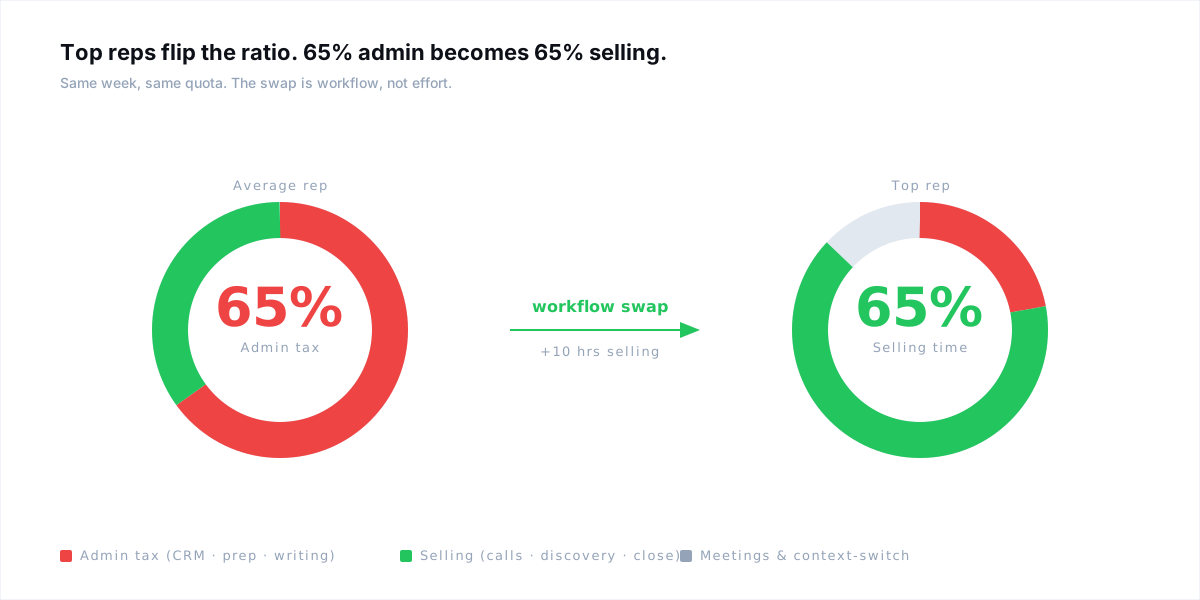
The average B2B rep spends 65% of the week on admin and 35% on selling. Top reps flip that ratio without working longer hours. They compress CRM notes, call prep, follow-up writing, and morning triage using one connected workflow. Ten hours a week is the spread between the rep who types everything and the rep who approves everything. The swap is mechanical — copy it.
Quick answer: Top sales reps save 10+ hours a week by replacing manual CRM entry, call prep, and follow-up writing with a connected workflow that drafts each task for them. The rep reviews and approves every step — the time win comes from cutting typing and context-switching, not from working faster. The five workflow swaps in this guide target the admin tax in order of size: CRM notes, call prep, morning triage, follow-up drafts, and live objection recall.
Key takeaways
- CRM admin (7.2 hrs), call prep (6.0 hrs), and follow-up writing (5.4 hrs) are the three biggest time leaks in an average B2B rep's week.
- Top reps don't time-block harder. They delete tasks that don't pay commission.
- Call prep should take under 5 minutes. 45 minutes means you're rebuilding context that already exists in the CRM.
- Move CRM from typing to confirming. A drafted note + one-click sync beats a blank Salesforce field every time.
- The 10-hour win is mechanical: the rep's job turns from producing artifacts to approving them.
Quick answer: A B2B outbound sales playbook is a repeatable system for turning target accounts into booked meetings. It defines your ICP, the buying signals you act on, the cadence a rep runs per account, the opener pattern, the qualification criteria, and the weekly metrics review. A modern playbook is signal-first — reps act on a fresh reason to reach out, not a static list.
Key takeaways
- Volume stops mattering the moment relevance goes up. A 3-touch signal-led cadence beats a 12-step blast.
- The only signals worth acting on are specific, recent, and tied to a job your product does.
- Opener math: one line that proves you did the work, one line that connects to the problem, one ask that costs 15 seconds.
- Open rate is vanity. Track positive reply rate and meetings booked per 100 contacts.
- Review weekly. Cut the bottom 20% of sequences every month.
Where a rep's 40-hour week actually goes
Before the tips, the math. The average B2B rep spends roughly 28% of the week on actual selling — discovery calls, demos, live outreach. Everything else is admin tax (Salesforce State of Sales, 2024). CRM entry alone takes about 7 hours a week. Call prep and follow-up writing eat most of what's left.
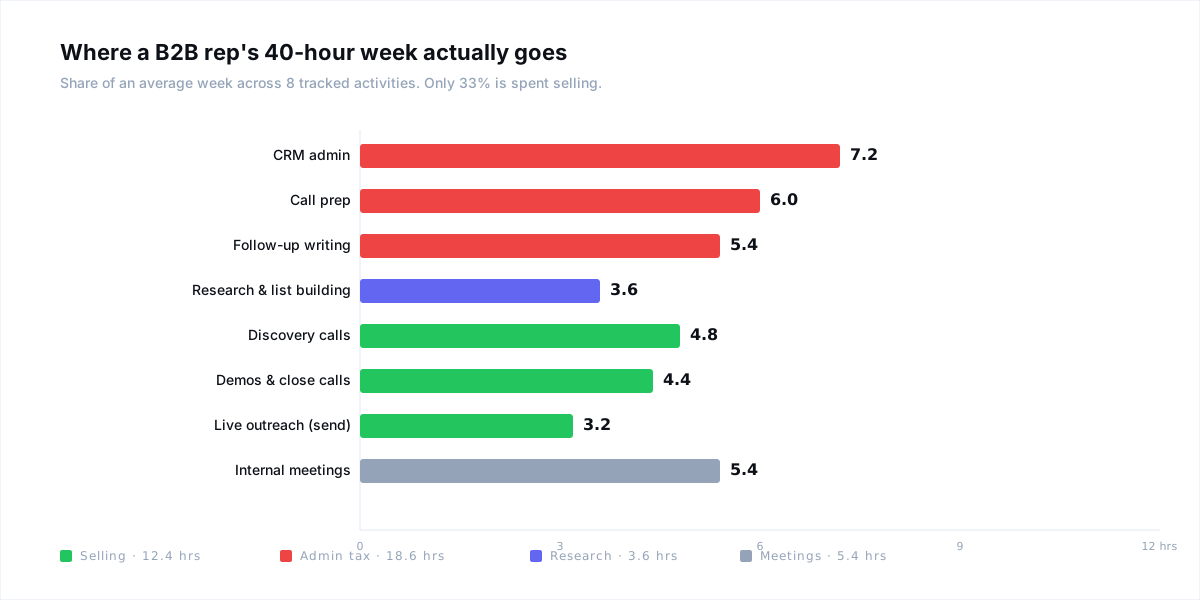
Ten hours is the number top reps recover. Not by working longer. By deleting tasks that don't pay commission. The swap is structural — a drafted CRM note is faster than a blank field, a 5-minute prep beats a 45-minute one, a queue of warm signals beats a scroll through Salesforce. This guide walks through the five places the hours actually come from.
The admin tax — the 3 tasks stealing the most time
Every productivity conversation that doesn't start with these three tasks is noise. CRM admin, call prep, and follow-up writing together account for 18 hours of the average week. Fix them and the 10-hour recovery is already most of the way there.
CRM ADMIN
7.2hrs
Salesforce State of Sales, 2024
CALL PREP
6.0hrs
Gong Revenue Intelligence, 2024
FOLLOW-UPS
5.4hrs
HubSpot State of Sales, 2024
Top reps run five workflow swaps against those tasks. None of the swaps involve willpower. They involve changing what the rep types, what the rep approves, and what the tools produce before the rep sees them.
Swap 1 — Kill the morning "what should I work today?" question
The slowest hour in a rep's week is 8:00–9:00am on Monday. Salesforce is open, 47 opps are listed, the rep scrolls, sorts by deal size, picks five, and hopes. Forty minutes gone, no meeting booked. The question "what should I work on?" is the wrong question.
The right question: "which of my accounts did something warm yesterday?" Top reps start the day with a queue, not a list. Signals they act on: a new VP hire in the buyer persona function, funding announcements, LinkedIn post activity on a relevant pain, a past champion who just changed companies. Working that short queue takes 5 minutes. Working Salesforce by gut feel takes 45.
Rule of thumb
If you can't name in one sentence why an account is on your work list today, it doesn't belong on your work list today. The signal earns the slot.
Time saved: 40 minutes a day · ~2.5 hours a week. More importantly, the accounts you reach actually convert — because they're warm, not because they're at the top of the CSV.
Swap 2 — Compress call prep to under 5 minutes
A rep doing 10 discovery calls a week at 45 minutes of prep per call burns 7.5 hours just getting ready. Most of that is context they already have — CRM history, LinkedIn, prior emails, company news — scattered across 5 tabs. Top reps don't research harder. They consolidate the context once.
What a 5-minute prep looks like, in order:
- Account one-pager (30 sec). Company size, industry, recent news, current tech stack.
- Contact brief (30 sec). Role, tenure, LinkedIn activity in the last 14 days.
- Prior thread summary (30 sec). What the last email said, what was promised.
- Likely objections (60 sec). Based on industry and company size — 2 or 3 predictable pushes.
- Three discovery questions (2 min). Account-specific. Not generic. Tied to the signal that triggered the call.
All of that exists already — in HubSpot, in Salesforce, in Gmail, in LinkedIn. A prep engine that pulls and stitches it is the difference between 45 minutes and 5. The rep still reviews, still writes the three questions themselves. The typing and tab-switching is what gets deleted.
Time saved: 40 minutes per call · 6+ hours a week for an AE running 10 calls weekly.
Swap 3 — Move CRM notes from typing to confirming
The biggest single win. A post-call note that used to take 20 minutes — remembering what was said, formatting it for Salesforce, creating the follow-up task, updating the stage — drops to 60 seconds when the draft is already written.
The pattern: the call ends, the notes engine summarizes key topics, decisions, and next steps from the transcript. It produces a CRM-ready note, a follow-up task list with suggested due dates, and a drafted follow-up email. The rep reads, edits a line or two, hits sync. HubSpot updates. The task appears. The email lands in Gmail drafts. Done.
The side effect is almost more valuable than the time save: the CRM ends up more accurate, not less. When logging a call drops to a minute, reps actually log every call. Pipeline reviews stop being archaeology projects.
Time saved: 19 minutes per call · 3+ hours a week, and a pipeline your manager can actually forecast against.
Swap 4 — Draft every follow-up, approve, send
The average rep writes 15 follow-ups a day. Generic "just checking in" messages at 2 minutes each. That's 30 minutes per day, 2.5 hours per week, producing the lowest-converting email in sales. The swap isn't to write them faster — it's to draft them differently.
A follow-up that actually gets a reply has three parts, regardless of scenario:
- A reference to a specific earlier interaction — "last time you mentioned you were evaluating in Q2" beats "bumping this up."
- A new angle — a customer story, a relevant stat, a framing question. Never a reminder that you sent the last one.
- A single ask — one 15-second yes/no. Not three stacked options.
When a follow-up engine drafts that structure automatically from the CRM thread and the last call's notes, the rep's job becomes quality control — read, adjust the specifics, approve. 15 follow-ups a day drops from 30 minutes to 6. Positive reply rate goes up, not down, because every send has a new angle (the 5-part follow-up anatomy covers the structure in depth).
Time saved: 24 minutes a day · 2 hours a week.
Swap 5 — Stop recalling objections mid-call
The smallest of the five on paper, but the one that wins deals the other four don't. When a prospect hits a price objection mid-demo, the average rep stumbles, mentions a competitor's old pricing, or forgets the ROI stat that would close the push-back. The top rep has the exact right stat on screen before they finish the sentence.
This is what live call assistance does — not record the call, not take over the call. Surface the relevant response when the objection keyword hits. "We already have Gong" triggers the competitive differentiation angle. "Send me more info" flags the brush-off. "It's not in the budget" pulls up the three-sentence ROI framing.
The rep keeps driving. The rep still answers. But the answer is tighter, the stat is accurate, and the call ends with a next step instead of a maybe. Time saved isn't just the hour of recall; it's the 30 minutes the rep doesn't spend re-pitching the same objection in the next meeting because it wasn't handled the first time.
Time saved: ~1 hour a week, plus the cycle-time compression on every deal the rep actually closes faster.
The math: where the 10 hours actually come from
Add the five swaps up and you're past 10 hours before counting the compounding effects. A rep who logs every call accurately has better forecasting, which means fewer last-minute fire drills, which means fewer meetings pulled into their week to explain pipeline. A prep-ready rep walks into every discovery with the right questions, which means shorter sales cycles, which means more throughput per hour of selling.
Weekly time recovered by swap
- Swap 1 — Morning triage queue: 2.5 hrs
- Swap 2 — Compressed call prep: 6.0 hrs
- Swap 3 — Post-call CRM sync: 3.0 hrs
- Swap 4 — Follow-up drafts: 2.0 hrs
- Swap 5 — Live objection surface: 1.0 hr
- Total recovered: 14.5 hrs/week — more than the 10-hour target, even with double-counting conservatism.
The number isn't the point. The point is that the recovered time goes back into the activities that pay commission: discovery calls, demos, live outreach, actual selling. The rep isn't suddenly working 10 hours less. The rep is selling 10 hours more.
The stack that actually saves time — and what to skip
Most reps end up with 12+ tools in a stack because every point solution promised productivity. The result is worse — context-switching across tabs burns more time than it saves. A rep running Apollo + Gong + Outreach + Sales Navigator + Salesforce + HubSpot email + Notion for prep is spending 30 minutes a day just moving data between them (see the lean AE stack breakdown for a minimum viable list).
What to keep:
- One CRM. HubSpot or Salesforce. The system of record never changes.
- One signal source. LinkedIn (Sales Navigator for enterprise), plus whatever surfaces job changes and funding news.
- One call platform. Zoom or Google Meet.
- One workflow layer. The thing that stitches signal → outreach → call → notes → CRM without the rep bouncing between tabs.
What to drop:
- Every tool that only writes (no context pulled). Pure "AI email generators" produce generic text that ranks the same as a template.
- Sequence tools that don't read signals. A cadence that ignores what the account is doing today is the old motion with extra steps.
- Any "productivity app" the rep has to remember to open. If the rep has to choose to use it, it will get skipped on busy days — which is every day.
How Gangly collapses all five swaps into one workflow
Gangly is the sales workflow system that runs the whole sequence. Each feature maps to one of the five swaps:
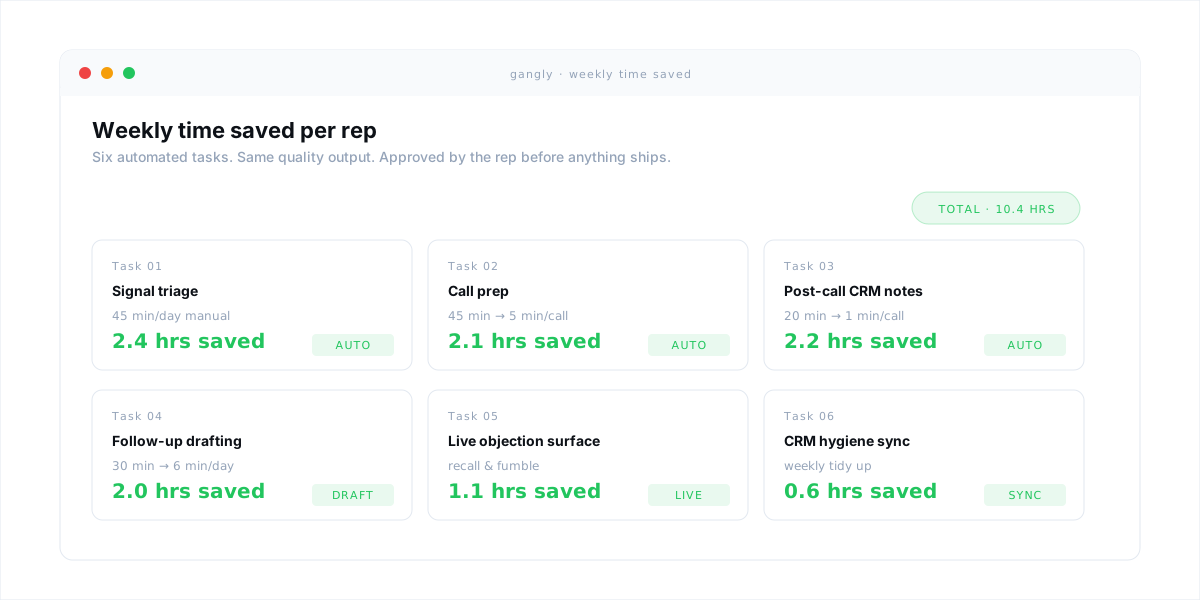
- Signal Detection replaces the morning triage — surfaces warm accounts ranked by signal confidence, so the rep starts the day with a queue, not a Salesforce filter.
- Call Prep Engine handles Swap 2 — pulls the account one-pager, contact brief, prior threads, likely objections, and account-specific discovery questions into a single brief in under 5 minutes.
- Post-Call Notes runs Swap 3 — drafts the CRM note, the follow-up task list, and the follow-up email draft the moment the call ends. One-click sync to HubSpot or Salesforce after the rep approves.
- Outreach Writer drafts Swap 4's follow-ups with a specific earlier reference, a new angle, and a single ask — trained on the rep's own voice so it doesn't read like a template.
- Live Call Coach handles Swap 5 — surfaces the right objection response, the right stat, the right reframe during the call on Zoom or Google Meet.
- Workflow Sequencer chains all of it: signal → outreach → call → notes → CRM → next signal. No copy-paste between LinkedIn, Gmail, Zoom, and HubSpot.
The rep approves every step. Gangly never sends, never logs, never syncs without review. That's the line — the rep runs the workflow, the workflow runs the admin. See the full feature set on the how Gangly works page, or see the per-seat plans if you're evaluating for a team.
Recover 10 hours a week in the first 14 days
Start the 14-day free trial — no credit card. Most reps complete their first full signal-to-CRM workflow in under an hour.
Where to read next
This pillar sits at the top of the Sales Productivity cluster. Each spoke goes deep on one of the five swaps:
- Sales Call Prep Workflow: How to Prepare in Under 5 Minutes — the full version of Swap 2.
- Post-Call Note Automation: The End of Manual CRM Updates — Swap 3 step by step.
- CRM Automation: How to Stop Updating Salesforce Manually — the CRM hygiene fix.
- How to Write a Follow-Up Email That Gets a Reply — the anatomy behind Swap 4.
- Buying Signals: How to Identify Accounts Ready to Buy — how to feed the morning triage queue.
Frequently asked questions
The average B2B rep spends about 28% of the week on actual selling — roughly 11–13 hours out of 40 (Salesforce State of Sales, 2024). The rest goes to CRM admin, call prep, writing follow-ups, internal meetings, and research. Top reps flip that ratio by compressing the admin-tax tasks, not by working longer hours.
CRM admin is the single biggest drain, consuming around 7 hours per rep per week on average. Call prep and follow-up writing sit close behind. Together those three tasks account for most of the admin tax. Every sales rep productivity framework worth running targets those three first — the rest is optimization.
For a mid-market discovery call, prep should take under 5 minutes. Anything longer means the rep is recreating context that already exists in the CRM, LinkedIn, or previous email threads. A pre-built brief that pulls account history, contact role, recent activity, likely objections, and three discovery questions is the baseline. Manual prep at 45 minutes per call is the main reason reps lose five hours a week.
Top reps don't time-block harder. They collapse tasks that don't pay commission. They triage a signal queue instead of scrolling Salesforce, compress call prep to under 5 minutes, draft follow-ups from a template engine, and sync CRM notes in one click. The productivity gap is workflow, not discipline. Moving from a scattered stack to one connected sequence is where the 10 hours come from.
Yes, but only on the specific tasks AI does better than a rep: summarizing call context, drafting a first-pass email from a signal, writing the CRM note after a call, and surfacing a relevant stat mid-call. Generic "AI-powered" sales tools that try to replace judgment save nothing. The rep must stay in control — the productivity win comes from removing typing and recall, not removing the rep.
Move CRM updates from typing to confirming. A post-call notes engine drafts the summary, suggests the stage change, and queues the next activity — the rep reviews and one-click syncs to HubSpot or Salesforce. The CRM ends up more current, not less, because the barrier to logging drops to near zero. Same applies to follow-up emails: draft first, approve, send.
Gangly connects the full sales workflow — signal detection, outreach writing, call prep, live coaching, post-call notes, CRM hygiene — in one sequence. Each stage compresses the highest-drag admin tasks in the week: Signal Detection replaces morning triage, Call Prep Engine cuts prep to under 5 minutes, Post-Call Notes writes the CRM entry before the call window closes. The rep approves every step. The time saved goes straight back into selling.