
- The average B2B sales org runs around 10 tools in the rep stack. High-performing AEs run 6, and it's usually the same 6: CRM, signal source, outreach, prep, call coach, notes.
- Every stack needs six jobs done. It does not need 16 tools to do them — most categories can be covered by one tool that owns multiple jobs.
- Four categories quietly bloat most AE stacks: standalone AI email writers, passive call recorders, LinkedIn scrapers that output spreadsheets, and productivity plugins that duplicate the CRM.
- The real cost of a bloated stack isn't the line-item spend. It's the 47 tool-switches a day that chew through focus — reps with consolidated stacks report 10 extra selling hours a week.
- Connected beats assembled. One tool that writes to the CRM and covers three stages beats three best-of-breed tools that each need a human to carry data between them.
The real sales tools stack has 6 jobs — not 16 tools
Walk into any AE's laptop on a Tuesday and you'll see the same thing. Fourteen browser tabs. Three desktop apps. Two Chrome extensions in the toolbar. Slack in another window. None of them were installed on purpose — each one solved a problem on a specific day, stayed open, and became the stack.
Gartner's 2023 research on B2B sales tech stack complexity put the average enterprise sales team at around 10 tools, with some north of 16 when you count extensions and standalone AI add-ons. The reps hitting quota in those orgs aren't the ones using the most tools. The best AEs we see at Gangly consistently run the smallest stack — six tools, sometimes five, almost never more.
The stack has six jobs that have to get done every week. The number of tools you use to do them is a judgment call — and most reps are over by a factor of two.
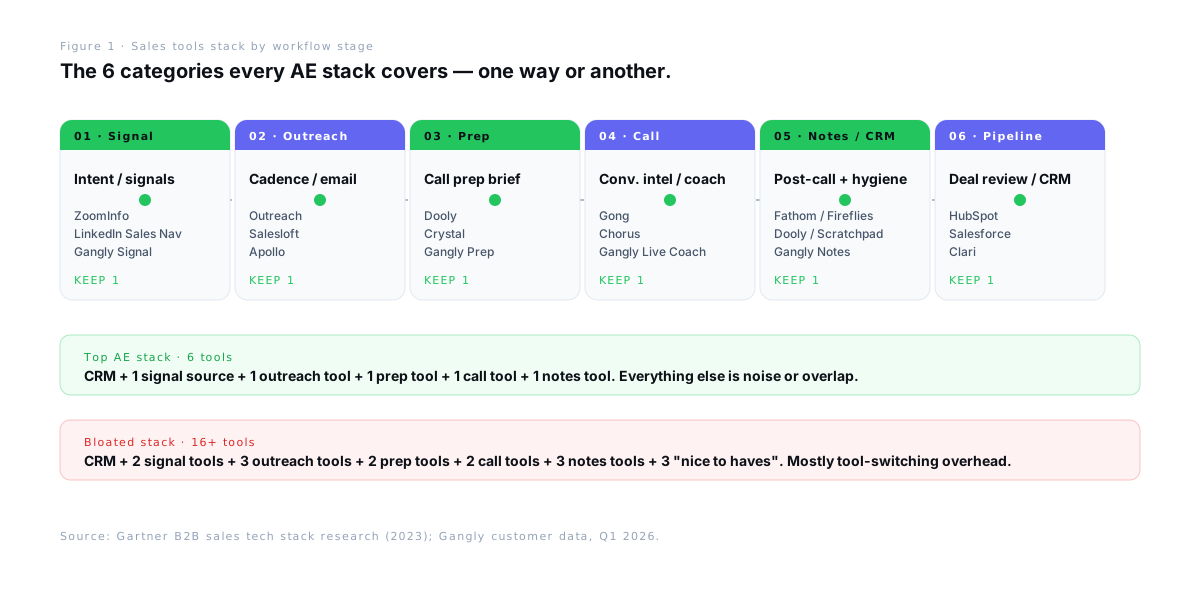
The 6 categories every AE stack actually needs
Before picking tools, get the categories right. A rep stack always covers the same six jobs, in the order the workflow runs them.
- CRM (system of record). HubSpot or Salesforce for most B2B teams. Pipedrive for smaller ones. This is the one tool nothing else can replace — the stack's foundation.
- Signal / intent source. LinkedIn Sales Navigator, ZoomInfo, Cognism, or a dedicated signal feed. The job: tell the rep which accounts are warm today, before the rep has to guess.
- Outreach tool. Outreach, Salesloft, Apollo, or HubSpot Sequences. Owns sequence sends, cadences, and email logging. Not the drafting — the sending.
- Call prep. Dooly, Crystal, or a connected workflow tool that pulls CRM, LinkedIn, and news into a pre-call brief. The job: rep walks into every call ready in under five minutes.
- Call intelligence / coach. Gong, Chorus, or a live coach that surfaces objection responses during the call. The job: catch the moments in the call where the rep loses the deal — either live or on review.
- Post-call notes and CRM hygiene. Fathom, Fireflies, Dooly, Scratchpad, or a built-in notes engine. The job: write the CRM note, update the stage, draft the follow-up, all before the rep closes the Zoom tab.
Pipeline intelligence and revenue forecasting tools (Clari, BoostUp, Gong Forecast) belong on a manager or RevOps stack, not an AE stack. Reps touch them in deal reviews, not every day. Mixing them in is one of the faster ways a rep stack goes from 6 to 12.
What top AEs actually use, category by category
Here's what the stack looks like in practice. No vendor is universal — the right pick depends on company size, ICP, and what's already wired into the CRM. The specifics matter less than the pattern: one tool per job, and every tool has to write back to the CRM.
CRM: HubSpot or Salesforce
Almost every AE above Series A lands on HubSpot or Salesforce. HubSpot wins for speed of adoption and clean UX; Salesforce wins for customization and enterprise reporting. Pipedrive is legitimate for small teams. Attio and Close are rising for PLG-led orgs. The point is to pick one and fully commit — the stack's job is to feed this record.
Signal / intent: LinkedIn Sales Navigator + one more
Almost every top AE we see keeps LinkedIn Sales Navigator, because it's where the job-change and hiring signals live. The second source depends on ICP. For enterprise deals, ZoomInfo or Cognism for firmographic enrichment. For PLG-friendly ICPs, a dedicated signal feed that watches funding events, executive hires, and website intent. The rule: one persistent source, never three overlapping ones. More on this in buying signals in B2B sales.
Outreach: Outreach, Salesloft, or Apollo
Outreach and Salesloft own the enterprise sequencer category. Apollo bundles prospecting and sequences for mid-market. HubSpot Sequences is enough for teams already on HubSpot — don't buy a second sequencer unless cadence analytics are critical. What matters is that the sequencer syncs email activity to the CRM automatically. If a rep is manually logging sequence emails, the tool is already broken.
Call prep: Dooly, Crystal, or a connected workflow tool
This is the category most reps don't even formalise. They "prep" by clicking through the CRM, LinkedIn, and the company website for 30 minutes before a meeting. The top AEs don't. They use a tool that pulls the brief before the calendar invite opens — account summary, contact profile, prior threads, recommended questions. Gangly's Call Prep Engine runs this as part of the connected workflow; Dooly and Crystal cover pieces of it as standalones. Full breakdown: sales call prep workflow.
Call intelligence / coach: Gong, Chorus, or a live coach
Gong and Chorus dominate conversation intelligence for enterprise. They record, transcribe, and surface coaching insights after the call — useful for managers, less so for reps during the call. Live call coaches are newer — they surface objection responses and stats in real time, so the rep doesn't need a 20-minute post-call recovery email to correct what they couldn't remember live. The best AEs usually keep one of the two, not both.
Post-call notes and CRM hygiene: connected tool preferred
Fathom, Fireflies, and Otter write the transcript. Dooly and Scratchpad write the CRM note. Most reps end up using two tools here, which defeats the point — you've just added a seam. Connected workflow tools that own both the transcript and the CRM sync are the consolidation play. Deep dive in post-call note automation and the adjacent CRM automation for sales reps post.
4 categories most AEs can cut this quarter
Zero-based stack reviews are uncomfortable. They're also how high-performing teams stay high-performing. Four categories tend to survive a review — and shouldn't.
- Standalone AI email writers (without a signal layer). ChatGPT browser tabs. Cold-email-specific drafters. Chrome extensions that generate "personalized" openers from a name and a company. They produce generic drafts that sound automated, kill reply rates, and make the rep rewrite half the output anyway. Cut them and move drafting into a tool that sees the signal and the CRM record.
- Passive call recorders. Tools that record and transcribe but don't write the CRM note or the follow-up. Useful for a manager; irrelevant for rep admin. Keep a conversation intelligence platform or a live coach — delete the standalone recorder.
- LinkedIn scrapers that output spreadsheets. They build a list, then hand the rep a CSV. Now the rep has another spreadsheet to keep in sync with the CRM. Net admin: up, not down. Replace with a signal feed that pushes directly into the CRM or the outreach tool.
- Single-purpose productivity plugins. Email trackers, meeting schedulers with their own mini-CRM, note-taking extensions that don't sync. Each one shaves a minute off one task and adds a minute of tool-switching. Net zero at best. More in AI tools for sales reps.
Auditing the stack usually surfaces three to six of these. Cutting them is the fastest way to claw back six to ten hours a rep per week without touching the core workflow.
The real cost of a bloated stack
The visible cost of a bloated stack is the line-item spend. That's the smaller half. The invisible cost is the tool-switching tax — and it's where the hours actually go.
Gong's internal workflow research, alongside broader context-switching studies, puts the typical B2B rep at 47 tool-switches a day. Each switch is a micro-context-reset: re-orienting, finding the record, remembering where the conversation left off. The University of California's research on interrupted work shows it takes roughly 23 minutes to fully return to a task after a context switch. Reps rarely get 23 clean minutes.
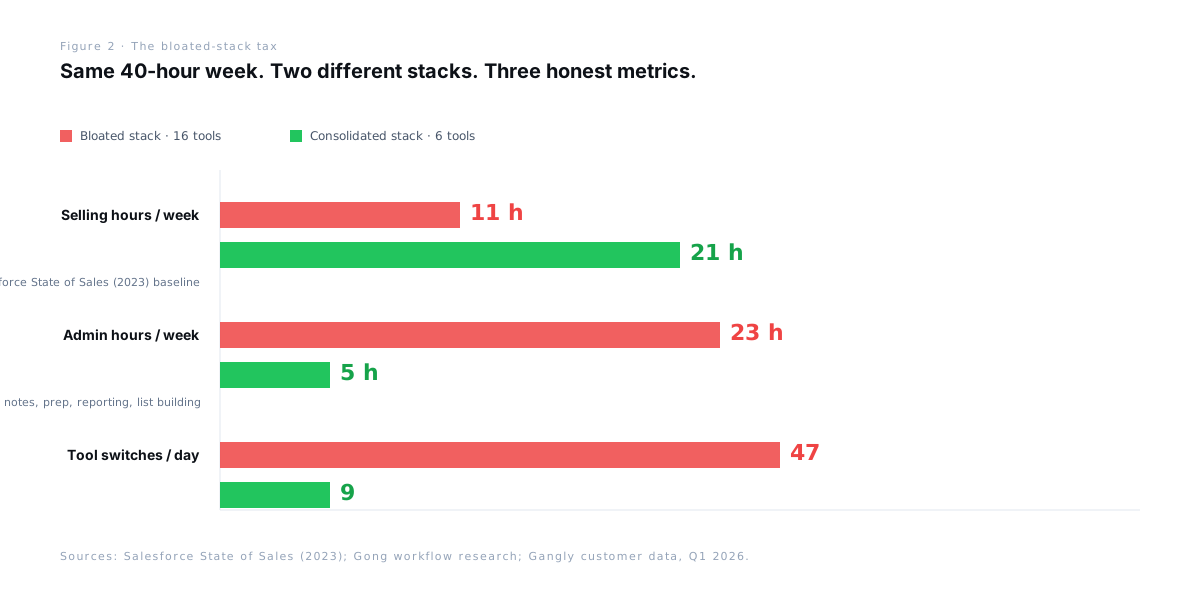
This is why the arithmetic of "our tool saves 20% on task X" never adds up across five tools. Each claim is true in isolation and disappears in the switching overhead between them. The reps who actually get the 10 hours back are the ones who consolidated first and automated second.
Consolidated vs assembled: what the connected stack looks like
There are two ways to build a sales stack. The assembled stack picks the best-of-breed tool for each of the six jobs and hopes the seams hold. The consolidated stack picks tools that each own multiple jobs and removes the seams on purpose. The consolidated stack wins almost every time for reps — not because the individual tools are better, but because the rep spends the day in the workflow, not in the connectors.
| Category | Assembled · best-of-breed | Consolidated · connected |
|---|---|---|
| CRM | HubSpot / Salesforce | HubSpot / Salesforce |
| Signal / intent | Sales Nav + ZoomInfo + signal tool (3) | Sales Nav + connected signal feed (1) |
| Outreach | Outreach / Salesloft | Connected workflow tool |
| Call prep | Dooly + Crystal + CRM clicks (3) | Same tool as outreach |
| Call coach / intel | Gong / Chorus (post-call only) | Live coach (real-time) |
| Notes + CRM hygiene | Fathom + Dooly + Scratchpad (3) | Same tool as outreach |
| Tool count | 12–16 | 5–6 |
| Admin hours / week | ~23 hrs | ~5 hrs |
Most teams are somewhere between these two. The path out isn't a rip-and-replace — it's a quarterly stack review that asks of every tool: what workflow stage does this own, and does a tool I already pay for own it better?
How Gangly collapses five stack categories into one
Gangly is purpose-built for the consolidation play. One tool covers five of the six stack categories — signal, outreach, call prep, live coaching, notes and CRM hygiene — so the rep works inside one sequence instead of bouncing between five.
Signal Detection replaces the overlap between LinkedIn, ZoomInfo, and any standalone signal tool: one ranked daily warm-account feed. Outreach Writer drafts rep-voiced messages that reference the exact signal — the rep reviews, edits, and sends. Call Prep Engine runs every call brief in under five minutes, pulling CRM, LinkedIn, and prior threads automatically.
The Live Call Coach surfaces objection responses and stats during the call — no post-call recovery email. Post-Call Notes writes the summary, CRM-formatted note, follow-up tasks, and draft email before the Zoom tab closes. CRM Hygiene Engine handles stage progression, close date, and next activity — the rep approves with one click.
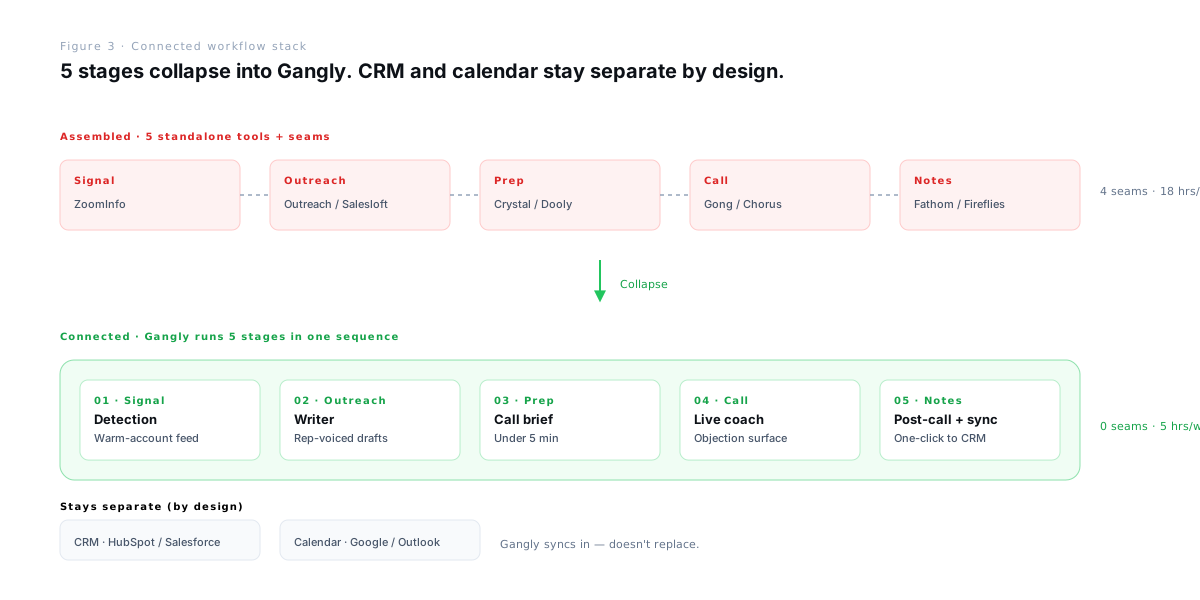
Gangly doesn't replace the CRM — it feeds it. Same with the calendar: integrations with HubSpot, Salesforce, Pipedrive, Zoom, Google Meet, Gmail, Outlook, LinkedIn, and both calendar systems keep the systems of record in place and push data in. For the broader pattern across the rep week, see the pillar: how top sales reps save 10+ hours per week, and the adjacent playbook on how to reduce sales admin time by 80%.
Run the stack top AEs already run.
Gangly covers signal, outreach, call prep, live coaching, and post-call notes in one connected workflow — so you run 6 tools, not 16. Try it free for 14 days. No credit card required.
Frequently asked questions
Tags: sales tools stack · AE tech stack · sales productivity · sales workflow · CRM · outreach · conversation intelligence