
 By Siddharth Gangal
What Is a Job Change Trigger in Sales?
A job change trigger is an external event — a new hire, promotion, or executive departure — that shifts a prospect's buying likelihood from low to high. It is one of the most reliable buying signals in B2B sales because it correlates directly with a decision-maker actively evaluating the tools and vendors they inherited or need to build.
Direct-answer block
A job change trigger in sales is when a prospect, champion, or key contact changes roles — joining a new company, getting promoted, or departing — creating a time-sensitive window where outreach is significantly more likely to convert. New executives evaluate their inherited stack in the first 90 days. Reps who reach them in the first 21 days close 2 to 4 times more often than those who wait.
Job change triggers work because they combine three factors that rarely align: a decision-maker with fresh authority, a mandate to evaluate tools and vendors, and a compressed timeline. New leaders do not have the institutional inertia that blocks buying decisions at established companies. They move fast. They buy fast.
For B2B sales teams, this is not a soft signal. Apollo, UserGems, Gangly, Clay, and LinkedIn Sales Navigator all have built entire product features around job change detection because the data is clear: outreach triggered by a job change converts 2 to 4 times higher than cold outreach to the same account without a trigger.
Why Job Change Triggers Are the Highest-Converting Sales Signal
Most buying signals are soft. A pricing page visit could mean a competitor researching you, an existing customer checking their plan, or an analyst writing a report. Job change triggers are hard signals — they carry specific, verifiable information about a real person in a real new situation.
New executives evaluate everything in their first 90 days
When a VP of Sales joins a new company, one of their first priorities is mapping what they have. CRM, sales engagement platform, signal tools, call recording, training software — everything gets reviewed. They ask their team what works and what frustrates them. They research alternatives. They have budget authority, a mandate to improve, and no political cost in switching vendors.
This is the single best moment to reach them. The tools they choose in month 1 and 2 become the standard for their tenure. Miss this window and you wait for renewal season — often 12 to 24 months later.
Champion tracking unlocks warm introductions
When a contact who knows your product moves from one company to another, they carry their experience with them. If they were a happy user at their previous company, they will often advocate for your product at the new one — without you even having to ask. Tracking former champions and reaching out when they land somewhere new is the highest-ROI outreach a rep can do. The prospect already trusts you. The only question is whether their new company is a fit.
Decision-maker turnover creates competitive displacement opportunities
When a VP at a competitor's customer leaves, the new person coming in has no loyalty to the existing vendor. The predecessor chose them. The successor did not. That is an opening. Reps who track competitor customer leadership changes and time outreach to new arrivals consistently find more receptive prospects than cold outreach to the same account 6 months earlier.
The Trigger Window: When to Reach Out and When It Is Too Late
Timing is the entire game with job change triggers. Reach out too early (before the new exec is publicly announced) and you look like you are monitoring their every move. Reach out too late (after month 3) and you compete with dozens of vendors who already had demos, sent proposals, and secured meetings.
| Days since job change | Prospect situation | Outreach approach | Conversion rate |
|---|---|---|---|
| Day 1–7 | Onboarding, overwhelmed | Congratulate + soft offer to connect | High |
| Day 8–45 | Actively evaluating tools | Direct meeting request tied to their mandate | Highest |
| Day 46–90 | Finalizing vendor decisions | Still worth outreach — frame as a second opinion | Medium |
| Day 90–180 | Stack is locked in | Plant seeds for next renewal cycle | Low |
| Day 180+ | Settled in, political capital spent | Standard account nurture — wait for next trigger | Very low |
The implication is clear: job change detection speed is a competitive advantage. A rep who finds a job change on day 3 has a dramatically better shot than a rep who finds it on day 47. Manual monitoring via LinkedIn cannot compete with automated detection. The account that hired a new VP on Monday needs an outreach email by Wednesday — not two weeks later after someone updates a spreadsheet.
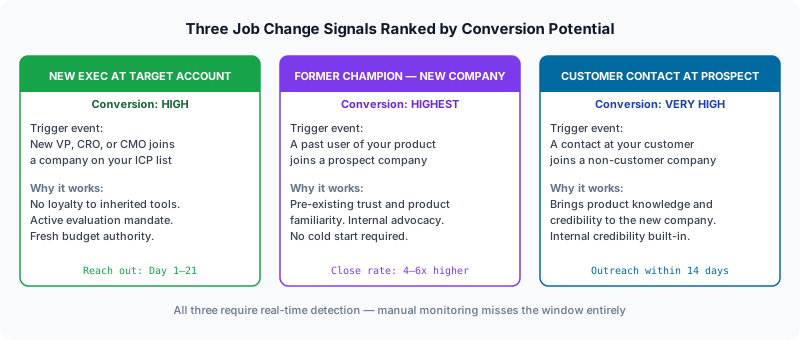
The Three Job Change Signals That Convert Above Average
1. New VP or C-level hire at a target account
When a new VP of Sales, VP of RevOps, CRO, or CMO joins a company in your ICP, they enter with a mandate to evaluate and improve. They do not feel ownership of the existing stack. They are open to conversations in a way that tenured leaders rarely are. This is the signal most sales teams track — and for good reason.
Outreach within 21 days, framed around "helping you map the landscape in your first 90 days," consistently produces meeting rates of 18 to 25% — 3 to 5x the cold outreach average.
2. A former champion moves to a new company
This is the highest-ROI outreach in sales. A former user — someone who logged into your product, saw the results, and experienced the value — is now at a new company where they could use it again. They already trust you. They already know the ROI story. All they need is a reason to bring it up.
Outreach to former champions at new companies typically converts 4 to 6x better than standard cold outreach to the same account. The message is simple: "Saw you joined [Company] — congrats. Would love to reconnect and show you what we have built since you were last using Gangly. Worth 20 minutes?"
3. A current customer contact moves to a prospect account
A contact at one of your existing customers just joined a company that has never bought from you. They know your product from the inside. They experienced onboarding, support, the product roadmap. Their credibility at the new company is high because they are an internal expert, not a vendor.
Track every contact at every customer account. When one of them moves to a prospect, prioritize that outreach above almost everything else in your pipeline.
How to Track Job Changes for Sales at Scale
Most sales teams discover job changes by accident — a rep notices a LinkedIn post, a bounce-back email clues them in, or an AE happens to check a contact's profile. That is not a system. That is luck. At scale, you need automated job change detection that runs continuously, covers your entire ICP, and surfaces signals the moment they happen.
Manual tracking (does not scale)
Setting Google Alerts for key contacts, checking LinkedIn profiles weekly, or relying on CRM bounce notifications. This works for a list of 20 VIP accounts. It fails across 500 target accounts. Reps spend more time on research than on outreach.
LinkedIn Sales Navigator job change filters
Sales Navigator's "Changed Jobs in Last 90 Days" filter is one of its most powerful features. It surfaces contacts from your saved lead lists who have recently changed roles. Limitations: it requires manual checking, the 90-day window is broad, and it does not trigger automated sequences. Strong for smaller teams doing targeted outreach, insufficient for teams managing 200+ accounts per rep.
CRM-integrated job change tracking tools
Tools like UserGems, Apollo.io job change alerts, and Cognism monitor your contacts continuously and push job change notifications to your CRM. When a contact changes jobs, you get an alert with the new company, title, and verified contact details. These tools are step-change better than manual tracking but still require the rep to prioritize and act on the signal.
Signal platforms with automated outreach triggers
Gangly goes one step further: it detects job changes, enriches the new contact's details, scores the signal by priority tier, and surfaces it to the rep with a suggested outreach message pre-written based on the trigger context. The rep reviews and sends — they do not research. This is the only approach that works across a full account list without adding headcount.
How Gangly handles job change detection
Gangly monitors your target account list and ICP contacts continuously. When a job change is detected, the platform: (1) confirms the change with a verified source, (2) enriches the new contact's profile with verified email, phone, and LinkedIn, (3) scores the signal — champion tracking, new exec, or VIP account — and (4) surfaces it to the rep the same day with a pre-written first touch based on the trigger type.
See how Gangly tracks job changes →Word-for-Word Outreach Scripts for Job Change Triggers
Job change outreach has a specific structure that works: acknowledge the change, position the conversation as helping the new leader (not selling to them), and make the ask small. Here are scripts for the three highest-converting trigger types.
Script 1: New VP at a target account (cold contact)
# Subject: Congrats on [Company] — quick question
Hi {FirstName},
Saw you recently joined [Company] as [Title] — congrats on the move.
New leaders in your role typically want to map out the full GTM stack in the first 60 days. I work with [similar company 1] and [similar company 2] on exactly this — [specific thing we help with in 1 line].
Worth 15 minutes to show you what the landscape looks like and where teams like yours are investing?
Best,
[Name]
Script 2: Former champion at a new company
# Subject: Welcome to [New Company] — congrats
Hi {FirstName},
Noticed you recently joined [New Company] — congrats on the new role.
It was great working with you at [Previous Company]. Would love to catch up and show you what we have built since you were last using Gangly — we have added [specific new feature or improvement] that would be relevant to what you are doing at [New Company].
Is there 20 minutes this week?
Best,
[Name]
Script 3: Current customer contact at a prospect account
# Subject: Your team at [Previous Company] moved fast — wondering if you'd bring that to [New Company]
Hi {FirstName},
Congrats on joining [New Company] — big move.
Your former team at [Previous Company] used Gangly to [specific outcome: e.g., cut call prep time by 40%]. Given you are building out [relevant function] at [New Company], it seemed like the right time to reach out.
Would it make sense to do a quick walk-through with your new team?
Best,
[Name]
Building a Job Change Detection Workflow for Your Sales Team
One-off job change outreach is not a strategy. A repeatable workflow that catches every trigger, routes it to the right rep, and ensures outreach happens within 72 hours is. Here is the structure of an effective job change sales workflow:
Step 1: Define your trigger list
Not every job change is worth pursuing. Define which contacts warrant automated monitoring: (1) Decision-makers and influencers at named target accounts, (2) Former champions who used your product at any previous company, (3) Contacts at existing customer accounts, (4) Churned customer contacts who could re-engage at a new company. This is your trigger list. Keep it focused — 500 to 1,000 contacts for a typical mid-market rep.
Step 2: Automate detection
Use a tool that monitors your trigger list continuously — not weekly. Job changes get posted to LinkedIn on Monday. Your competitor's rep sees it Tuesday. You see it next Friday when you do your manual CRM review. That 10-day gap costs deals. Gangly, Apollo, UserGems, and Clay all offer real-time or near-real-time job change detection.
Step 3: Score and route the signal
Not all job changes have equal priority. A VP of Sales at a Tier 1 target account is a different urgency than a director-level contact at a Tier 3 account. Score signals by: account tier, contact seniority, trigger type (champion vs. new exec), and decay window. Route high-priority signals to senior AEs within 24 hours. Route mid-priority signals to SDRs within 48 hours.
Step 4: Launch a tailored sequence
Job change sequences are 3 to 5 touches over 14 days — shorter than a standard cold sequence because the window is tighter and the relevance is built in. Touch 1: congratulatory outreach with a soft ask. Touch 2: a specific value offer (case study, benchmark report, or relevant insight). Touch 3: a direct meeting request. Touch 4: breakup email with a specific follow-up date.
Step 5: Log, measure, and iterate
Track job change outreach as a separate cohort in your CRM. Measure: response rate, meeting rate, pipeline generated, and close rate versus standard cold outreach. This data tells you which trigger types convert best and where to invest more detection capacity.
5 Job Change Trigger Mistakes That Kill Conversion
Mistake 1: Waiting too long
Manual monitoring means you find job changes 10 to 20 days after they happen. The executive is already talking to competitors. Automate detection so you reach out in days, not weeks.
Mistake 2: Making it about your product
"Congrats on the new role — let me tell you about Gangly" is a pitch, not a congratulations. Job change outreach that converts positions the meeting as research — helping the new leader understand the landscape, not buying something. The product pitch comes later.
Mistake 3: Not personalizing beyond the trigger
"Saw you changed jobs" is not personalization. Add one more layer: reference something about the new company's challenge, the exec's background, or a shared connection. This is the difference between an 8% reply rate and a 22% reply rate.
Mistake 4: Sending only one touch
New executives are overwhelmed. The first email might not land in the right moment. A 3 to 5 touch sequence over 14 days dramatically outperforms a single email. Keep the messaging fresh — each touch adds value, not just reminder noise.
Mistake 5: Ignoring champion tracking entirely
Most teams focus only on new executives at target accounts. Champion tracking — following former happy users to their new companies — produces the highest close rates and the lowest resistance. If you do not track where your former users go, you are leaving your highest-converting pipeline source on the table.
Job change triggers are one type of buying signal in a broader signal detection strategy. The full picture includes funding events, hiring spikes, technology changes, and behavioral signals. Read how to build a complete signal stack for your team.
Frequently Asked Questions
What are the triggers for a job change in sales?
The triggers that cause a prospect to change jobs — and make that job change a high-priority outreach signal — include company instability, a promotion gap at their current employer, or an offer from a growing company in the same vertical. Each creates a window where the new executive actively evaluates vendors and tools, making them far more receptive than their tenured equivalent.
What are the main triggers in B2B sales?
Sales triggers are external events that shift a prospect's buying likelihood from low to high. The main categories are: job change triggers (new hire, promotion, departure), company event triggers (funding, acquisition, expansion), behavioral triggers (pricing page visit, competitor research), and technology triggers (new tool adoption, contract expiration). Job change triggers are among the highest-converting because they correlate directly with active vendor evaluation.
How long does a job change trigger stay active?
A job change trigger is hottest in days 1 to 45. New leaders make the majority of their vendor decisions in their first 90 days. After 90 days, the window shrinks significantly — budget is often locked and evaluation criteria are set. Reps who reach out in week 1 to 3 get the first-mover advantage. Reps who wait until month 3 compete with 15 other vendors already in the mix.
How do you track job changes for sales outreach at scale?
Three approaches: (1) Manual — Google Alerts and LinkedIn profile checks (does not scale past 20 accounts), (2) LinkedIn Sales Navigator 'Changed Jobs in Last 90 Days' filter (good for targeted lists, requires manual action), and (3) Automated signal platforms like Gangly that continuously monitor your target account list, detect changes the day they happen, and surface them for immediate outreach. Only option 3 works at scale.
What should I say when reaching out after a job change?
Reference the job change explicitly and position the conversation as helping the new leader map the landscape — not a sales pitch. Example: "Saw you joined [Company] as [Title] — congrats. New leaders in your role often want to understand the full GTM stack in their first 60 days. Worth 15 minutes to show you what teams in [vertical] are using?" This frames the meeting as research, which reduces resistance.
Which job change signals have the highest conversion rate?
The three highest-converting signals: (1) New VP or C-level hire at a target account — they inherit tools they did not choose and immediately evaluate alternatives, (2) A former champion moves to a new company — they already know your product and can advocate internally, (3) A customer contact moves to a prospect account — they bring product familiarity and credibility. Champion tracking consistently produces the highest close rates.
How does Gangly detect job change triggers?
Gangly continuously monitors your target account list and ICP contacts for job change events — new executive hires, promotions, departures, and champion movements. When a job change is detected, Gangly enriches the contact's details (title, LinkedIn, verified email), scores the signal by priority tier, and surfaces it to the rep with a suggested outreach message. The entire process runs automatically so reps see warm signals each morning without any manual research.
Never miss a job change trigger again.
Gangly monitors your target accounts continuously and surfaces new exec hires, champion movements, and departure events — with suggested outreach — the day they happen.