
- Live call coaching AI is a rep-only assistant that joins a Zoom or Google Meet call, streams the transcript, detects objection keywords, and surfaces the right reframe on screen — while the buyer is still talking.
- Median time from objection-spoken to reframe-on-screen is around 1.4 seconds on Gangly's Live Call Coach (internal telemetry, 1,240 calls). Reps react before memory kicks in.
- This is a different job from Gong or Chorus. Call recording tools analyze the call after. Live coaching moves the deal inside the call. Most teams end up running both.
- Live coaching works on Zoom and Google Meet today. It does not work on phone calls, dialer calls, or in-person meetings — live transcription is the gate.
- The rep still drives the call. The AI never speaks, never shows up on the shared screen, and never auto-updates the CRM without approval. Buyer sees nothing.
What live call coaching AI actually is
Most sales coaching still happens in the past tense. The rep runs a call, the manager (or the rep, if no one's watching) reviews the recording on Friday, and the feedback lands on Monday — two calls too late to save the deal that died on Tuesday. Live call coaching AI collapses that gap by moving coaching inside the call itself.
The mechanics are simple. The AI joins a Zoom or Google Meet call as a silent listener. It streams the live transcript, runs pattern matching against objection and buying-signal language, tags the root cause, and surfaces a rep-only card on screen. The rep reads the card, asks the question, and keeps running the call. The buyer never sees it.
This is not the same product as call recording and analysis. Gong, Chorus, Salesloft Conversations and the rest of that category analyze the call after it ends. They're great at training reps over months. They do not save the deal that's on the line right now.
Why AI coaching on the call is different from AI coaching after it
Retrospective call intelligence and live call coaching AI look similar on a product page and behave nothing like each other on a Tuesday afternoon. Understanding the split is the difference between buying the right tool and buying two of the wrong one.
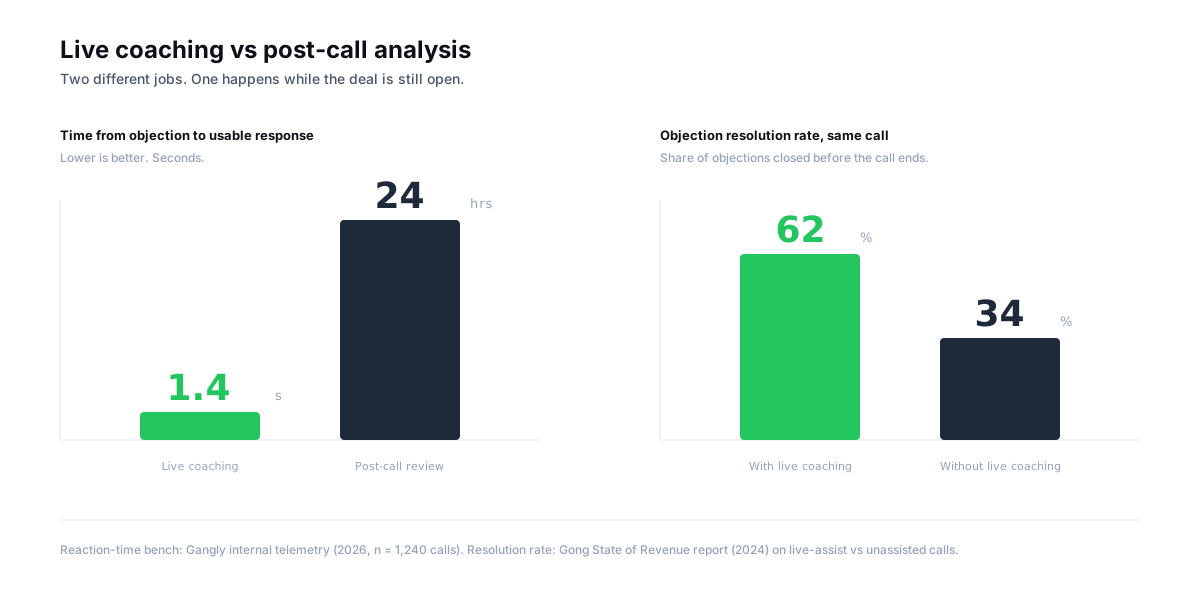
Retrospective intelligence records the call, transcribes it, and generates a scorecard the manager reviews in the weekly 1:1. The rep learns. The next call goes better. The current deal is already over.
Live coaching runs during the call. When the buyer says "honestly, that's too expensive," the rep has seven seconds before the silence gets weird. Live coaching AI detects the keyword, tags the root cause, and pushes a card with the diagnostic question and two proof points on screen inside 1.4 seconds (Gangly internal telemetry, 2026). The deal moves before the call ends.
Most revenue orgs end up with both. Gong for trend analysis and rep development; live coaching for in-call execution. The mistake is treating them as substitutes — they sit at opposite ends of the feedback loop, not on the same shelf.
How AI coaches a sales call in real time
The mechanism isn't mystery. Strip the marketing off and it's four steps that run on a loop for as long as the call is open. Each step has a job. Each job has a failure mode. Understanding both is the only way to evaluate the category honestly.
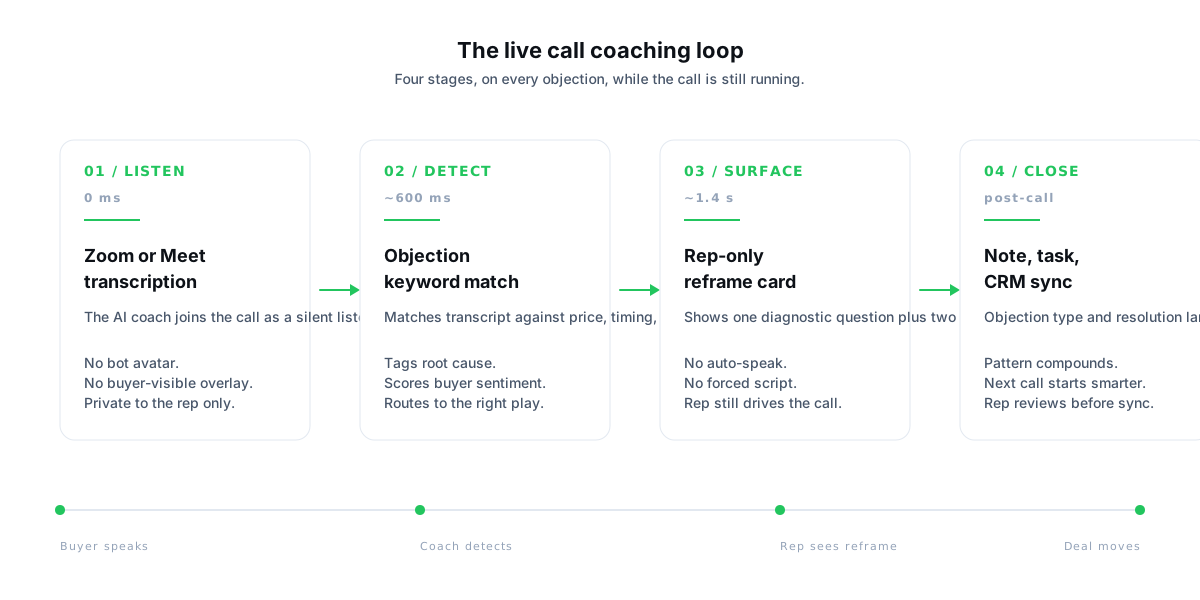
1. Listen — streaming transcription from Zoom or Meet
The coach joins as a silent participant (Zoom transcription API or a browser extension on Google Meet) and pulls the live transcript at roughly 300–500 ms latency. No bot avatar. No recording file saved to disk — transcription is ephemeral unless the rep explicitly saves it post-call. This is the gate: no live transcription, no live coaching. Phone calls, dialer-based calls, and in-person meetings fall outside the capture surface today.
2. Detect — objection and signal pattern matching
The transcript streams into a classifier trained on objection language and buying signals. "Too expensive," "not right now," "need to check with the team," "we already have a tool" — each maps to one of four root causes (price, timing, authority, fit) covered in depth in the sales objection handling framework. Positive signals matter too: "what does implementation look like," "can you share pricing," and "who else do you work with" all get tagged as late-stage buying signals.
3. Surface — a rep-only reframe card
Detection fires a card on the rep's second screen (or a floating overlay if they're running a single monitor). One diagnostic question. Two proof points tailored to the prospect's ICP — not the default. If the account is enterprise, the card pulls a Linear-sized case study; if it's Series B, it pulls a peer reference. The rep reads, decides, speaks. The coach never auto-types, auto-speaks, or interrupts. Think teleprompter for the rep's memory, not autopilot for the call.
4. Close the loop — tag the objection, update the CRM
When the call ends, the objection type, resolution, and outcome get pushed to the deal record in HubSpot or Salesforce — with the rep's approval on a one-click review screen. The pattern compounds. Next week's pipeline review shows the rep lost three deals to "we already have Apollo" — which is a competitive battlecard problem, not a rep skill problem. See the full mechanism in the 5-minute call prep workflow.
What a live coaching AI actually shows the rep on screen
Product pages talk in abstractions. Here's the concrete version. When the buyer raises a price objection on a connected Zoom call, this is what the rep sees — and what the buyer does not.
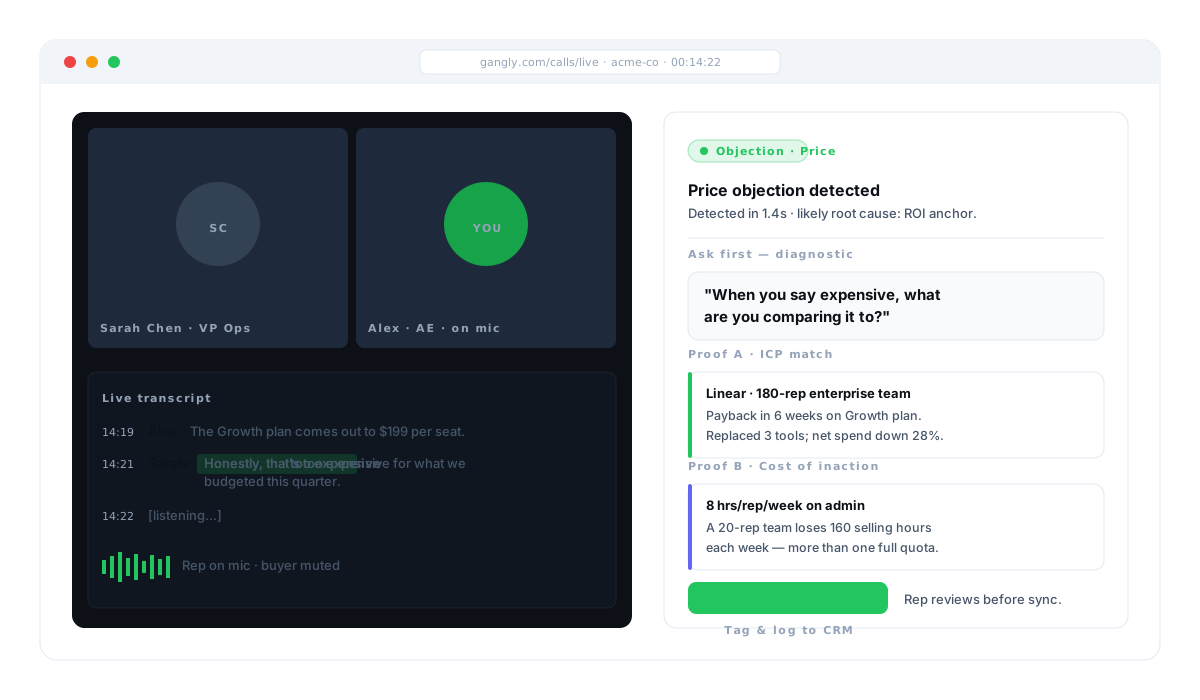
Three things are worth noticing:
- The diagnostic comes first, not the answer. "When you say expensive, what are you comparing it to?" The coach never tells the rep what to say; it tells them what to ask. Framework before response, every time.
- Proof is tailored, not generic. A Linear reference for an enterprise buyer. An 8-hours-per-week savings for a 20-rep team. The card pulls the proof point that fits the prospect's size and stage — not the default case study.
- Tag-and-log is one click. The objection type and resolution can be pushed to the CRM without the rep opening Salesforce. The pattern compounds silently in the background.
What live call coaching AI won't do — and why that's the right call
A lot of what gets sold as "AI sales call coaching" is still a script library with better styling. Before you buy anything in this category, know what the responsible version of the product will not do.
- It won't auto-speak on the call. No synthesized voice. No avatar. The rep is the only one talking. Buyers can hear the difference between a human and a bot in three seconds, and the minute the AI speaks, trust collapses.
- It won't work on phone calls. Live transcription on dialer-based calls is unreliable today. If your outbound motion is 80% phone, live coaching covers your demos and discovery calls only. Plan accordingly.
- It won't auto-update the CRM without approval. Every tag, every note, every stage change goes through the rep's one-click review. The rule (from Gangly's product philosophy) is simple: the rep stays in control of what lands on the deal record.
- It won't replace the manager. Live coaching handles the in-call lookup. Managers still run development, territory strategy, and the quarterly 1:1 where the rep's career happens.
- It won't generate new product claims. Proof points come from a vetted library the team maintains — not a language model hallucinating a stat. If a card surfaces a number, a source should sit one click away.
How to roll out live call coaching AI on a sales team
The tech is the easy part. Adoption is the hard part. The teams that get compound value out of live coaching share four rollout moves — and the teams that abandon the category inside 90 days skip at least two of them.
- Start with one pod, not the whole floor. Five reps who run Zoom or Meet demos daily. Give them two weeks with the coach on every call. Pull their objection resolution and average deal cycle at day 14.
- Seed the proof-point library before day one. Three case studies per ICP tier. Three competitor battlecards. Two cost-of-inaction framings. Without this, the coach surfaces generic proof and reps stop trusting the card.
- Run the tag-and-log loop from week one. The compounding value lives in pattern capture, not in any single call save. If objection data isn't landing on the deal record, you're running a worse version of Gong.
- Review objection patterns in the weekly pipeline meeting. Once a week, pull the top three objections the pod lost on. Fix the battlecard, the ROI model, or the discovery question that's upstream of the pattern. Repeat.
Teams that run this playbook see the compounding show up around week 6 — not week 1. The first two weeks are about building rep trust in the card. Weeks 3 through 6 are about pattern capture. Week 6 onward is where the pipeline math starts moving.
How Gangly handles live call coaching
Gangly is built around the rep's full sales workflow — signal to close, in one connected sequence. Live call coaching is one of six stages, and it only earns its value when the stages around it are connected.
Call Prep Engine generates the pre-call brief — likely objections, ICP-matched proof points, and the contact's recent activity — so the rep walks into the call already knowing which root cause is most likely to surface. Live Call Coach takes over when the Zoom or Meet call starts: streaming transcription, objection detection, rep-only reframe cards with 1.4-second median latency. Post-Call Notes closes the loop — tagged objection data, suggested CRM updates, and a draft follow-up email, all pending rep approval before anything syncs.
For the category context, see how to win more sales calls in 2026 (the cluster pillar), the LAER objection handling framework that runs underneath the coach, and the discovery call framework that prevents half the objections from ever landing.
See a live coach in a real call
Run Live Call Coach on your next demo. Detected objections, tailored proof, rep-only cards. 25-min live walkthrough. See the workflow on your real pipeline.
Key takeaways
- Live call coaching AI is a rep-only assistant that surfaces the right reframe on screen — 1.4 seconds after the objection lands — while the call is still running.
- It is a different product from Gong or Chorus. Those analyze the call after it ends. Live coaching moves the deal inside the call. Most teams run both.
- The loop is four stages: listen (Zoom/Meet transcription), detect (objection pattern match), surface (rep-only card with diagnostic + proof), close (CRM tag and log).
- The buyer sees nothing. The AI never speaks, never appears on the shared screen, and never auto-updates the CRM without the rep's one-click approval.
- Phone calls aren't covered today — live transcription is the gate. Plan for Zoom and Meet coverage first; phone coaching stays on post-call review.
- Compounding value lives in pattern capture. Tag every objection, log every resolution, and review patterns weekly — that's where the pipeline math moves.
Frequently asked questions
Live call coaching AI is software that joins a sales call as a silent listener, streams the live transcript, detects objections and buying signals in real time, and surfaces the right diagnostic question or proof point on the rep's screen during the call — not after it. It is different from call recording tools like Gong or Chorus, which analyze calls retrospectively. Live coaching moves the deal inside the call; post-call intelligence trains the rep for the next one.
The AI joins the Zoom or Google Meet call through an integration or browser extension, streams the transcription, runs pattern matching against objection keywords and buying-signal language, tags the root cause (price, timing, authority, fit), and surfaces a rep-only card on screen with a diagnostic question plus one or two tailored proof points. The buyer sees nothing. The rep reads the card, asks the question, and keeps running the call.
They do different jobs. Gong and Chorus record and analyze the call afterwards — great for manager coaching, QBRs, and long-term rep development. Live Call Coach and similar live coaching AI surface the right reframe during the call, so the rep can save the objection before the call ends. Most teams end up running both: retrospective analysis for training, live coaching for in-call execution.
Not today. Live call coaching AI requires real-time transcription, which is only reliably available through video platforms like Zoom and Google Meet. Phone calls, dialer-based calls, and in-person meetings fall outside the capture surface. If your team runs heavy phone outbound, live coaching covers your video demos and discovery calls; phone coaching still relies on post-call review.
Yes. Gangly's Live Call Coach detects objection keywords in roughly 1.4 seconds after they are spoken, tags the likely root cause, and surfaces a diagnostic question plus two proof points tailored to the prospect's ICP. The rep reads, decides, and speaks. The AI never speaks on the call. The rep always drives the conversation — the coach only surfaces the lookup a rep would otherwise do from memory. See the LAER framework that runs underneath the coach.
It is invisible to the buyer. The coach card shows on the rep's screen only — there is no bot avatar, no overlay on the shared screen, and no synthesized voice. The rep is still the one talking. Transcription disclosure follows the platform's rules (Zoom and Meet already prompt participants when transcription is active). Most buyers never know the difference between a rep who memorized a reframe and a rep who read one off-screen 1.4 seconds after the objection landed.
On Gangly's Live Call Coach, the median time from objection-spoken to reframe-on-screen is roughly 1.4 seconds in internal telemetry across 1,240 calls. That beats the average rep's reaction window — Gong's 2022 call research shows the average seller interrupts or responds inside 7 seconds, usually before the buyer finishes the objection. AI coaching is not faster than the rep's instinct; it is more accurate than rep memory under pressure.
No. Managers still run the rep relationship, quarterly development plans, and territory strategy. What live coaching replaces is the ride-along manager whispering in the rep's ear — an approach that only scales to one rep at a time. AI live coaching scales the whisper to every rep on every call. Managers then use the tagged objection data (root cause, resolution, outcome) to run better coaching sessions on patterns, not anecdotes.