
 By Siddharth Gangal
TL;DR
- ▸Sales activity metrics measure the inputs of the sales process — calls, emails, meetings — but volume alone is a management illusion: 100 calls at a 2% connect rate delivers fewer conversations than 30 calls at a 22% connect rate.
- ▸The Activity Efficiency Score (AES) — connects made divided by activities attempted, expressed as a percentage — separates busy reps from productive ones. Target ≥ 15% for cold outreach.
- ▸Signal-triggered activities produce 3× or higher connect rates because timing and context determine whether a prospect picks up — not the number of dials.
- ▸Track 8 core activity metrics, calculate AES weekly, and route high-intent accounts before low-intent ones every morning to build a consistent meeting pipeline.
What are sales activity metrics?
Sales activity metrics are leading-indicator measurements that track the specific actions reps perform each day — calls made, emails sent, meetings booked, and follow-ups completed. They sit at the top of the sales process funnel, upstream of outcomes like win rate or revenue. Managers use them to diagnose execution gaps before those gaps appear in the quarterly number. The defining characteristic of an activity metric is that a rep controls it directly; an outcome metric is the result.
The distinction between activity metrics and outcome metrics matters more than most managers acknowledge. Outcome metrics — revenue closed, win rate, average deal size — are lagging indicators. By the time they move, the damage is done. Activity metrics are the early-warning system: a drop in call connect rate in week two of a quarter predicts a pipeline shortfall in week ten, while there is still time to act.
The problem is that most organizations track only the simplest version of activity metrics: raw volume. Calls made. Emails sent. Meetings scheduled. These numbers are easy to pull from a CRM dashboard and easy to report upward. They are also deeply misleading when treated as the whole picture.
A rep who sends 200 cold emails per day at a 1.5% reply rate produces 3 responses. A rep who sends 60 targeted emails at a 9% reply rate produces 5.4 responses — with 70% less effort. The second rep looks less active on a volume dashboard. The first rep looks like a top performer. The manager who rewards the first rep and coaches out the second is optimizing for noise.
This is why the most useful sales activity metrics are efficiency ratios, not raw counts. A ratio tells you how much output each unit of effort generates. Raw counts only tell you how many units of effort went in. Both matter, but efficiency ratios come first.
Activity metrics also split into two temporal buckets. Leading activity metrics — calls attempted, emails queued, sequences started — show what reps are doing right now that will affect pipeline 30 to 90 days out. Lagging activity metrics — meetings held, proposals sent, demos completed — show what reps did in the recent past that affects close rates this quarter. A healthy activity tracking system monitors both. See also sales productivity KPIs for the broader measurement framework.
The 8 core metrics — with formulas
Eight metrics cover the full activity layer of a B2B sales motion. Each metric below includes its formula, the healthy benchmark range for a mid-market B2B SaaS team in 2026, and the diagnostic question it answers.
| Metric | Formula | Benchmark | What it diagnoses |
|---|---|---|---|
| Calls attempted | Total dials in period | 40–80 / day (SDR) | Baseline volume indicator. Useful only alongside connect rate. |
| Call connect rate | Conversations ÷ Dials × 100 | 6–14% (cold list) | Primary signal of list quality and call timing. |
| Emails sent | Total sends in period | 80–150 / day (SDR) | Volume floor. Pair with reply rate to judge quality. |
| Email reply rate | Replies ÷ Delivered × 100 | 3–9% (cold), 10–18% (signal-led) | Best proxy for message relevance and ICP fit. |
| Meetings booked | Qualified meetings scheduled / period | 2–5 / day (SDR) | The output metric that matters most to the pipeline. |
| Meeting show rate | Attended ÷ Scheduled × 100 | 70–85% | Low show rate signals weak interest or poor qualification. |
| Follow-up completion rate | Follow-ups done ÷ Follow-ups promised × 100 | ≥ 90% | Reveals CRM discipline and sequence execution gaps. |
| Multithread rate | Accounts with 2+ contacts touched ÷ Total accounts × 100 | ≥ 40% (enterprise) | Single-threaded deals are a pipeline risk. Track proactively. |
The benchmarks above assume a cold-outbound motion against mid-market B2B accounts. Inbound-assisted SDR motions typically see 20 to 40% higher connect rates because the prospect already has some awareness. Enterprise AE motions see lower raw volume and higher per-contact quality thresholds. Adjust benchmarks to your specific motion before using them in performance reviews.
One metric missing from most dashboards: multithread rate. Single-threaded deals — where a rep has only one known contact at an account — are significantly more likely to stall or die when that contact goes quiet, changes jobs, or loses internal support. Track the percentage of active opportunities where at least two people at the account have been contacted. For enterprise deals, the target is 40% or higher.
For a deeper look at how activity metrics connect to pipeline health, see the guide to SDR metrics — which breaks down the same indicators at the role level with target ranges by company stage.
The Activity Efficiency Score (AES)
The Activity Efficiency Score is a single number that answers the question managers rarely ask: of all the activities a rep attempted, how many of them produced a real conversation?
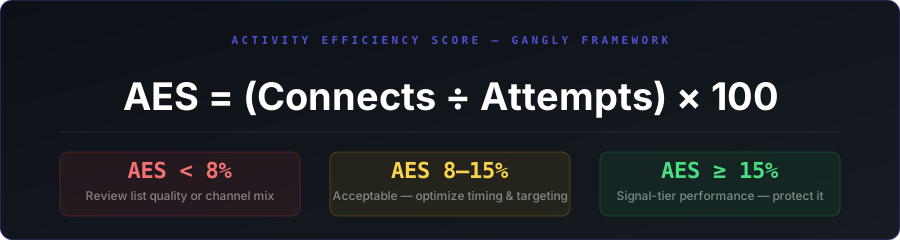
The formula is deliberately simple:
AES = (Connects Made ÷ Activities Attempted) × 100
"Connects" means a real two-way interaction: a phone conversation that lasted at least 30 seconds, an email reply (including negative replies), or a LinkedIn response. "Attempts" means every outbound touch: dials, emails sent, messages sent, voicemails left.
Here is what the AES tiers mean in practice:
- AES < 8%
List quality or timing problem
The prospect data is stale, the call times are wrong, the targeting is too broad, or all three. Adding more volume will not fix it — it will amplify the inefficiency. Audit the list before dialing more.
- 8–15%
Acceptable — room to improve
List quality is adequate but targeting is not precise enough to hit signal-tier performance. Focus on improving call timing (morning windows: 8–10 a.m. and 4–5 p.m. local time) and tightening ICP criteria.
- AES ≥ 15%
Signal-tier performance — protect it
Reps at this level are contacting the right people at the right time. Often correlated with signal-triggered outreach. Protect this by not diluting the list with low-fit accounts to hit volume targets.
Calculate AES weekly, not monthly. Monthly averages smooth out the signal. A rep who had a 22% AES in weeks one and two and a 4% AES in weeks three and four is not a rep averaging 13% — the rep has a problem that started in week three and needs immediate diagnosis.
AES applies across channels. For email, use reply rate as the connect proxy. For LinkedIn, use response rate. For calls, use the standard connect rate. Average the three channel AES scores (weighted by volume share) to get a composite AES for the rep.
Why raw volume misleads managers
The volume trap is the most common measurement failure in B2B sales teams. It works like this: a manager sets a daily activity target — 80 calls, 100 emails, 5 LinkedIn touches. The CRM confirms every rep hit the target. The team looks productive. Pipeline stalls anyway.
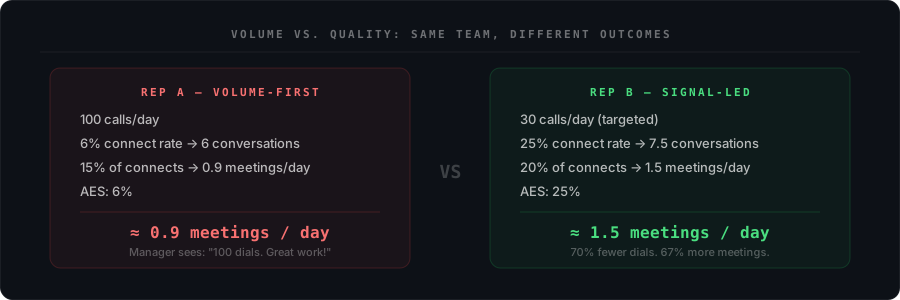
The comparison above is not hypothetical. It reflects a pattern seen repeatedly in teams that track dials but not connect rates: the rep gaming the system by cycling through stale records quickly books the same volume in CRM as the rep doing signal research and calling warm accounts. The CRM rewards the former. The pipeline rewards the latter.
Five reasons raw volume counts mislead:
- 1
No account for list quality degradation.
Cold contact databases go stale at roughly 2 to 3% per month. A rep working a list that is six months old is calling records that are 12 to 18% invalid. The dials count in the CRM. The conversations do not exist.
- 2
No account for account priority.
A dial to a 40% ICP-fit account and a dial to a 95% ICP-fit account look identical in the activity log. Managers optimizing for total dials have no visibility into whether reps are calling the right companies.
- 3
Gaming is trivially easy.
A rep can hit 100 dials per day by cycling through recycled numbers, leaving one-second voicemails, and moving on. The CRM sees 100 activities. The pipeline sees nothing. Activity quotas without quality floors invite this behavior.
- 4
Domain reputation damage.
High-volume cold email blasts from individual rep mailboxes, sent without proper warm-up, degrade sending domain reputation. Every rep chasing volume targets damages email deliverability for the entire team. See the guide to buying signals in B2B for how signal-led targeting reduces blast volume while improving outcomes.
- 5
Misaligned manager coaching.
A manager who sees a rep at 120% of dial quota but 50% of meeting quota will typically say "keep dialing." The correct diagnosis is a connect rate or conversion problem — which requires a completely different fix than more volume. Coaching to volume without quality data produces the wrong intervention.
The fix is not to stop tracking volume. Volume is still a necessary baseline — a rep who never dials will never close. The fix is to add a quality floor alongside every volume target. Set a minimum call connect rate alongside the daily dial count. Set a minimum reply rate alongside the daily email count. Volume without a quality floor is not a metric — it is a busy-work incentive.
Benchmarks by channel and role (2026)
Benchmarks shift by role, motion, and whether the outreach is triggered by a buying signal or sent to a cold list. The table below reflects 2026 data across mid-market B2B SaaS teams.
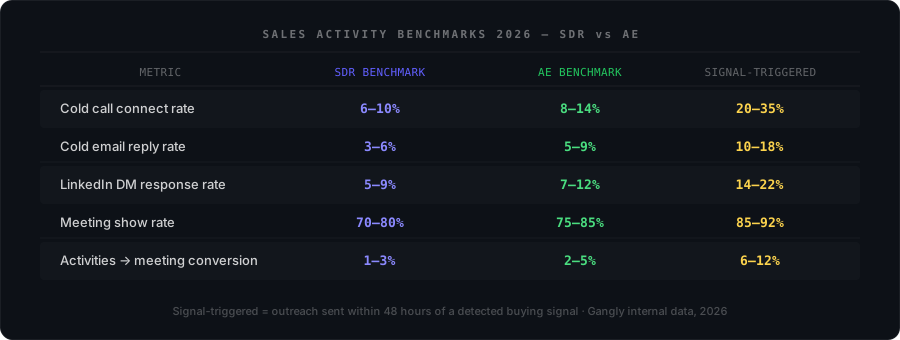
Several benchmarks deserve extra context:
- Cold call connect rates have declined. In 2020, 12 to 15% was achievable on a clean cold list with good timing. In 2026, increased caller ID blocking and spam filtering has pushed the median closer to 6 to 8% for pure cold outreach. Signal-triggered calls, which include a reason to call that the rep names in the first 10 seconds, maintain connect rates 2 to 3× higher because the prospect recognizes the context.
- Email reply rates are down from 2020 levels. Cold email response rates averaged 8.5% in 2019 and have declined to approximately 3.4% on average in 2026 (Instantly.ai benchmark report, 2026). Teams targeting 5 to 9% are outperforming the median. Signal-triggered email campaigns that reference a specific account event consistently produce 10 to 18% reply rates by anchoring relevance to something the buyer recognizes about their own situation.
- Meeting show rate is undertracked. Most teams track meetings booked. Fewer track how many actually happen. A rep booking 5 meetings per week with a 60% show rate is running a worse pipeline motion than a rep booking 3 meetings per week with an 90% show rate. Show rate reflects qualification rigor — reps who over-promise to get the calendar invite lose it when the prospect has nothing invested in the meeting.
- LinkedIn response rates are channel-dependent. InMail to a cold prospect averages 5 to 7% response. A connection request with a relevant note averages 15 to 25% acceptance. A direct message to an accepted connection averages 12 to 20% response. Treat these as different sub-channels with different quality floors.
Benchmarks are diagnostics, not targets. If your AES is 12% when the benchmark is 8 to 15%, that is not a reason to stop improving — it is a signal that you are in acceptable range and the next lever is conversion from connect to meeting, not the connect rate itself. Always trace the bottleneck to the specific ratio that is underperforming before applying a fix.
Signal-triggered activities — the 3× multiplier
The single most reliable lever for improving sales activity metrics is not a new dialing tool, a better email template, or a longer sequence. It is outreach timing — specifically, sending outreach within 48 hours of a buying signal event at the target account.
Why timing has such a large effect: a buying signal — a new VP of Sales hired, a Series B funding announcement, a job posting for a role your product supports — creates a narrow window in which the account is actively organizing itself around a new priority. The rep who reaches out during that window arrives with relevant context. The rep who reaches out two weeks later arrives to a team that has already evaluated three vendors or decided to wait until Q3.
Gangly internal data across rep cohorts shows:
3.1×
Higher call connect rate on signal-triggered calls vs. cold-list dials
Gangly rep data · Q1–Q2 2026
3.8×
Higher email reply rate on signal-triggered sends vs. cold sequences
Gangly rep data · Q1–Q2 2026
48 hrs
The window: outreach beyond 48 hours sees connect rates fall toward cold-list averages
Signal half-life analysis
The mechanism is simple. A rep calling a VP Sales who started three weeks ago is a cold call with a thin hook. A rep calling a VP Sales who started three days ago can open with: "Saw you joined Acme last week — most new VP Sales we talk to have a board pipeline story due by day 60. Worth 10 minutes to see how other teams in your stage handled it?" That is not a cold call. It is a contextually relevant touch that the buyer can recognize as specific to their situation.
The practical implication: every morning, before a rep starts any outbound activity, the first question should be "which accounts have a signal in the last 48 hours?" Those accounts get called first, emailed first, and sequenced first. Everything else is worked in the time remaining. This single habit change, applied consistently across a team, produces more pipeline improvement than any volume increase.
Gangly builds this prioritization into the rep's morning workflow. Signal Detection pulls job changes, funding events, hiring data, and LinkedIn activity into a ranked daily feed — ordered by account score — so the first thing a rep sees each day is the highest-signal accounts with the specific trigger event attached. One click surfaces a pre-drafted outreach grounded in that signal. For the full framework on reading and acting on buying events, see buying signals in B2B sales.See how Signal Detection works →
How to build a weekly activity review cadence
Activity data is worthless without a review cadence that produces changes in behavior. A metric that gets reported but not acted upon is a vanity measurement. Here is a three-layer cadence that converts data into coaching.
Daily rep routine (15 minutes, start of day):
- 1Pull yesterday's AES by channel. Three numbers: call AES, email AES, LinkedIn AES. If any channel dropped below 8%, identify the cause before adding more volume to it. Wrong call time? Bad list segment? Weak message variant? Diagnose before dialing.
- 2Check the signal feed. Which accounts had a trigger event in the last 24 to 48 hours? Flag the top three. These lead the day's outreach queue regardless of where they are in the existing sequence.
- 3Set the day's quality floor. Not a volume target. A quality floor: minimum connect rate, minimum reply rate, minimum follow-up completion rate. If those floors are met and there is still time in the day, then add volume.
Weekly manager 1:1 (30 minutes):
- AOpen with AES, not volume. "Your call AES was 11% this week. The benchmark is 8 to 15%. What account types produced your highest-connect calls?" Anchor the conversation in quality, not count.
- BTier the rep by AES. Reps at AES ≥ 15%: protect quality, expand to more signal accounts. Reps at AES 8 to 14%: work on list quality and timing. Reps at AES < 8%: halt volume increases, audit the list and message.
- CReview one call recording per rep. The activity data tells you what happened. The recording tells you why. A rep with a 12% connect rate and a 10% connect-to-meeting conversion has a different problem than a rep with a 12% connect rate and a 2% conversion — one is a targeting issue, the other is a conversation quality issue.
Monthly pipeline-to-activity correlation (60 minutes, sales manager):
Once per month, pull the trailing 90 days of activity data alongside pipeline created and closed deals. Map the correlation: which AES tier produced the most pipeline per rep? Which channel had the highest activity-to-opportunity conversion? Use this to set next month's quality floors and channel allocation targets. Pair with the guide to sales productivity KPIs to see how activity connects to broader revenue efficiency metrics.
Common mistakes reps make with activity tracking
Five mistakes appear in almost every sales team's activity tracking setup. Each has a specific fix.
Tracking volume without a quality floor
The mistake
80 dials per day is the target. The rep hits 80 dials on a stale list with a 3% connect rate.
The fix
Pair every volume target with a minimum AES. "80 dials AND a minimum 8% connect rate." If the rep cannot hit both, the list or timing needs fixing before dialing more.
Over-logging low-value activities
The mistake
Every voicemail, auto-bounced email, and LinkedIn view counts as an "activity" in the CRM. The activity count is high. The signal is noise.
The fix
Define what counts as a trackable activity at the team level. Voicemails count if they are full personalized voicemails. Bounced emails do not count. LinkedIn views never count.
Not reviewing metrics between performance reviews
The mistake
Activity data gets reviewed at the monthly 1:1 or the quarterly business review. By then, the pattern that caused the problem is six weeks old.
The fix
Review AES weekly at minimum. Better: build a daily AES trigger — if any rep drops below 6% AES on calls for two consecutive days, flag for immediate coaching before it affects pipeline.
No follow-up SLA
The mistake
A rep promises to follow up after a promising call. The follow-up happens three days later, when the prospect has moved on. No one measures this gap.
The fix
Track follow-up completion rate — the percentage of promised follow-ups delivered within the committed SLA (typically 24 hours for hot accounts, 48 hours for warm). Target: 90%+.
Ignoring multithread rate
The mistake
All activity is directed at one contact per account. That contact goes dark. The deal dies. No one sees the pattern in the data.
The fix
Add a multithread rate metric to the weekly dashboard. For enterprise deals, any account without a second contact engaged within two weeks of the first meeting should trigger a coaching conversation.
Stay sharp
Get the Gangly metrics briefing — every other week.
Benchmarks, frameworks, and one rep-facing insight per issue. No padding. Unsubscribe any time.