
 By Siddharth Gangal
TL;DR
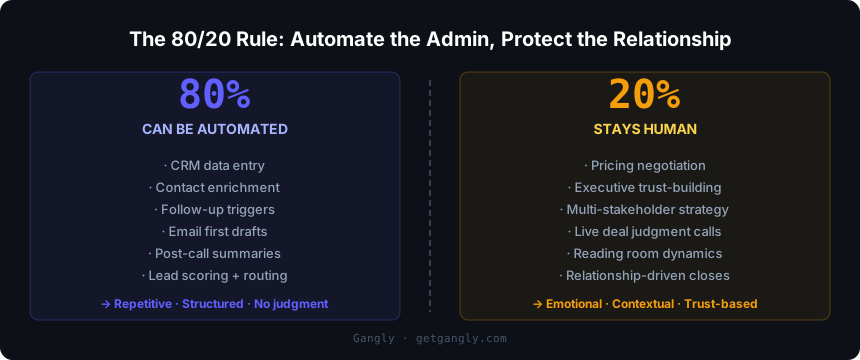
- The 80/20 rule: 80% of a rep's admin tasks — CRM data entry, enrichment, follow-up triggers, email drafts, post-call notes — can be automated or AI-assisted. The other 20% — pricing negotiation, executive trust-building, live deal judgment — must stay human. Most teams get this ratio wrong in one direction or the other.
- Three zones: Six tasks are 100% automatable today. Five more are AI-assisted (machine drafts, human reviews). Five always require a person. Misplacing a task across these zones is where automation breaks pipeline quality and rep trust.
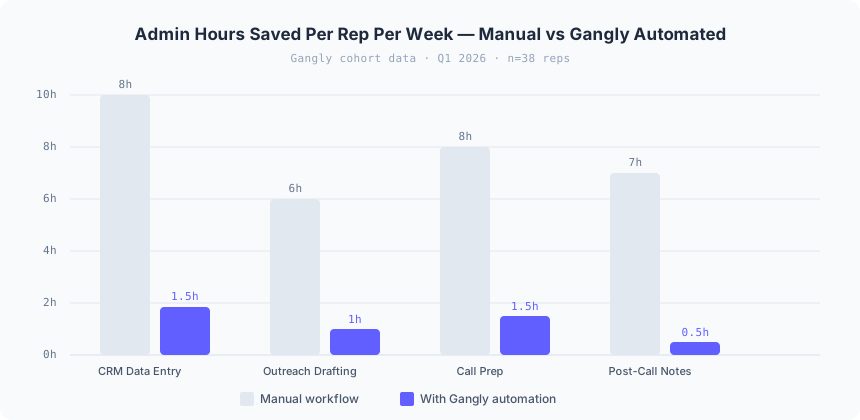
- Time math: manual sales admin costs reps 8 to 10 hours per week on CRM alone. With a connected automation workflow covering data entry, outreach, call prep, and post-call notes, total admin drops to under 6 hours per week. Gangly cohort data (38 reps, Q1 2026) records 28 to 32 hours per rep per week saved at full workflow activation.
- Where to start: audit your five most time-consuming repetitive tasks. Apply the three-zone test. Automate the structured tasks first — CRM activity logging, enrichment, and follow-up triggers — before touching anything that touches the buyer directly.
What is sales workflow automation?
Sales workflow automation is the use of software to execute repetitive, structured tasks in the sales process without manual input from the rep at each step. It handles the administrative layer — activity logging, contact enrichment, follow-up triggers, lead scoring, email drafting, post-call summaries, and CRM updates — so the rep spends available hours on buying conversations rather than data entry. The goal is not to remove the rep. It is to remove the administrative work that surrounds the rep.
The category is not new. Salesforce introduced basic workflow rules in the mid-2000s. What changed in 2024 and 2025 is the reliability of AI-assisted automation at the edges — drafting outreach from real buying signals, summarizing calls into structured qualification fields, generating account briefs from live CRM data — tasks that previously required full human effort because no rule-based system could handle their variability.
The problem most teams run into is not that they fail to automate. It is that they automate the wrong things. Over-automation — running AI outreach without rep review, auto-advancing deal stages without human confirmation, templating all buyer communication — destroys the personalization that earns replies and builds trust. Under-automation — leaving every CRM field, every follow-up reminder, and every email draft to manual effort — drowns reps in admin and leaves them with fewer selling hours than they had in 2020.
The fix is precision. Know exactly which tasks belong to the machine, which benefit from AI assistance with human review, and which require a person every time. The Automation Audit framework in the next section maps it out. Once a team applies it correctly, the impact is structural: reps reclaim 8 to 10 hours per week from CRM admin alone, and those hours go back into the selling conversations that generate revenue.
Sales workflow automation — the systematic use of software to execute structured, repetitive sales tasks without rep-level manual input at each step. Example: a rep finishes a discovery call; the automation writes the call summary, fills the MEDDPICC fields in Salesforce, updates the deal stage, queues the follow-up email for review, and logs the activity — before the rep's next call begins.
Sales workflow automation differs from its close cousin, AI sales workflow, in scope. An AI sales workflow is the broader end-to-end motion from signal detection to closed deal. Sales workflow automation is the specific capability layer within that motion that handles the repetitive administrative steps. The two concepts overlap — and the best implementations integrate them — but they are not the same thing. This article covers automation principles and implementation. The AI sales workflow article covers the connected sequence end to end.
The Automation Audit: three zones every rep must know
Every task in a sales workflow fits into one of three automation zones. The assignment determines whether the task belongs to the machine, to an AI-human collaboration, or to the rep alone. Getting this mapping right is the single most important step before touching any automation tool or configuration.
The three-zone test for any sales task: Does the output require human judgment about a specific relationship or situation? If no — automate 100%. Does it require AI to generate a draft that a human must review before it reaches the CRM or a buyer? If yes — AI-assist. Does it involve emotional intelligence, relationship trust, or live contextual reading of a buyer? If yes — always human. Apply this test to every task before you set up a single workflow rule.
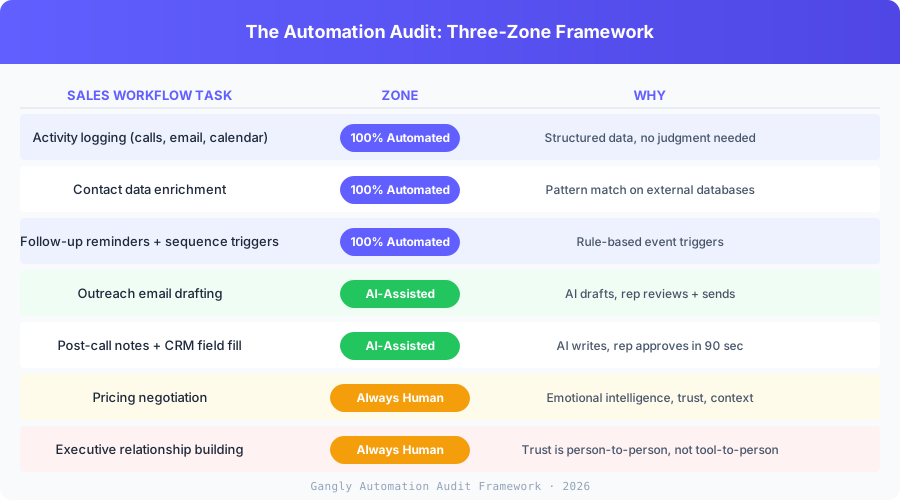
| Sales Workflow Task | Zone |
|---|---|
| Activity logging from calls, emails, and calendar | 100% Automated |
| Contact data enrichment | 100% Automated |
| Follow-up reminders and sequence triggers | 100% Automated |
| Lead scoring and routing | 100% Automated |
| Duplicate detection and CRM hygiene | 100% Automated |
| Deal stage progression after logged interaction | 100% Automated |
| Outreach email drafting | AI-Assisted |
| Post-call summary and qualification field fill | AI-Assisted |
| Account brief and call prep generation | AI-Assisted |
| Pipeline health flags and zombie deal alerts | AI-Assisted |
| Revenue forecast review | AI-Assisted |
| Pricing negotiation | Always Human |
| Executive relationship building | Always Human |
| Deal strategy and exception decisions | Always Human |
| Multi-stakeholder negotiation | Always Human |
| Reading room dynamics during live calls | Always Human |
The rest of this article unpacks each zone with specifics. The detail matters because the line between "100% automated" and "AI-assisted" is not always obvious — and teams that blur it are the ones opening support tickets six weeks later about why their pipeline data is wrong or their buyers stopped replying.
Zone 1: What to automate 100%
Six categories of sales workflow tasks meet the reliability threshold for 100% automation. Each one shares a defining characteristic: the input is structured data, the output is a field update or trigger, and human judgment adds no meaningful value. These tasks do not need the rep in the loop. Requiring manual intervention here is the definition of underautomation — and it costs the average rep two working days per week.
1. Activity logging from calls, emails, and calendar events
Every call, every email, every meeting should log automatically. CRM platforms like Salesforce and HubSpot capture email sends natively. AI call tools — Gong, Chorus, Fireflies — write call transcripts to the activity timeline with no rep input. Gangly's post-call automation handles the full sequence: transcript, summary, and activity log before the rep's next call begins. The manual equivalent costs 15 to 20 minutes per call interaction. A rep on 10 calls per week reclaims 2.5 to 3 hours per week from this change alone. For the full post-call workflow, the AI CRM automation guide covers exactly which activity types log reliably versus which still need a quick human review.
2. Contact data enrichment
Job title, company size, industry, LinkedIn URL, phone number, and tech stack should populate automatically when a contact is created. Tools like Clay, Apollo, ZoomInfo, and Clearbit write enrichment data on a schedule or on contact creation. The rep never types a company field manually. Enrichment accuracy from top providers runs above 85% for business email and above 75% for mobile numbers — well above the accuracy of reps typing data during or after a busy outbound session. Stale enrichment is a separate problem: set a 90-day refresh cadence so job change data stays current.
3. Follow-up reminders and sequence triggers
When a prospect has not been touched in 14 days, a reminder surfaces. When a buyer opens an email three times in an hour, a trigger fires. When a deal stage changes, the next sequence step starts. These are deterministic rules on event data. AI improves the trigger condition — not just "opened email" but "opened email twice in 24 hours and visited the pricing page" — but the execution stays automated. Reps do not set manual reminders. The system manages cadence. This removes one of the most common deal-killing behaviors: the rep who forgets to follow up because the manual reminder fell off the radar.
4. Lead scoring and routing
Predictive lead scoring assigns a numeric priority to every lead based on fit signals (company size, industry, tech stack match) and behavioral signals (email opens, site visits, content downloads). The highest-scored leads route to the relevant rep or sequence automatically. No queue review meeting. No SDR manually deciding which accounts to work each morning. The result is a rep who starts every day with a ranked list of the accounts most likely to convert — not a flat list sorted by date added. Signal-based selling approaches that feed lead scoring with buying signals from job changes and funding announcements see 3x to 5x improvement in meeting book rate over static list prospecting.
5. Duplicate detection and CRM hygiene
AI deduplication runs on a schedule and merges or flags records that match on email, phone, or name plus company. Hygiene automation removes contacts with hard bounces, marks inactive companies, and standardizes field formats. These are pattern-matching tasks at scale — the exact type of work where machine precision consistently beats human attention. DedupeLy, ZoomInfo's deduplication module, and Salesforce's native duplicate rules all handle this automatically with the right configuration. The prerequisite: define what a "clean" record looks like before turning on any deduplication rule, or you risk auto-merging records that should stay separate.
6. Deal stage progression after a logged interaction
When a call is logged with a specific outcome — demo completed, proposal sent, verbal agreement captured in the transcript — the deal stage should advance automatically based on predefined criteria. AI reads the call summary and the qualifying criteria for the next stage, then pushes the update. Reps do not drag pipeline cards manually. They run calls. The system records the outcome. The condition for reliable automation here is clean stage definitions: each stage must have binary exit criteria (either the criteria is met or it is not) for the AI to advance the deal accurately.
Zone 2: What needs AI assist, not full automation
Five more sales workflow tasks benefit enormously from AI — but require a human in the loop before the output becomes a CRM record or a sent message. The key distinction: in Zone 1, the machine acts and the human only intervenes when something goes wrong. In Zone 2, the machine drafts or flags and the human decides whether to accept, modify, or override.
Misclassifying Zone 2 tasks as Zone 1 is the most common configuration error in sales automation rollouts. An outreach email drafted and auto-sent without a rep read misses the relationship context the rep holds and the AI cannot see. A call summary pushed directly to Salesforce without review captures the AI's interpretation of the conversation, not the rep's. The rule: if the output touches a buyer or affects a forecast number, a human must approve it first.
Outreach email drafting
AI drafts the email in 90 seconds. The rep reads, edits if needed, and sends. This division is where most AI sales tools earn their ROI: the first draft takes the most time, and a signal-grounded AI draft is typically 80% ready to send. The rep adds the 20% that requires relationship context the system does not have. What makes the draft good or poor is the signal behind it. An email that opens with a specific buying signal — "saw the job post for a VP of Sales, which usually means you are building a new outbound motion" — outperforms a generic opener by 5 to 10 times on reply rate. The rep is in the loop not because the AI cannot write, but because the rep knows things about the relationship that no data source contains.
Post-call summary and qualification field fill
Post-call AI generates the summary and pre-fills MEDDPICC, BANT, or SPIN fields from what was said on the call. The rep reviews the output within five minutes of the call, corrects any misinterpretations, and approves. On a standard 30-minute discovery call, the review takes under 90 seconds instead of 20 minutes to write manually. AI accuracy on well-structured calls with clear audio runs above 90% for major qualification criteria. The edge cases — ambiguous buyer language, rapid topic switches, heavy jargon — still need a rep's read to catch errors before they land in the pipeline record.
Account brief and call prep generation
AI assembles the pre-call brief: company news, headcount changes, recent funding, tech stack, buyer history from the CRM, and three suggested discovery questions. The rep reads the brief and adjusts based on what they already know about the relationship — context no external database holds. Reps who skip the review and read the brief cold on the call get caught when the AI missed a nuance: a reorg the buyer mentioned last quarter, a pricing conversation that ended badly six months ago. The brief is a foundation. The rep adds the context layer. Gangly builds the brief from live CRM data, so the account history and last three touchpoints pull in automatically rather than requiring the rep to open five tabs before a call.
Pipeline health flags and zombie deal alerts
AI scans the pipeline weekly and surfaces deals with stale close dates, missing next steps, or no activity in 21 or more days. The flag goes to the rep as an action item — not an automatic field change. The rep decides: re-engage, move the close date, or mark lost. AI gets the pattern right. It sees a deal sitting in "Proposal Sent" for 45 days and knows it is at risk. The human knows whether that risk exists because the champion went quiet or because procurement runs slow in this industry. That context changes the response. AI provides the signal. The rep runs the play.
Revenue forecast review
AI forecasting tools read deal stage, close date, engagement signals, and historical win rates to produce a predicted revenue number. Clari, Gong Forecast, and Salesforce Einstein generate these predictions with meaningful accuracy on standard deals. The rep and manager review the AI forecast, adjust for deals the system cannot see — verbal commitments, relationship factors, competitive dynamics — and submit a human-reviewed number. AI forecasting reduces variance. The final number always has a human accountable for it.
Zone 3: What stays human — always
Five categories of sales work stay human regardless of automation tool sophistication. These tasks share a common trait: they require judgment that depends on relationship history, emotional intelligence, or contextual factors that no AI system reliably accesses in 2026.
The honest position on AI automation limits in 2026: AI processes data, scores intent, and writes a strong first draft. It cannot read a room, build trust over time, or make a judgment call when two signals point in opposite directions. Teams that automate these five tasks — even partially — report damaged pipeline quality and rep trust within one quarter. The machine handles the work around the relationship. The human owns the relationship itself.
Pricing negotiation
Negotiation is not a data problem. It is a trust problem played out in real time. The rep on the call reads hesitation, hears confidence, and decides whether the CFO objection is a test or a hard no. AI provides the data context — standard discount thresholds for this buyer segment, historical close rates at this price point. It cannot decide whether this specific CFO is genuinely price-sensitive or performing a ritual objection. That judgment call determines whether the rep holds the number, offers a value reframe, or proposes a restructured deal. The machine provides the preparation. The human runs the negotiation.
Executive relationship building
C-suite relationships are built on trust in the person, not the product. An executive who buys from a rep at one company follows that rep to the next. That trust is entirely human. AI can surface relevant conversation starters, flag company news before an executive call, and generate a crisp brief. It cannot build the earned credibility that comes from being in the room, navigating a hard conversation well, and keeping a commitment six months after it was made. The rep is irreplaceable here — and any attempt to automate executive touchpoints with AI-generated messages will signal inauthenticity faster than it builds pipeline.
Deal strategy and exception decisions
Should the rep accelerate this deal or let it breathe? Bring in a solutions engineer now or wait for a second call? Propose a shorter contract to get the deal unstuck? These judgment calls depend on dozens of factors no CRM captures — the rep's read of the champion's political capital, the knowledge that this buyer's budget resets in October, the relationship between the rep and the prospect's legal counsel. AI models the average outcome based on historical data. The rep navigates the specific situation. Both inputs matter. Neither replaces the other.
Multi-stakeholder negotiation
Enterprise deals with five or more stakeholders require the rep to hold a live map of who wants what, who is blocking whom, and whose definition of success matters most at each stage. AI can document the buying committee — titles, engagement history, last contact date. It cannot synthesize the political dynamics between those people or decide in real time which stakeholder to address in which order. That synthesis is where enterprise deals are won or lost, and it requires a human with full context of the relationship arc, not a system reading a CRM record.
Reading room dynamics during live calls
The live sales call is where the human rep retains a permanent advantage. The pause before a price question. The energy shift when a new stakeholder joins the Zoom. The laugh that signals the objection is performative. These signals do not appear in transcripts. They register in the room — or on the screen — and the rep processes them in real time. Live call coaching AI surfaces objection responses and suggested talk tracks during the call. It does not replace the human reading the room, and no model in 2026 comes close to that capability.
The Gangly connected automation sequence
Most automation stacks solve one step in isolation. A notetaker captures the transcript. An enrichment tool fills company fields. A sequencer fires follow-ups. Each tool works. Together, they create a stack of four or five logins, four or five data sources that do not sync cleanly, and four or five points where the rep has to manually bridge the gap between systems.
Gangly connects the sales workflow end to end: signal detected → outreach drafted → call prepared → live coaching delivered → notes generated → CRM updated. No manual bridge. No end-of-day data entry block. The rep goes from signal to closed record without touching a CRM field at any step in the sequence.
- 1
Signal Detection → Contact enrichment fires automatically
When a buying signal is detected — job change, funding round, hiring post, technology install — Gangly enriches the contact record with current company data, title, and signal context. The rep opens their morning feed to warm, enriched accounts rather than blank records.
- 2
Outreach Drafting → Activity logs on send
The AI drafts a signal-grounded first message in under 2 minutes. The rep reviews, edits if needed, and sends. On send, the outreach logs to the CRM record automatically — subject, body, timestamp, signal context. Zero manual entry.
- 3
Call Prep → Brief generated from live CRM data
The pre-call brief pulls from the CRM record's activity history, the last three touchpoints, the open email threads, and the current deal stage. The rep reviews the brief in under 8 minutes instead of the manual 45-minute prep routine most AEs still run.
- 4
Live Coaching → Next step staged before call ends
During the call, Gangly surfaces objection responses and suggested next steps. As the call closes, the follow-up task is already staged in the CRM — waiting for a one-click confirmation, not a blank field.
- 5
Post-call Notes → CRM Updated → Deal moves forward
Gangly generates the call summary, pre-fills MEDDPICC fields from what was said, drafts the follow-up email, and pushes the stage update to Salesforce or HubSpot. The rep reviews in under 90 seconds and approves. The record is complete before the next call starts.
The time saved on sales workflow tasks alone — across CRM logging, outreach drafting, call prep, live coaching assist, and post-call notes — averages 28 to 32 hours per rep per week in Gangly's Q1 2026 cohort of 38 reps. That is not a marginal improvement. It is a structural change to how much of the working week a rep spends in buying conversations versus administrative work.
How to implement sales workflow automation in four weeks
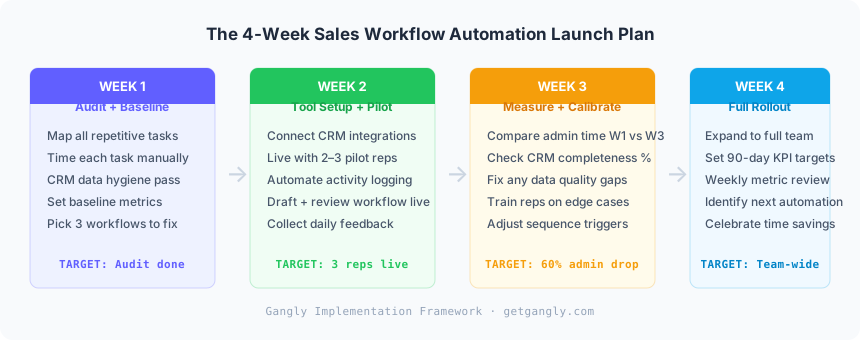
Sales workflow automation does not require a six-week implementation project. A rep-facing tool should be live for a pilot group within one week. Full team rollout should finish within four weeks. The implementation sequence matters: automate the structured, internal-facing tasks first. Build to the buyer-facing tasks only after you have established a reliable data foundation.
Week 1: Audit and establish baseline
Before any tool configuration, map every repetitive task in your current sales workflow and time each one manually. Common findings: CRM data entry runs 8 to 10 hours per rep per week. Post-call notes average 18 to 22 minutes per call. Outreach drafting takes 10 to 15 minutes per email from a blank page. Run a CRM hygiene pass before automation goes live: purge contacts with no activity in 180 days, standardize stage names, and enforce next step plus next date on every open deal. Automation amplifies whatever exists in the system. Clean the foundation first.
The metric to baseline in Week 1: minutes per rep per week on CRM admin, outreach writing, and call prep combined. Self-report via a one-question survey. This number is the benchmark that measures whether automation is working.
Week 2: Tool setup and two-rep pilot
Connect the automation tool to your CRM. Start with a two to three rep pilot. The pilot configuration should cover the highest-volume Zone 1 tasks first: activity logging from calls and emails, contact enrichment on new records, and follow-up trigger rules. Let the pilot run for five working days before adding Zone 2 capabilities (AI-assisted outreach drafting and post-call summaries). Collect daily feedback: what outputs does the rep trust, what do they override, and where does the system miss context they hold.
The pilot data is diagnostic. If the activity log accuracy is above 90%, expand. If the AI call summaries require heavy correction, the call structure or audio quality needs attention before scaling. Fix the underlying issue before rolling out to the full team.
Week 3: Measure and calibrate
Compare Week 3 admin minutes to the Week 1 baseline. Target: 50 to 60% reduction in the pilot group. Check CRM completeness score — percentage of open opportunities with all required fields filled. It should climb to 85% or above by Week 3 if the automation is working. Identify any tasks the pilot reps are still doing manually that should be automated. Adjust trigger conditions and field mappings. Fix any data quality gaps the pilot surfaced. Train reps on the two or three edge cases the AI handles poorly.
Week 4: Full team rollout
Expand the configuration to the full team with the calibrations from Week 3 already applied. Set 90-day KPI targets: CRM completeness above 90%, admin time below 4 hours per week per rep, meetings booked from signal-led outreach up by at least 30%. Run a weekly 15-minute metric review for the first four weeks post-rollout. The number that does not move is the workflow segment that needs attention — either the tool configuration, the rep adoption, or the underlying task is in the wrong zone and needs reclassification.
Five automation mistakes that stall results
Most sales workflow automation rollouts that stall make the same five mistakes. Each is avoidable. Together, they account for nearly every case where a team bought an automation tool and saw no measurable improvement in rep output after 90 days.
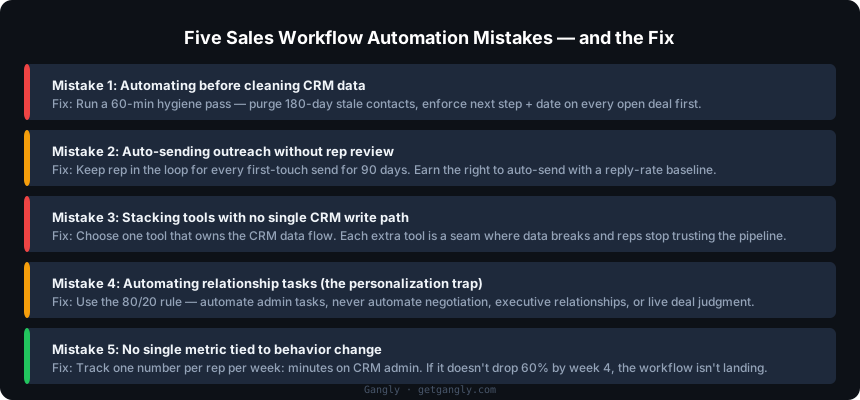
Mistake 1: Automating before cleaning the data
Automation amplifies what already exists in the CRM. A pipeline full of zombie deals, blank required fields, stale close dates, and duplicate contacts does not improve with automation — it becomes messier at machine speed. The fix: run a hygiene pass before any automation layer goes live. Purge contacts with no activity in 180 days. Standardize stage names. Enforce next step plus next date on every open deal. The automation runs cleanly on a clean foundation. Run it on dirty data and the AI outputs are only as reliable as the inputs feeding them.
Mistake 2: Letting AI send outreach without rep review
Auto-sending AI-drafted outreach without a human read misses context the system cannot access: the conversation that happened at a conference four months ago, the buyer who asked to be followed up in Q3, the relationship that is warm and does not need a cold opener. Brand damage from a tone-deaf message to a warm prospect is hard to undo. Keep the rep in the loop on every first-touch send for the first 90 days. Earn the right to reduce review frequency with a reply-rate baseline that demonstrates the AI draft quality meets the threshold.
Mistake 3: Stacking tools without a single CRM write path
Five tools that each write to the CRM in slightly different formats produce five partially-synced records and one pipeline nobody trusts. The most common broken stack: a separate notetaker, a separate enrichment tool, a separate sequencer, a separate coaching tool, and the CRM's native AI — each writing activity logs in a different format and on a different schedule. The fix: choose one tool that owns the CRM data flow end to end. Each additional tool in the stack is a seam where data breaks and reps stop trusting the output.
Mistake 4: Automating relationship tasks (the personalization trap)
The personalization trap is the most damaging failure mode in sales automation. Teams see that AI can draft 500 emails in the time a rep writes one — and they run that math all the way to full auto-send. Buyers receive messages that read as AI-generated. Reply rates drop. Opt-outs climb. The brand looks cheaper than it is. The fix is the 80/20 rule: automate the research and the draft, never the final send decision and never the relationship tasks in Zone 3. The rep's review is not friction. It is the quality gate that keeps automation from becoming noise.
Mistake 5: No metric tied to rep behavior change
If the only measure of success is "the tool is deployed," nobody can tell whether it is working. Track one metric per rep, per week, for the first 90 days: minutes on CRM admin. If that number does not drop by 60% within four weeks, the workflow is not landing and intervention is needed — more rep coaching, a different configuration, or a different tool. The metric that matters is not vendor uptime or feature adoption rate. It is rep behavior change, measured in time reclaimed for selling.
Four metrics that prove it is working
Four metrics tell the full story of whether sales workflow automation is earning its seat on the team. Track all four weekly for 90 days after rollout. Three of four moving in the right direction by week eight means the automation is working. Two or fewer means the problem is either data quality, workflow adoption, or the wrong zone assignment for one of the automated tasks.
Metric 1: Admin time per rep per week
Baseline before rollout. Measure again at week four and week twelve. Target: 60% reduction by week four. Reps starting at 10 hours per week on CRM admin should be under 4 hours by week four. The task-level breakdown matters — if one specific task still takes the same time, that task is either misconfigured or in the wrong automation zone. Source: Gangly cohort data, Q1 2026, n=38 reps.
Metric 2: CRM completeness score
Percentage of open opportunities with all required fields filled: a next step, a next step date within policy, a close date that has not slipped, and the qualification criteria fields. Target: 90% or above within 30 days of rollout. If it plateaus at 70%, the AI is writing fields that reps are overwriting — which means the AI output quality or the rep trust in that output needs attention.
Metric 3: Meetings booked from automated outreach
Track meetings booked per rep per week from outreach where the initial draft was AI-generated and signal-grounded. Reps acting on buying signals within 24 hours book 3.4 times more meetings than reps acting on the same signals after 72 hours (Gangly cohort, Q1 2026). If signal-led outreach numbers are flat after 60 days, the issue is either signal quality or the AI draft quality before rep review.
Metric 4: Forecast accuracy variance
Measure the gap between committed forecast and actual close at month end. Sales workflow automation that keeps pipeline records current and stage progressions honest should tighten forecast accuracy by 5 to 8 percentage points within two quarters. If variance is getting worse, the automation is pushing stage progressions that do not reflect deal reality — typically because qualification criteria in the CRM are not calibrated to how deals actually move in this segment.
For a deeper look at CRM-specific automation — what AI handles inside Salesforce or HubSpot, what needs human review, and the five most common rollout errors — the AI CRM automation guide covers the CRM layer specifically. This article covered the broader workflow. The CRM guide covers the database that sits beneath it.