
 By Siddharth Gangal
TL;DR
- What it is: the LinkedIn Social Selling Index is a free 0–100 score that measures your LinkedIn selling effectiveness across four pillars — professional brand, finding prospects, engaging with insights, and building relationships. It updates daily at linkedin.com/sales/ssi.
- Good score: the average SSI sits at 40–50 across all users. A score above 70 puts you in the top 25% of your industry. Anything above 86 is industry leader tier.
- Fastest gains: complete the profile to All-Star status (brand pillar), run 5+ daily searches and save 20 leads (find pillar), and post 3× per week with 5 substantive comments daily (engage pillar). Most reps gain 15–25 points in 30 days.
- Critical caveat: SSI is a behavioral diagnostic, not a pipeline predictor. The goal is to convert the habits that raise the score into actual signal-triggered outreach — and that is where the meetings come from, not the number itself.
Gangly Newsletter
Get the weekly playbook for signal-based outbound
Tactics on LinkedIn selling, signal-based prospecting, and rep workflows — sent every Tuesday.
Subscribe freeWhat is the LinkedIn Social Selling Index?
The LinkedIn Social Selling Index (SSI) is a 0–100 score that LinkedIn calculates for every user to measure how effectively they use the platform for social selling. It reflects activity across four equally weighted behaviors — building a professional brand, prospecting for the right contacts, engaging with relevant content, and nurturing relationships. The score updates every 24 hours and is freely accessible at linkedin.com/sales/ssi.
LinkedIn introduced the SSI in 2014 as a paid feature for Sales Navigator subscribers. In August 2015, the company opened it to all members at no cost. Since then, the SSI has become one of the most-cited LinkedIn metrics in sales training programs, manager coaching sessions, and SDR onboarding curricula — which is both a sign of its influence and a source of misunderstanding about what it actually measures.
The score reflects behavior over the trailing 90 days, not a single day's activity. This means a rep who was very active for six months and then went quiet will see their score decay gradually — typically losing two to four points per week with zero activity. The score also compares you against two benchmarks: others in your industry and others in your LinkedIn network. Both benchmarks appear on the SSI dashboard.
One important clarification: the SSI score does not affect your profile's search visibility or how many people see your posts. LinkedIn has confirmed this explicitly. The score is a diagnostic tool for you — not a ranking signal for their algorithm. However, the behaviors it tracks (posting content, engaging with prospects, building an active network) do influence organic reach because LinkedIn's feed algorithm rewards consistent engagement.
For B2B reps doing outbound — AEs, BDRs, and founders — the SSI serves as a useful health check on LinkedIn habits. The relevant question is not "how high is my score?" but "which pillar is lowest, and what does that tell me about a gap in my prospecting or relationship behavior?" That diagnostic lens is what makes the SSI worth tracking weekly, not obsessing over daily. Read more about how LinkedIn fits into a broader outbound strategy in the guide to cold email vs LinkedIn outreach.
How to find your SSI score in 60 seconds
Finding your SSI takes under one minute. Open a browser, log in to your LinkedIn account, and navigate to linkedin.com/sales/ssi. The page loads immediately and requires no Sales Navigator subscription. You do not need to request access or sign up for any trial.
What you will see on the dashboard:
- Total SSI score — your composite 0–100 score, displayed prominently at the top.
- Four pillar sub-scores — each out of 25, shown as segments of a donut chart.
- Industry rank — your percentile position compared to all LinkedIn users in your industry.
- Network rank — your percentile position among your direct connections.
- Trend line — a chart showing your SSI over the last few weeks so you can see whether you are moving up or drifting down.
Check the score every Monday morning as part of your weekly LinkedIn planning session. Compare each pillar sub-score to the previous week. If one pillar dropped, identify which behaviors you skipped. The trend matters more than the absolute number — a score moving from 55 to 65 in four weeks signals that your habits are working. A flat score at 72 for three months means you have plateaued and likely need to vary your activity.
For teams, managers can ask each rep to screenshot their SSI breakdown at the start of a weekly 1:1. Compare the pillar breakdown across the team. If the entire team scores poorly on "Find the Right People," that is a coaching signal: the team is not running enough searches or saving enough leads daily. If most reps score well on brand but poorly on relationships, the gap is in follow-up and DM nurture — not content.
The four SSI pillars — 25 points each
The SSI splits your total score into four blocks of 25 points each. Each pillar scores a distinct category of LinkedIn behavior. A rep who posts content daily but never searches for prospects will score high on brand and engagement, but low on find people — and the total score reflects the gap.
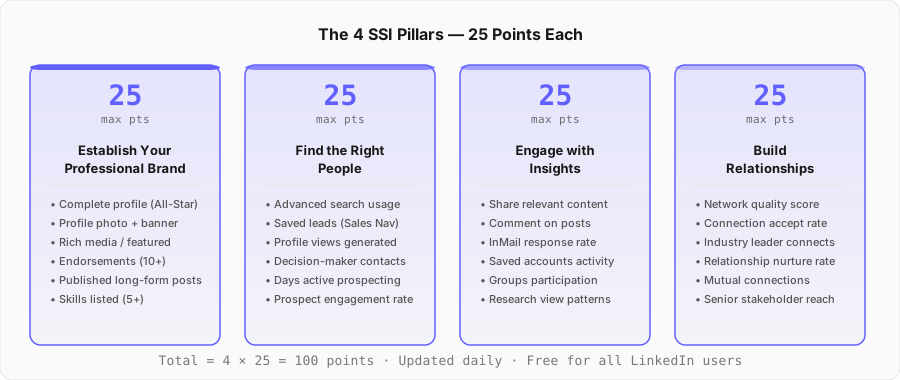
Pillar 1: Establish Your Professional Brand (up to 25 points)
LinkedIn scores how complete, credible, and content-rich your profile is. A sparse profile with no featured section, no endorsements, and no published posts will cap your brand pillar below 10.
- Reach All-Star profile status — fill every section, including the About, Experience descriptions, and Education.
- Add five or more pieces to your Featured section: posts that performed well, a case study PDF, a short video intro.
- Collect at least 10 skill endorsements from colleagues and clients. Endorse theirs first — most reciprocate within a week.
- Publish a long-form article or newsletter post. LinkedIn weighs original content more heavily than reposts.
- Replace the default banner image with a custom one that signals your role, company, or ICP-facing value proposition.
Pillar 2: Find the Right People (up to 25 points)
This pillar measures how actively you search for and save ICP-matched prospects. LinkedIn tracks the number of advanced searches you run, leads you save, profiles you view, and days per week you actively prospect.
- Run five or more filtered searches per day using Sales Navigator. Filter by seniority, company size, geography, and job change recency.
- Save 20 or more ICP leads per day. Saved leads signal active prospecting to the algorithm.
- View 15 to 25 decision-maker profiles per day. Profile views generate return views — a warm signal that costs nothing.
- Send 10 personalized connection requests daily. Personalized requests accept at 3x the rate of blank requests.
- Use the "Posted in the last 30 days" filter to find prospects who are active. Active users reply faster.
Pillar 3: Engage with Insights (up to 25 points)
LinkedIn scores your engagement depth — how often you comment on relevant posts, share content with original commentary, respond to InMails, and interact with saved account activity. Passive scrolling earns nothing.
- Comment on five prospect or industry leader posts each day. Write three or more sentences — one-word comments rank as noise.
- Share one article per week with two or three sentences of your own perspective. The original take is what earns the engagement points.
- Reply to every comment on your own posts within 24 hours. Response rate lifts your InMail response score indirectly.
- Join three or more groups in your ICP industry and post once per week inside each.
- Respond to InMails within 24 hours, even if the answer is no. Response speed affects this pillar score directly.
Pillar 4: Build Relationships (up to 25 points)
The final pillar scores the quality and growth of your network — specifically whether you are connected to senior decision-makers, whether new connections accept your requests, and whether you are maintaining active two-way relationships.
- Send five warm, contextual DMs each day to recently accepted connections. The goal is a real exchange, not a pitch.
- Connect with VP-level and C-level contacts at target accounts. Network quality (seniority mix) matters more than quantity.
- Congratulate connections on promotions, new roles, and funding announcements. LinkedIn surfaces these in the notifications tab.
- Ask satisfied clients and colleagues for introductions to their second-degree contacts who match your ICP.
- Follow up with every connection who engaged with your content that week. Engagement is a warm hand-raise.
Reps who work all four pillars consistently — not just the easiest two — generate compounding returns. A strong brand brings profile views. Profile views become search results. Engagement adds name recognition before the cold outreach. Relationships warm up the DM. That full loop is exactly what social selling on LinkedIn looks like when it works.
What is a good SSI score? Benchmarks by role
The average SSI across all LinkedIn users sits between 40 and 50. That number is pulled down by the vast majority of LinkedIn profiles that are essentially dormant — created for job applications, never actively used for selling. Among B2B sales professionals with an active LinkedIn presence, the practical average is closer to 55 to 65.
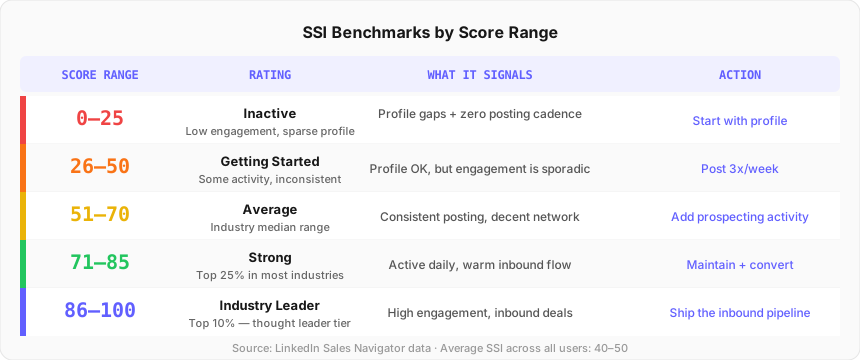
| Score Range | Rating | What It Signals | Priority Action |
|---|---|---|---|
| 0–25 | Inactive | Profile incomplete, near-zero activity | Start with profile completeness this week |
| 26–50 | Getting Started | Some activity, inconsistent cadence | Post 3× per week, run 5 searches daily |
| 51–70 | Average | Industry median — most reps land here | Add daily prospecting and engagement routines |
| 71–85 | Strong | Top 25% in most industries | Maintain the habits, shift focus to pipeline |
| 86–100 | Industry Leader | Top 10% — thought leader tier | Convert inbound attention into booked meetings |
Benchmarks by industry
SSI benchmarks vary by industry because LinkedIn activity norms differ. Technology, SaaS, and digital marketing professionals tend to score higher because LinkedIn is a core tool in those verticals. Manufacturing, logistics, and construction professionals often score lower — not because they sell less effectively, but because their selling motion relies less on LinkedIn as a channel. Industry SSI rank matters more than raw score: a score of 58 in manufacturing may rank in the top 15% of that industry, while a score of 70 in SaaS puts you near the median.
Practical targets by role:
- AE (active outbound): 70–80. The goal is consistent prospecting and content presence that makes cold outreach warmer.
- BDR / SDR: 65–75. High prospecting activity score (pillar 2) is the priority. Brand pillar matters less at this stage.
- Founder doing outbound: 70+. The personal brand pillar is especially important because prospects research the founder before replying to outreach.
- Sales manager: 60+. Posting regularly and maintaining a visible network signals credibility to candidates and prospects alike.
How to improve your SSI score: pillar-by-pillar
Improving your SSI score requires changing specific daily behaviors, not running a one-week sprint. The score reflects 90-day activity. A single day of heavy engagement will not move it significantly. What does move it is a consistent daily routine across all four pillars, maintained for four or more weeks.
The fastest single improvement for most reps starting at 40–55: complete the LinkedIn profile to All-Star status and post three times in the first week. The brand pillar often represents the biggest drag on total score for reps who have been on LinkedIn for years but never updated their profile beyond a job title and headshot. Filling the About section, adding the Featured section, and collecting 10 skill endorsements can move the brand sub-score from 8 to 18 in under a week.
Pillar 1: Improve your professional brand score
Fill the LinkedIn profile completely. Every empty field is a lost point. The most impactful changes in order: (1) write a specific, ICP-facing About section that states who you help and how, not a bio about yourself; (2) add five Featured section items — a strong post, a written article, a case study, or a company page; (3) upload a professional headshot and a custom banner image; (4) list all relevant skills and request endorsements from five colleagues today. Then post three times per week — short-form commentary or original insights about your industry, not reposted articles with no added perspective. Original posts earn more brand points than reshares.
Pillar 2: Improve your find the right people score
This pillar rewards active prospecting behavior. Run five or more filtered searches per day. Save 20 ICP-matched leads daily — this is the single highest-leverage action for this sub-score. View 15 to 25 decision-maker profiles per day; profile views trigger return views, which creates organic awareness before any message is sent. Send 10 personalized connection requests daily. Personalization does not mean a long paragraph — one sentence referencing a specific post they wrote or a mutual connection is enough to triple accept rates. Read the full approach in the guide to LinkedIn outreach best practices.
Pillar 3: Improve your engage with insights score
Engagement quality matters more than quantity for this sub-score. Commenting "great post!" on 20 items per day earns very little. Leaving a three-sentence, substantive response — adding a counterpoint, a related stat, or a real example — on five posts earns significantly more. Pick five prospect or industry leader posts from your feed each morning and write one genuine comment on each. Share one piece of content per week with two or three sentences of your own commentary added above the share. Respond to InMails within 24 hours. Even a short "not the right time, but I will keep your note on file" counts as a response and lifts the sub-score.
Pillar 4: Improve your build relationships score
The relationship pillar is the slowest to improve because it reflects network quality accumulated over time, not just recent activity. The fastest short-term lever: send five warm, non-pitch DMs per day to recently accepted connections. A simple opener — "thanks for connecting — saw you joined [Company] recently, interested in how you are approaching [topic]" — starts a real exchange. Congratulate connections on promotions, new roles, or company milestones. LinkedIn surfaces these in the notifications tab. Every reply to a congratulations message lifts the relationship sub-score. Connect with VP and C-level contacts at target accounts — the seniority mix of your network directly affects this pillar.
The 30-day SSI improvement plan
Most reps starting at a score of 40–55 can reach 65–80 in 30 days with a structured daily routine. The plan below assigns each week to a pillar-specific focus while maintaining baseline activity on the others.
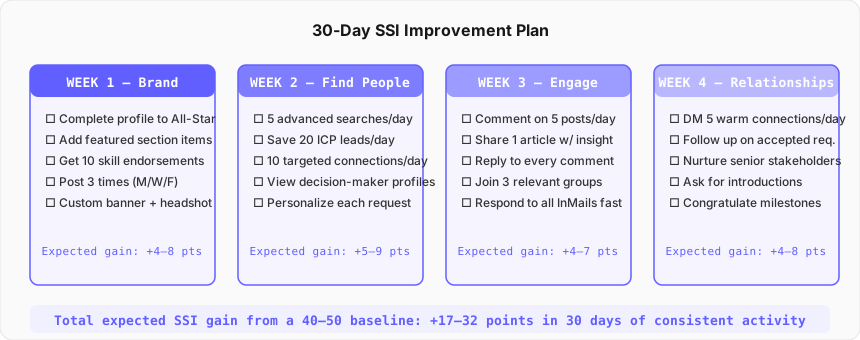
The daily time investment for this plan: 25 to 35 minutes. Breakdown: 10 minutes in the morning for searches and profile views, 10 minutes for commenting and sharing content, 5 to 10 minutes for DMs and relationship management. Block the same time each day — morning before the first call works best for most reps because the LinkedIn feed is freshest and engagement rates are higher between 7 and 9 a.m. in the prospect's time zone.
One critical rule: do not let SSI activity replace pipeline activity. Reps who spend 90 minutes per day optimizing LinkedIn habits and book no meetings have traded the output for the input. Track both — SSI score and meetings booked from LinkedIn — week over week. If the score rises but meetings do not, the habits are not translating. The fix is usually that the content is too broad (not ICP-specific) or the DMs are too generic (no signal reference). Both are fast fixes.
SSI vs pipeline: the honest relationship
LinkedIn's own research makes bold claims about the SSI. Social selling leaders create 45% more opportunities than peers with lower scores. They are 51% more likely to hit quota. They outsell non-social sellers by 78%. B2B buyers are 58% more likely to buy from industry experts they already follow.
Those numbers get cited constantly in sales enablement decks. They deserve a sharp caveat: they are correlative, not causal.
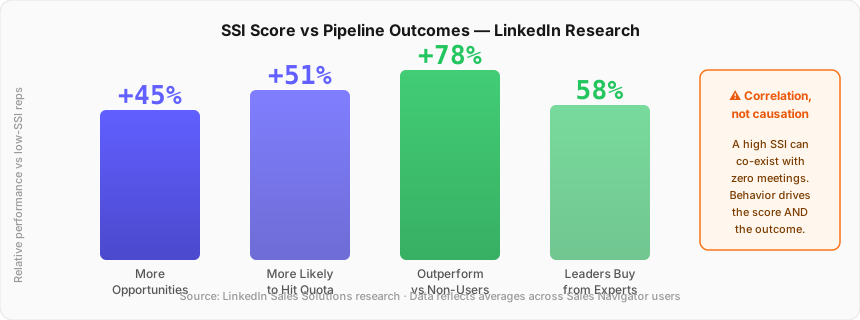
A high SSI score does not cause more pipeline. The behaviors that produce a high SSI — actively prospecting for the right contacts, engaging consistently with relevant content, building a warm network — are the same behaviors that produce pipeline. The score and the outcome share a common cause: consistent, disciplined LinkedIn selling habits. Remove those habits and both the score and the pipeline decay together.
The misuse of SSI happens when reps chase the number without connecting it to real output. A rep who posts every day, comments on everything, and accepts every connection request can hold an SSI of 80 while booking zero meetings from LinkedIn. The score measures inputs, not outcomes. The moment you treat it as a goal rather than a diagnostic, it becomes useless.
The practical framework: track SSI weekly as a leading indicator. Track meetings booked from LinkedIn as the lagging outcome. If SSI rises but meetings do not, something in the conversion step is broken — the outreach is not signal-led, the profile does not build enough credibility, or the DMs are too generic. If meetings are growing but SSI is flat, you are generating pipeline through channels the SSI does not capture and that is fine. Let the pipeline metric win. You can read about the broader connection between LinkedIn signals and pipeline in the signal-based selling guide.
The Signal-First Framework: converting SSI into meetings
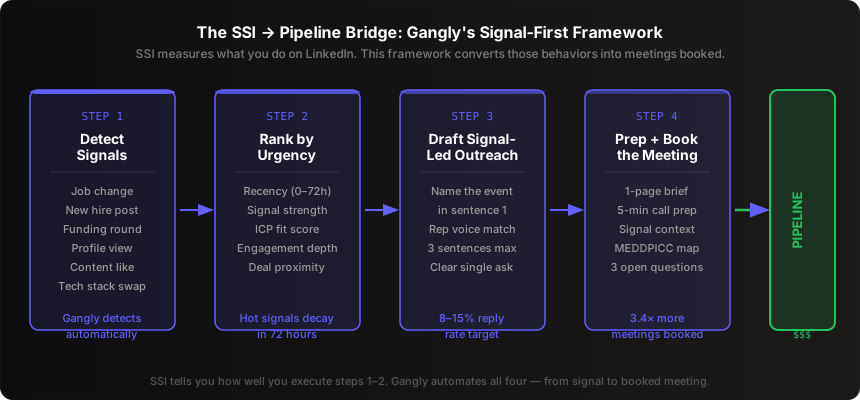
SSI tracks whether you are doing the right LinkedIn behaviors. The Signal-First Framework turns those behaviors into a specific, repeatable motion that ends with meetings booked — not just a higher score.
Step 1: Detect the right signals
The strongest LinkedIn signals for outbound are: a prospect viewed your profile (they raised their hand), a prospect posted about a challenge in your ICP pain cluster, a contact changed jobs to a new company in your ICP, or a target account posted a hiring role in a function you sell to. These signals are orders of magnitude warmer than sending a cold InMail to someone who has never interacted with you. LinkedIn's Sales Navigator surfaces many of them natively; buying signals in B2B covers the full taxonomy.
Step 2: Rank by urgency — hot signals decay in 72 hours
Hot signals decay in 72 hours. A job change post from a buyer is most relevant the week it happens. A profile view is most meaningful the day it occurs. A funding announcement loses urgency once competitors have all sent congratulatory messages on day two. The rep who reaches out inside 24 hours of a signal fires is competing with far fewer vendors than the rep who emails on day seven. Rank your signal list daily by recency, not by account size.
Step 3: Draft signal-led outreach — name the event in sentence one
The outreach message must reference the specific signal in the opening sentence. "Saw you joined Acme from Northwind three weeks ago" outperforms "hope this message finds you well" by a factor of five to ten on reply rate. Keep the message short — three sentences: the signal reference, the connection to a pain you solve, and a single low-friction ask. The rep reviews and ships. Signal-led outreach drafted on the back of SSI-building behavior is what produces the 8 to 15% reply rates LinkedIn research attributes to social sellers — not the score itself.
Step 4: Prep and book the meeting in under five minutes
When a prospect replies, the rep needs a one-page brief in minutes: who the buyer is, what signal triggered the outreach, three discovery questions tied to that signal, two likely objections, and the one outcome the prospect cares about most. Reps who prep this way close 23% more deals than reps who wing it (Gong, 2025). The sales call prep workflow covers the exact brief format. Gangly automates this step — pulling the signal context, account history, and prep questions into a single view before every call.
Common SSI mistakes to avoid
Most reps who try to improve their SSI hit the same failure modes. Each one is fixable once you know what is causing it.
Mistake 1: Treating SSI as a goal rather than a diagnostic
Managers sometimes set SSI targets — "everyone on the team should be above 70 by end of quarter." The problem: reps then optimize for the number, not for pipeline. They post generic content, leave hollow comments, and accept every connection request to inflate metrics. The score rises. The pipeline does not. SSI targets work when paired with a pipeline output metric — meetings booked from LinkedIn or inbound DM reply rate — to close the loop.
Mistake 2: Posting without an ICP lens
Posting about generic business topics — leadership, productivity, life lessons — earns engagement from other sellers but not from buyers. The content that converts SSI activity into warm inbound is content about the specific problems your ICP faces. An AE selling to RevOps leaders should post about forecast accuracy, CRM data quality, and pipeline coverage — not general sales advice. Every post is a magnet for the right audience when the topic matches the ICP's daily pain. The playbook for this is in the guide to LinkedIn content strategy for sales reps.
Mistake 3: Connecting without following up
Sending 20 connection requests per day and never sending a follow-up DM is the most common LinkedIn waste. The moment a prospect accepts the request, they have taken a micro-action that signals interest. That is the warmest moment in the entire relationship sequence. A rep who waits three weeks to send a follow-up has let that warmth evaporate. Send a short, non-pitch message within 24 hours of acceptance. Something that references why you connected and opens a real conversation.
Mistake 4: Running SSI activity in isolation from the CRM
LinkedIn signals and interactions that never make it into the CRM are invisible to the sales team, the manager, and the rep's own pipeline hygiene. A prospect who viewed your profile and then replied to a DM is a warm touch that should be logged immediately. If the rep does not log it, the account sits in the CRM as cold and uninformed outreach continues. Log every meaningful LinkedIn interaction in the CRM the same day it happens. If that takes more than 90 seconds, the CRM workflow is broken — not the LinkedIn habit.
Mistake 5: Optimizing brand while neglecting prospecting
Content creation is visible and feels productive. Running searches and saving leads is invisible and feels mechanical. Most reps default to content creation because the feedback loop — likes, comments, follower growth — is immediate and rewarding. The prospecting pillar earns fewer visible signals but drives more pipeline. Reserve 10 minutes per day for structured search and lead-save activity regardless of how well the content performed that day.
How Gangly converts LinkedIn activity to pipeline
Gangly is built to handle the pipeline side of the equation that SSI cannot score. The SSI tells you whether you are doing the right LinkedIn behaviors. Gangly takes those behaviors and converts them into meetings booked.
The workflow is one connected sequence: Signal Detection ranks LinkedIn and cross-channel buying signals — profile views, job changes, company funding rounds, hiring posts — by recency and ICP fit before 8 a.m. The rep opens Gangly and sees a ranked feed of the ten accounts most worth reaching out to today. Outreach Writer drafts a signal-led LinkedIn DM or cold email that references the specific event in the first sentence — in the rep's own voice, not a template. The rep reviews, edits if needed, and ships. When the prospect replies and a meeting goes on the calendar, Call Prep builds a one-page brief in under five minutes. Live Coaching surfaces objection responses and next-step language during the call. Notes and CRM pushes the summary and MEDDPICC fields to Salesforce or HubSpot after.
The SSI behavior that matters most for Gangly users — the Find the Right People pillar — is handled automatically. Gangly surfaces the right accounts without the rep spending 30 minutes per day manually searching LinkedIn. The rep's SSI prosecting score still benefits because Gangly's signal detection identifies and interacts with the right profiles at the right time. The difference is that the rep spends those 30 minutes on actual outreach and calls, not research.
Reps using Gangly who also post three times per week and engage daily on LinkedIn see the strongest combined results: a rising SSI score from consistent content and network activity, plus a signal-fed pipeline from Gangly's daily signal rank. The two reinforce each other — the content builds warm awareness, Gangly finds the signal that makes the first message land. See the full workflow at how Gangly works or book a 20-minute demo.