
 By Siddharth Gangal
TL;DR
- What real-time call guidance is: AI coaching cards that appear on the rep's screen during an active sales call — triggered by objection keywords, competitor names, talk-time drift, and hesitation signals. The buyer never sees or hears the guidance. The card arrives in under two seconds.
- Prompt timing matters more than prompt content: a guidance card that arrives 5 seconds after the objection competes with the rep's own improvised response. A card that arrives in 1.4 seconds lands before the rep has to decide what to say. The decision window on a B2B objection is 20–45 seconds. Late prompts are noise.
- Pre-call context loading is Gangly's unique angle: reps who enter a call with account context already loaded need fewer in-call prompts. Fewer, better prompts outperform more frequent generic ones. Every contextual card fires more accurately when the AI already knows what the rep prepared.
- Real-time guidance and post-call review serve different time horizons: Gong improves rep behavior over a quarter; Gangly's guidance moves the specific deal in the current call. Both belong in the stack. They are not substitutes.
What is real-time call guidance?
Real-time call guidance is AI-powered coaching delivered to a sales rep during an active conversation — not after it ends. The system joins the meeting as a silent participant, streams the transcript word by word, detects trigger phrases such as pricing objections, competitor names, and hesitation signals, and surfaces a relevant coaching card on the rep's screen within seconds. The buyer cannot see or hear the guidance. The rep decides whether to use the suggested frame and continues in their own voice.
Real-time call guidance — AI-powered, in-call coaching that detects objection signals, competitor mentions, and behavioral drift during a live sales conversation and surfaces a silent response card on the rep's screen, typically within 1–2 seconds of the trigger. Example: a prospect says "that sounds expensive" at minute 14 of a demo; 1.4 seconds later the rep's screen shows a reframe anchored to the pain cost the prospect stated in minute six.
The category has roots in manager whisper coaching — a practice as old as B2B sales, where a manager silently joined a call and spoke into the rep's ear when a difficult moment arose. The problem with whisper coaching is scale: one manager cannot cover ten simultaneous calls. And even when a manager is available, audio injection creates a second stream of input for the rep to process at exactly the moment they need to be fully present with the buyer.
AI-powered real-time call guidance solves both problems. Software scales across every call on every rep simultaneously. A silent screen card eliminates the audio distraction. The rep glances at the card in peripheral vision, absorbs the frame in under a second, and continues the conversation without the buyer noticing any shift.
The difference between this and post-call review is not a matter of preference — it is a matter of timing. Deals close or die on specific moments inside specific calls. The rep who handles the pricing objection at minute 18 keeps the deal alive. The rep who reads the coaching summary at 9 a.m. the next morning learns for the next call. The moment from yesterday has already resolved. For a detailed comparison of in-call coaching versus post-call analysis tools, the live call coaching guide covers the full breakdown of whisper, post-call, and AI prompt modes side by side.
Real-time call guidance has expanded beyond sales into contact centers, customer service, and compliance-intensive environments. The underlying mechanism is the same in every context: transcript streaming, trigger detection, card surface. The playbook content changes by use case. In B2B sales, the playbook centers on objection responses, battle cards, and discovery prompts. In a contact center, it centers on compliance language, escalation routing, and resolution paths.
This guide focuses on real-time call guidance for B2B sales reps — specifically AEs and BDRs running discovery and demo calls on Zoom and Google Meet. The principles apply across contexts, but the examples, metrics, and frameworks are built for the sales motion where deals advance or stall based on what happens inside a 30-minute conversation.
Why prompt timing matters more than prompt content
Every real-time guidance discussion focuses on what the prompt says. Almost none focus on when it arrives. That asymmetry is why so many real-time guidance deployments fail within 60 days: the content of the cards is acceptable but the timing renders the content useless.
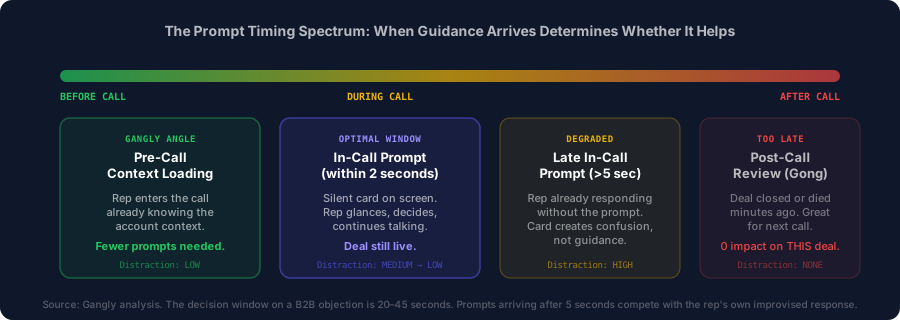
The decision window on a B2B objection is 20–45 seconds. A guidance card that arrives within 2 seconds lands before the rep begins formulating their response — the card can shape the response. A card that arrives after 5 seconds competes with the rep's own improvised answer. The rep is mid-sentence. The card creates confusion rather than direction. Prompt timing determines whether guidance helps or hinders.
The research on this is consistent across contact center and sales environments. Analysis from Chordia AI's contact center operations study finds that "when prompts are vague, late, or frequent, agents tune them out" — the guidance becomes distraction rather than support. The finding applies directly to B2B sales: a rep who stops trusting the guidance engine ignores all subsequent cards, regardless of quality.
Three latency failures destroy trust in real-time guidance systems:
Latency failure 1: Transcript buffering
Systems that buffer transcripts in 15-30 second chunks introduce structural delay. The trigger fires at the correct moment in the conversation but the system does not detect it until 20 seconds later. The card arrives when the topic has already moved on. Fix: require under-400ms word-level transcript latency from any guidance vendor.
Latency failure 2: Slow card delivery
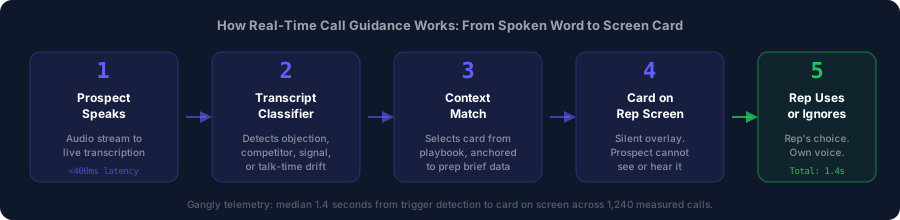
Even with fast transcription, some systems have slow card delivery — the time between trigger detection and card on screen. This is a separate latency metric. The trigger fires but the card takes 3-4 seconds to render. Gangly's median card delivery runs 1.4 seconds, measured across 1,240 calls in internal telemetry. That includes transcription time plus trigger detection plus card selection plus screen render.
Latency failure 3: False trigger volume
Systems with low-precision trigger detection fire cards on ambiguous phrases. The rep gets a pricing objection card because the prospect said "what does success look like" and the word "like" matched a fuzzy keyword rule. Five false triggers per call produces the same outcome as late prompts: the rep stops looking at the card panel.
Speed is a prerequisite, not a feature. A guidance system that is slow is not a guidance system — it is a distraction that arrives after the moment it was meant to address. Evaluate any real-time guidance tool against these three latency metrics before evaluating content quality. If the timing infrastructure fails, the best-written cards in the world produce nothing.
How real-time call guidance works technically
Understanding the technical architecture of real-time call guidance matters for one practical reason: it tells you where each vendor can fail and what to test during evaluation. Every real-time guidance system shares the same four-stage pipeline. The performance differences between tools come from how each stage is implemented.
Stage 1: Live transcript streaming
The guidance system joins the Zoom or Google Meet session as a silent participant and streams the audio to a live speech-to-text engine. Word-level transcription with speaker attribution is the requirement — the system must know whether the rep or the prospect is speaking, because trigger rules apply differently to each side. A prospect saying "expensive" is a price objection trigger. A rep saying "expensive" is context for a different pattern.
The speed target at this stage is sub-400ms from spoken word to processed text. At that latency, the transcript feeds the classifier in near-real-time. Higher latency — 1-2 seconds at the transcription stage — makes sub-2-second card delivery impossible regardless of how fast the rest of the pipeline runs.
Stage 2: Trigger detection
The transcript feeds a classifier that watches for six trigger categories: pricing objection keywords, competitor names, timing deferrals, authority escalation language, trust and risk phrases, and talk-time thresholds. Modern guidance systems use multi-signal classification rather than single-keyword rules — a pricing trigger fires when a combination of phrases, context, and conversation position match the pattern, not just when the word "expensive" appears.
Multi-signal classification reduces false trigger rates significantly. Chordia's analysis of contact center operations found that "static rules misread context, turning single words into false alarms while missing meaningful paraphrases." A rep who says "let us talk about cost" gets the same pricing card as one whose prospect said "that is too expensive" — both are correct triggers. A prospect who says "we need to think about this" does not get a timing objection card unless the broader context confirms a deferral pattern.
Stage 3: Context match and card selection
When a trigger fires, the system selects the appropriate card from the configured playbook. This is where pre-call context loading changes everything. A system without pre-call context selects from a generic playbook: the pricing card that fires has no knowledge of this buyer's stated pain, company size, or prior touchpoints. It surfaces a generic ROI reframe that may or may not connect.
A system that has loaded the pre-call brief — the rep's five-minute account summary covering prior signals, buying history, and stated pain points — can select a card that references this account's specific context. The pricing card fires with the specific cost anchor the buyer mentioned in the prep brief or earlier in the call transcript. That difference in card specificity is the difference between a rep who uses the card and a rep who ignores it.
Stage 4: Card display
The card appears on the rep's screen in a coaching overlay panel that is separate from the meeting window. The design requirement is clear: the buyer must not be able to see the card, the card must not require a click to dismiss, and the card must be readable with a single glance. Gangly's card design shows the detected trigger phrase, the recommended response frame in two to three sentences, and, where relevant, the account context that informed the selection. The rep scans it in under a second. The conversation continues without interruption.
For a full breakdown of how AI call recording tools capture and process call data after the conversation ends — the post-call layer that complements real-time guidance — the AI call recording analysis guide covers the operating model in detail.
The role of pre-call context loading
Pre-call context loading is the element of real-time call guidance that every competitor misses. The dominant vendors in this space — Balto, Abstrakt, CallMiner — describe their systems as call-time tools. The system joins the call and begins guiding. No mention of what the system knows before the call starts.
Gangly's approach is different. Before the call starts, the rep spends five minutes on a pre-call brief: account signal history, prior touchpoints, the buying team's stated pain from earlier interactions, and three suggested discovery questions. That brief is not just for the rep — it feeds the guidance engine. When the AI detects a pricing objection during the call, it does not search a generic playbook. It searches the playbook plus the context it already knows about this specific account.
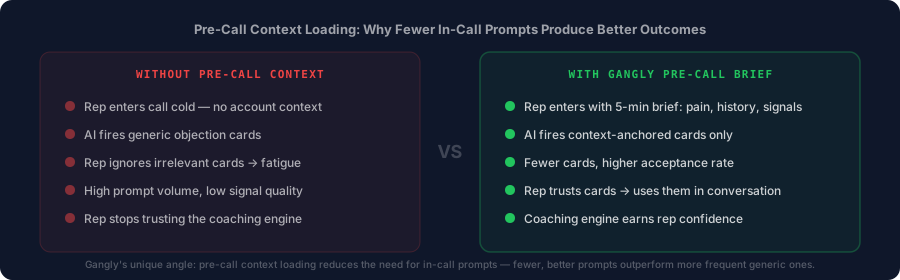
The pre-call context principle: A rep who enters a call with account context already loaded needs fewer in-call prompts. Fewer, better prompts outperform more frequent generic ones. When the AI knows what the rep knows about the account, every card it fires is anchored to something real — not a keyword pattern that could apply to any buyer. Teams using Gangly's connected pre-call and in-call workflow report prompt acceptance rates two to three times higher than benchmarks for generic real-time guidance tools (Gangly telemetry, 2026).
The mechanism is straightforward. A generic pricing card says: "Focus on ROI. Ask what the cost of inaction is." A context-loaded pricing card says: "They mentioned in the prep brief that their reps spend eight hours per week on manual CRM updates. Anchor to that cost: at their average OTE that is $6,400 per rep per year in admin time." The rep reads the second card and immediately connects it to a conversation they already had about this account. The card earns trust. The rep uses it.
This is why Gangly's UVP describes a connected sequence — "turns buying signals into prepared reps, covering outreach, call prep, live coaching, post-call notes, and CRM updates." The live coaching is the fourth stage. It is valuable precisely because stages one through three have loaded context into the system before the call starts. Without the prep workflow, the guidance is generic. With the prep workflow, the guidance is specific. For the full five-minute pre-call brief structure that feeds the coaching engine, the sales call prep workflow guide covers each element of the brief and how it connects to in-call card quality.
The Context-First Guidance Framework
After analyzing how rep adoption of real-time guidance succeeds and fails across dozens of sales team deployments, the pattern is consistent: teams that configure their guidance systems around context quality outperform teams that configure around prompt volume. The question is not "how many cards can we fire?" — it is "how accurate is each card when it fires?"
The Context-First Guidance Framework
Three layers determine whether a real-time guidance card earns the rep's trust or trains them to ignore the system.
- Layer 1 — Account context (pre-call): what the rep knows about this specific account before the meeting starts. Pain history, signal source, prior touchpoints, buying team. This layer is built by the five-minute prep brief. Without it, all downstream guidance is generic.
- Layer 2 — Call context (in-call, running): what the prospect has said in the current call. Every pain statement, buying signal, objection, and hesitation builds a running context that the guidance system can reference in subsequent cards. A card that fires in minute 22 and references something the prospect said in minute 6 is always more credible than a card that fires without that reference.
- Layer 3 — Playbook context (configured): the team's specific objection responses, battle cards, and discovery prompts, written in the voice of the team's best rep. Generic playbook content — default template copy from the vendor — produces cards that sound like marketing language. Playbook content written from the team's own best calls sounds like a colleague who has closed this type of deal before.
The framework's principle: a card that satisfies all three layers is almost always used. A card that satisfies only Layer 3 is often ignored. Teams that invest in Layers 1 and 2 get higher card acceptance rates, not because they write better prompts, but because the prompts arrive with context the rep immediately recognizes as relevant.
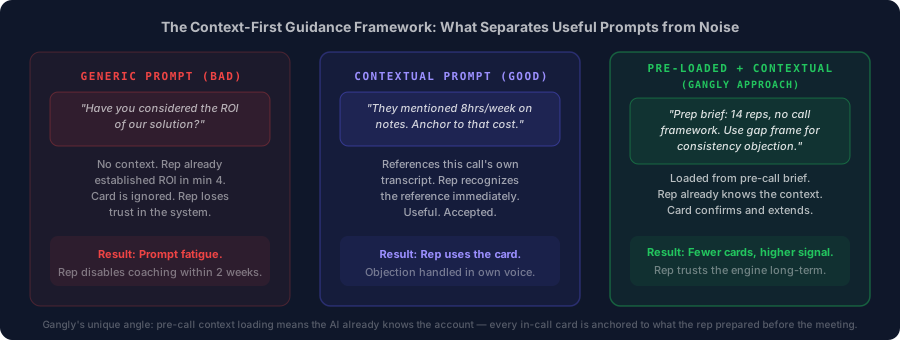
The practical implementation of the Context-First framework takes two hours on first setup and improves over 30 days as the guidance engine processes more calls. Start with Layer 3: rewrite the six objection response cards from vendor template language into the voice of the team's best rep. Then configure Layer 1 by connecting the pre-call brief workflow so the guidance engine reads the brief context before each call. Layer 2 happens automatically once the system is live — the running call transcript builds context with every new prospect statement.
Trigger types: what real-time guidance detects
Real-time call guidance detects six core trigger categories on B2B sales calls. Each trigger type has a distinct detection pattern and a distinct response goal. Understanding the six types — and what the AI is actually detecting — is the prerequisite for configuring playbook content that lands.
The six categories below cover approximately 85 percent of situations where in-call guidance changes the outcome. The remaining 15 percent require human judgment: relationship-specific situations, unstated concerns the transcript cannot capture, and deals where the rep's own read of the buyer's non-verbal signals outweighs any card suggestion.
| Trigger type | Example phrase | What the card does | Rep goal |
|---|---|---|---|
| Price / ROI objection | "That sounds expensive" | Anchors reframe to buyer's stated cost from prep brief or earlier transcript | Shift from price defense to cost comparison |
| Competitor mention | "We already use Gong" | Surfaces battle card for the named competitor — use-case gap, not attack | Differentiate on workflow, not features |
| Timing deferral | "Maybe next quarter" | Prompts test: "what would need to be true for Q3?" — separates timing from value gap | Diagnose real objection vs. disguised priority problem |
| Authority escalation | "I need to check with my boss" | Multi-thread entry prompt — advance to next stakeholder, do not accept deferral | Expand contact map, prevent deal stall |
| Trust / risk concern | "We tried this before and it failed" | Surfaces proof story matched to buyer segment from prep brief | Replace promise with proof |
| Talk-time drift | Rep ratio exceeds 55% threshold | Silent indicator: pause and ask a question — no text content | Restore discovery ratio to 46% |
The talk-time trigger deserves specific mention because it operates on a behavioral signal rather than a keyword. The AI tracks the rep's talk ratio in real time. When the ratio drifts above the configured threshold — typically 55 percent — a quiet visual indicator appears. No text, no objection response — just a signal to pause and ask a question. Gong's research on 519,000 calls found top reps close at a 46 percent talk ratio. A live signal that fires when the rep drifts above that benchmark holds the standard on every call, not just the ones that happen to get reviewed. For the full breakdown of how AI detects behavioral patterns on calls, the sales call hesitation detection guide covers the audio signals that indicate buyer disengagement before it becomes visible.
Two trigger types warrant additional configuration time beyond the defaults. Competitor battle cards require the most account-specific input: the gap between your product and the named competitor must be accurate, specific, and framed as a use-case difference rather than a feature attack. Generic competitor cards that say "we are better at X" underperform specific cards that say "Gong analyzes after the call. Gangly operates during it. The question for your team is which time horizon matters more." The AI objection handling guide covers the five objection types AI handles most reliably and the framing that makes each one land.
What real-time guidance cannot do — and where judgment wins
Real-time call guidance handles approximately 85 percent of in-call situations where a rep needs support. The 15 percent it cannot handle are worth knowing in detail — not to dismiss the technology, but to calibrate expectations and preserve the manager's role for the situations where it still dominates.
Relational judgment calls
A rep who has worked an account for eight months has context the AI cannot access from the transcript. The prospect's tone in this call compared to the last three. The hesitation that sounds like a trust concern but is actually frustration about a procurement delay. The buying signal that looks like a standard timeline objection but is actually the champion trying to create urgency with their own leadership team. Relational judgment — reading what is happening between the words — is still the domain of the rep. Real-time guidance operates on the transcript. The transcript captures what was said, not what was meant.
High-stakes deal strategy
When a seven-figure deal is at a decision point and the CRO is on the call, the rep does not need a playbook card. The card would fire on "our board needs to approve this" and suggest a multi-thread entry prompt. The experienced rep already knows the board dynamics from six months of stakeholder mapping. The card is noise. Manager coaching — human, specific, strategic — remains the right tool for high-stakes deal pivots where the cost of the wrong move is a year of pipeline work.
Non-verbal and tonal signals
Current real-time guidance systems operate on text. They cannot hear the prospect's tone shift from engaged to polite-but-checked-out. They cannot see the rep's screen-share confusion or the buyer's body language on video. Audio sentiment analysis is an emerging capability in the contact center space but is not yet standard in B2B sales guidance tools. For now, the rep's own read of the buyer's non-verbal engagement remains a signal that guidance cannot replace.
Procurement and legal navigation
When the deal is in procurement and the conversation shifts to redlines, indemnification clauses, and SLA requirements, the guidance engine has nothing useful to say. This is a legal and compliance conversation, not a sales conversation. The card that fires on "we need our legal team to review" should prompt the rep to advance the process, not explain why legal review is unnecessary. The rep's relationship with the procurement contact and their organization's standard redline position matters more than any playbook prompt.
The honest framing: real-time call guidance is the most effective sales tool available for the predictable moments on a call — the six objection categories that arise on 85 percent of B2B discovery and demo calls. For the unpredictable moments, the tool steps back and the rep steps up. Good guidance system design reflects this: cards are suggestions, not mandates. The rep's judgment is always the final call.
Four metrics that prove real-time guidance is working
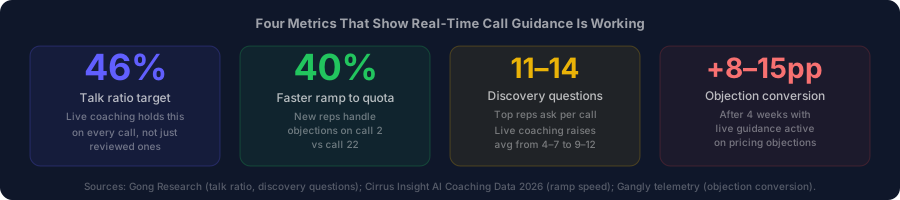
Real-time call guidance produces changes in rep behavior that show up in four metrics within the first 30 to 60 days. Track all four from day one of rollout. One metric in isolation misleads — talk ratio improves but objection conversion rate stays flat? The rep is pausing more but not using the guidance to handle objections more effectively. All four metrics moving together confirms the system is working.
Metric 1: Talk ratio per call
Measure the rep's average talk ratio before and after live guidance is enabled. Target: 46 to 52 percent. Most reps without in-call guidance run 58 to 65 percent on discovery calls, even after training. Guidance that fires a talk-time signal when ratio drifts past 55 percent typically brings teams to 49 to 53 percent within 30 days. The target of 46 percent comes from Gong's research on 519,000 calls — it is the level at which reps close the most deals, not the level at which they cover the most slides.
Metric 2: Discovery question count per call
Count the number of open-ended discovery questions the rep asks per call. Gong's research on top-performing AEs shows 11 to 14 questions per call. Average reps ask 4 to 7. Real-time guidance that prompts when the rep has been presenting for more than three minutes without a question typically raises the count to 9 to 12 within two weeks of consistent use. Higher discovery question count means more prospect statements on the transcript — which means the running context layer builds faster and subsequent cards become more precise.
Metric 3: Objection conversion rate
For every call where a pricing objection was detected by the guidance system, what percentage ended with a next step confirmed? Baseline this number before enabling guidance. After four weeks, it should improve by 8 to 15 percentage points. A team at 35 percent pre-guidance should reach 43 to 50 percent after 30 days. If the metric does not move, the configured cards are not connecting with buyers — review the most frequently fired cards that were not used, rewrite them in the team's own language, and re-baseline.
Metric 4: Next-step set rate
The percentage of calls that end with a dated next step confirmed in the meeting — a calendar invite, not a "I will follow up." This is the most direct downstream indicator of call quality. A rep who handles the six trigger categories well, maintains the right talk ratio, and asks enough discovery questions will close calls with confirmed next steps. Real-time guidance that improves the three upstream metrics should produce a measurable improvement here within 45 to 60 days. If the next-step rate does not improve after 60 days of guidance, the problem is in meeting structure, not objection handling — see the discovery call framework for the meeting structure that produces confirmed next steps consistently.
One additional metric worth tracking separately: card acceptance rate. This is how often the rep used a card versus ignored it. Target: above 40 percent on initial rollout, climbing to 55 to 65 percent after 60 days as playbook quality improves. Do not use card acceptance as the primary KPI — reps can game it by clicking cards they do not actually use. Use it as a signal of playbook quality: a card that consistently fires but is never used is a card that needs to be rewritten, not repeated.
Five mistakes that kill real-time guidance adoption
Real-time call guidance adoption fails in five predictable patterns. Each one has a specific cause and a specific fix. The teams that deploy guidance and abandon it within 60 days almost always have one or more of these five patterns active from the first week.
Mistake 1: Deploying with vendor template cards
Every real-time guidance tool ships with default playbook content. The defaults are generic by design — they need to work for every customer out of the box. The problem is that "works for everyone" means "customized for no one." A pricing card written by a vendor marketing team sounds like a vendor marketing team, not like the rep's best colleague. The rep reads the card and immediately recognizes it as stock language. Trust drops. The card gets ignored on subsequent calls.
Fix: spend two hours rewriting every card in the voice of the team's best rep. Record them saying it on an actual call if needed. The difference in card acceptance rates between vendor-template cards and team-written cards is significant — and the rewrite takes one afternoon.
Mistake 2: Skipping the pre-call brief connection
Real-time guidance deployed without a pre-call context workflow is guidance without context. The cards fire accurately on timing — the trigger detection works — but the card content has no account anchoring. The rep reads a generic ROI frame when they needed the specific cost number from the prep brief. The card is technically relevant but practically weak. Rep ignores it. The pre-call brief workflow is not optional if the goal is contextual guidance. It is the fuel source.
Mistake 3: Mandating card use rather than inviting it
Managers who tell reps they must use the coaching card when it fires produce reps who read cards verbatim. Buyers notice the scripted language shift in the middle of a conversation. The conversational flow breaks. Trust with the buyer drops. The rep knows the card was wrong for that specific moment but used it because they were told to.
Fix: "Use the direction, not the words." The card suggests the frame. The rep delivers the frame in their own voice. A rep who says "I actually want to come back to what you mentioned earlier about your team's admin time — walk me through that cost" is using the pricing card correctly. A rep who reads "Studies show that ROI realization happens when teams anchor to existing pain costs" is reading a card incorrectly and destroying the conversation.
Mistake 4: Measuring card acceptance as the primary KPI
Card acceptance rate is a useful diagnostic, not a goal. When managers track it as the primary KPI, reps game it — they click the card to register acceptance without changing their actual response. Card acceptance rate goes up. Deal outcomes stay flat. The manager concludes the guidance is working because the metric looks healthy.
The right primary KPIs are call outcome metrics: next-step set rate, objection conversion rate, and demo-to-opportunity conversion rate. Card acceptance is a leading indicator of playbook quality. If acceptance rate is low, rewrite the cards. Do not confuse the leading indicator with the outcome.
Mistake 5: Running guidance without post-call integration
The live guidance surfaces a great reframe. The rep uses it. The deal advances. Then the rep spends 20 minutes writing the call note manually. The admin burden erases the time efficiency that guidance produced. The rep's net experience of the guided call is: better conversation, same admin.
The three workflows — pre-call brief, live guidance, and post-call note automation — compound when they run together. The pre-call brief loads context. The guidance fires accurate cards. The post-call note stages automatically from the transcript. The rep reviews and approves in under 90 seconds. That connected workflow is what changes the total time equation. Guidance alone changes the call. The full workflow changes the rep's day. The post-call note automation guide covers the workflow that closes the loop after the call ends.